16. Low Battery
17. Troubleshooting
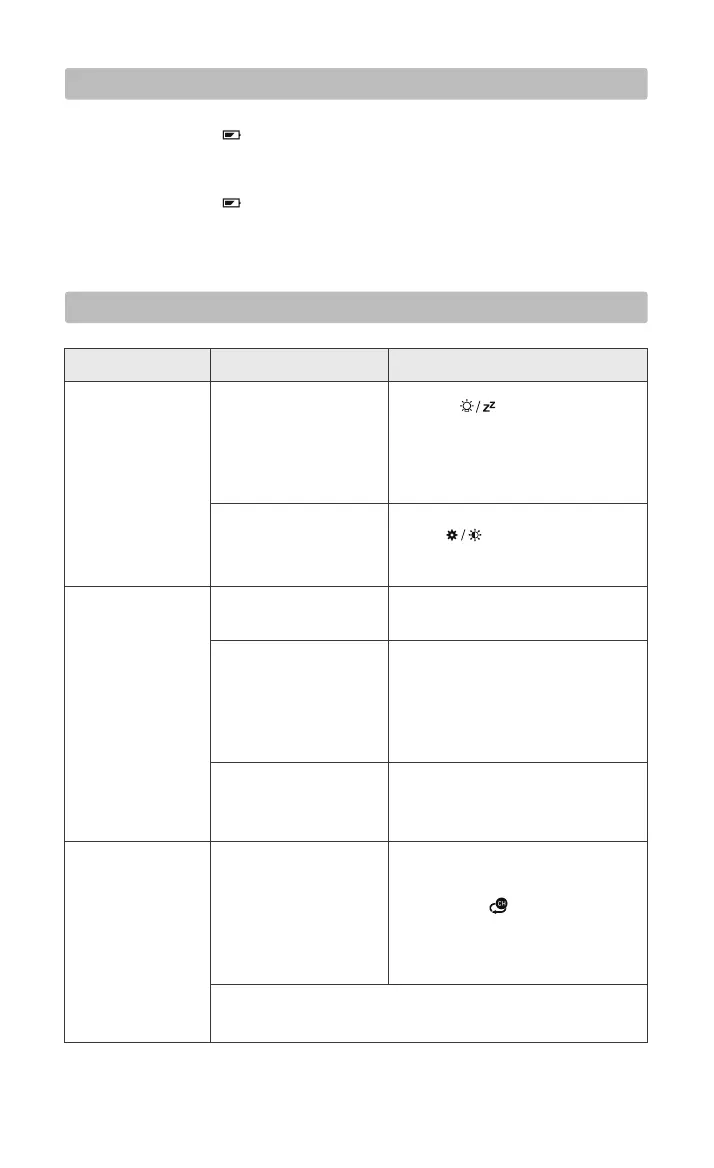
PROBLEM CAUSE SOLUTION
No backlight.
● If the battery icon " " is displayed in the "INDOOR" column, it means that the
weather station batteries are running out. Please replace the batteries as soon as
possible.
● If the battery icon " " displays in the "OUTDOOR" column, it means that the
remote sensor batteries are running out. Please replace the batteries as soon as
possible.
16
No outdoor
temperature
displayed on the
weather station.
The weather station is
only powered by
batteries.
DC adapter is connected,
but the backlight is set on
the dimmest level.
The batteries of the
sensor have run out.
The channel displayed
on the weather station is
different from the
channel of the remote
sensor.
The weather station did
not receive signals from
the outdoor sensor.
There is a delay or
interruption of
transmission.
1. Place the sensor next to the weather
station.
2. Long press " " button on the
weather station till the dashes appear.
3. Press "TX" button on the sensor to
send signals.
If the problem persists, please contact after-sales support at:
support@smartro.co.
Please refer to the instructions on
page 9 to receive the signals
manually.
Adjust the channel of the weather
station or the sensor to keep them
paired.
For detailed instructions, please refer
to page 9.
Replace 2×AA batteries for the outdoor
remote sensor.
Press " " button to adjust the
backlight brightness.
1. Press " " to temporarily
activate the backlight for 15 seconds.
2. Connect DC adapter to power up
the weather station, the backlight will
remain on.
The outdoor
temperature on
the weather
station is different
from that on the
sensor.



 To Next Page