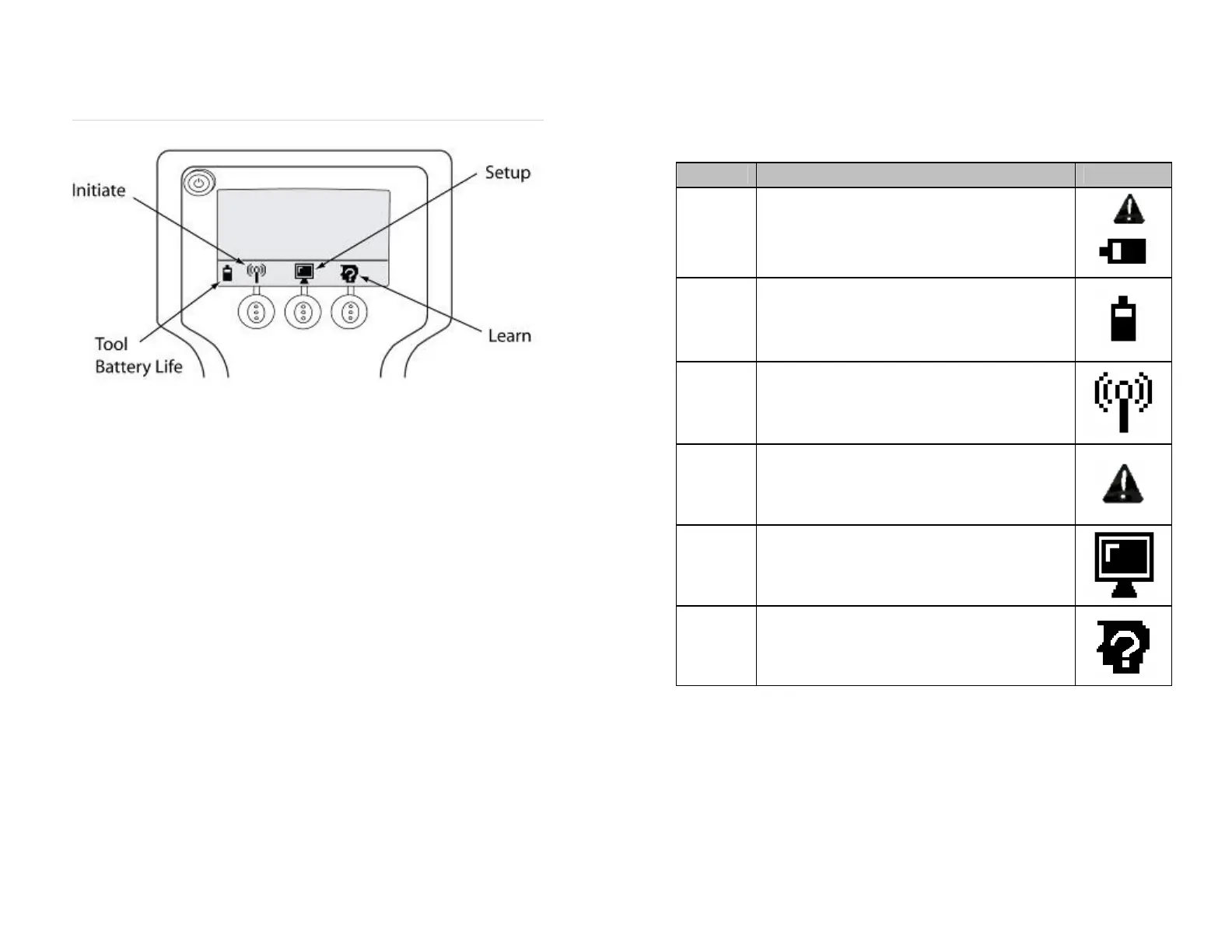
Main Menu
Main Menu Icon Legend
STATE DESCRIPTION ICON
Handheld
Battery
Life
These icons indicate the battery life of the handheld
device at startup. This icon is located in the lower left
area of the tool display.
To continue, press the Check mark. To turn off the tool
and replace the batteries, press the X.
Handheld
Battery
Life
This icon indicates the battery life of the handheld
device.
Initiation
This icon is used to indicate initiation. When the Initiate
button is selected, this icon starts to blink during
transmission.
Initiation
Failure
This icon indicates tool initiation failure. This could be
caused by either a low battery in the wheel sensor or
the tool.
Set-up
Menu
This icon is used to indicate the set-up menu. When
this button is selected and held for 2 seconds the set-
up menu appears. Refer to Menu Options for more
information to set-up specific options.
Learn
This icon is used to indicate sensor Learn. When the
Learn button is selected this icon starts to blink during
transmission.
Figure 3
Initiate Function
If the Initiate button is pressed, the tool retrieves sensor ID, pressure
data and battery status from the sensor which is displayed. Review the
Application section of this guide for more information.
Setup Menu
If the Setup button is pressed, the tool enters the Setup mode. Review
the Application section of this guide for more information.
Learn Function
If the Learn button is pressed, the tool learns/displays the sensor ID.
Review the Application section of this guide for more information.
5
6


 To Next Page