Use
68
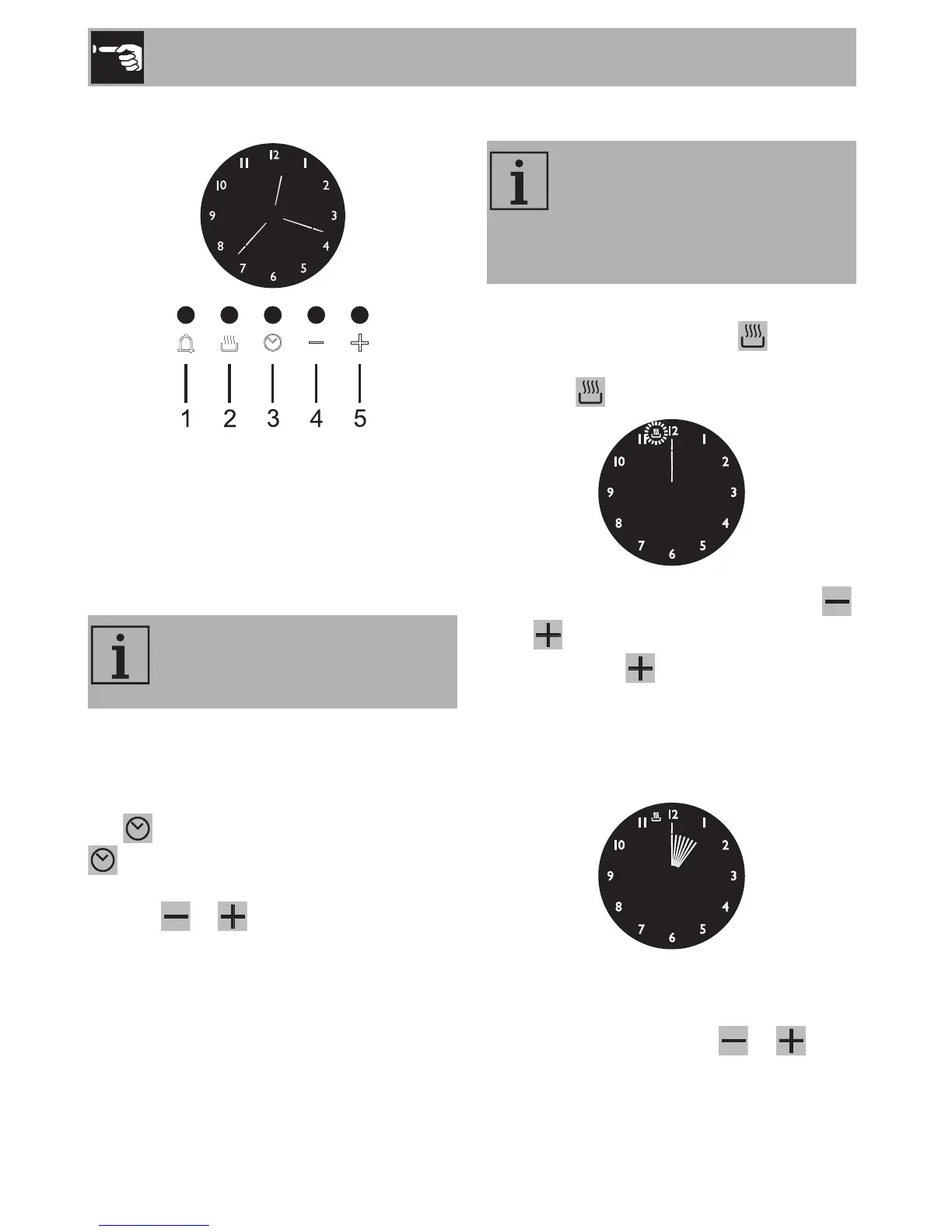
3.8 Programmer clock
1 Minute minder timer key
2 End of cooking key
3 Time setting and reset key
4 Value decrease key
5 Value increase key
Setting the time
On the first use, or after a power failure, the
display flashes at regular intervals. Press the
key to stop the flashing. Press the key
again for two seconds to start the
procedure for setting the current time. Use
the keys or to increase or decrease
the time value by one minute for each
pressure until setting the required time. The
clock starts working 5 seconds after the last
key pressure.
Timed cooking
1. After selecting a cooking function and
temperature, press the key . The
pointer moves to position 12 and the
symbol will flash on the display.
2. To set the cooking time press the key
or within 5 seconds: each time you
press the key adds 1 minute to the
cooking time, and every 12 minutes a
new internal segment will light up (the
example below shows a cooking time of
1 hour).
3. Once the required time is obtained,
cooking will start about 5 seconds after
you last pressed the key or .
The programmer clock only
controls the left main oven and
does not control the “pizza” oven.
Timed cooking is the function
which allows a cooking operation
to be started and then ended after
a specific length of time set by the
user.



 To Next Page