Instructions for the User
34
9. DESCRIPTION OF THE CONTROLS ON THE FRONT PANEL
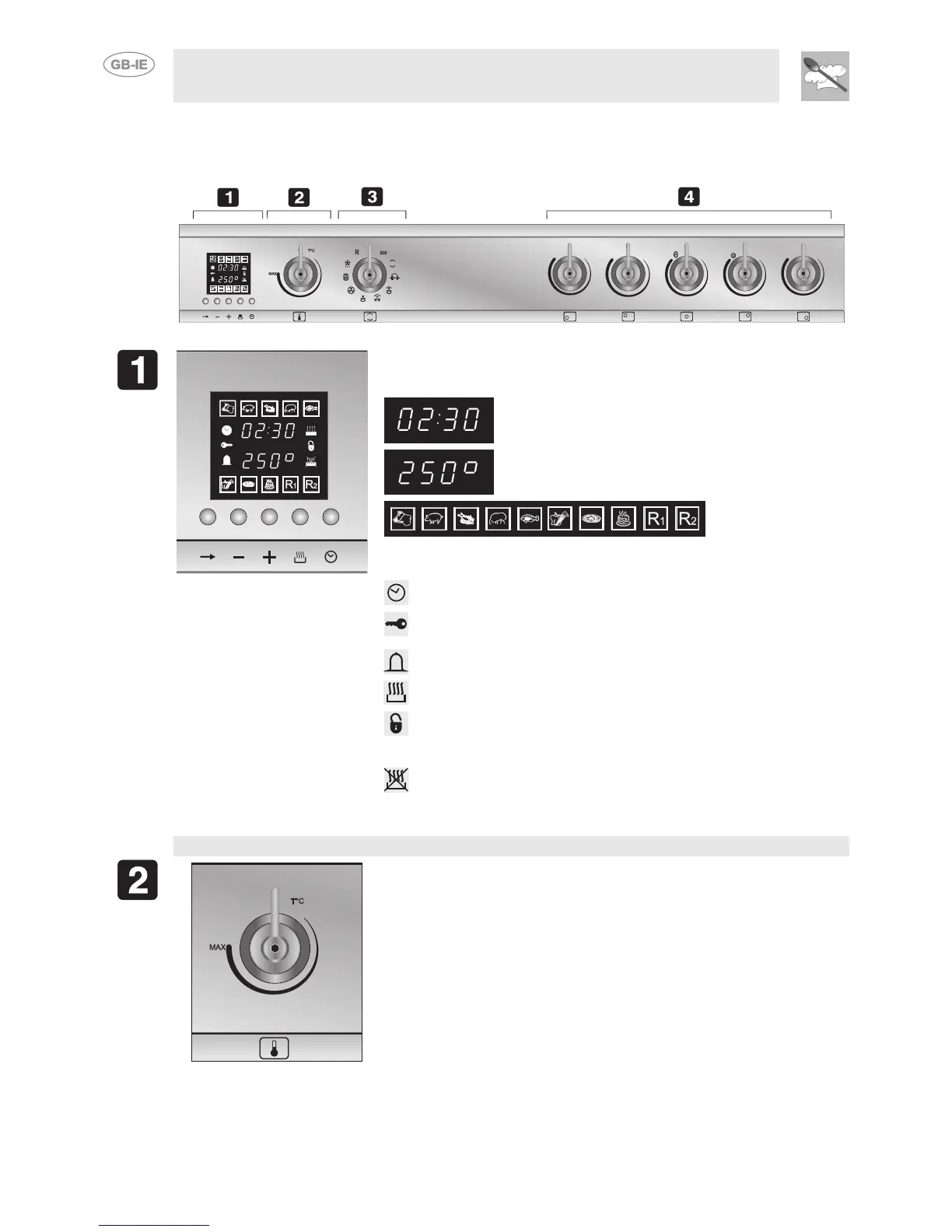
All the control and monitoring devices are clearly in view on the front panel. The symbols used are
described in the table below.
This display shows the following information:
Indicates the current time or the cooking time.
Shows the preset temperature for the function or
recipe required, or the temperature set by the user.
Recipes that can be
selected.
The following symbols coming on indicate:
Clock
: adjusting the cooking time.
Child lock-out function: child lock-out function mode ON (see
10.7 Secondary menu).
Bell
: minute minder activated.
Cooking duration: setting the cooking time.
Door interlock indicator light: comes on when the cleaning cycle
is used to indicate the door has been locked (pyrolytic models
only).
Delayed start: sets a delayed start for the cooking time.
MAIN OVEN TEMPERATURE SELECTION KNOB (PT1)
PT1
This knob is used for selecting the desired temperature for the main
oven. Turning it clockwise, the display shows the temperature just set,
the temperature can be set between 50°C and 260°C according to the
chosen function. In the case of using the “pizza” recipe, the maximum
temperature allowed is 280°C.



 To Next Page