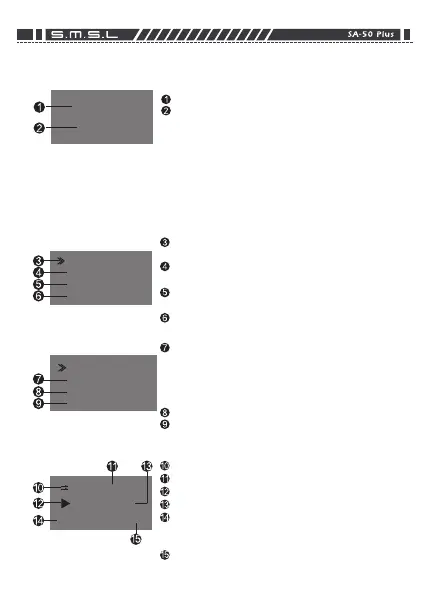
Long-press code switch on left into MENU (Figure 2). When no
memory device plugged into,To avoid improper operation,some
of functions will automatically hide(figure 3).
Input Display
SDB OFF VerInfo
Tone Reset
Play Mode
(Figure 3)
(Figure 2)
Input
Display
Verinfo
Reset
‘ve Hever Been
44.1k/ 128kbps MP3
00:19
Display
Auto Weaken S creen
5s→15s→30s→60s→OFF
Auto TurnOff Screen
5s→15s→30s→60s→OFF
Verinfo
Reset
Factory Reset
Retrun
Playback mode
Music File name
Playback status
Playback time for curret music file
Playback music sampling rate / bit
Rate or depth rate ( When SA-50 PLUS mute a-
ctive, it shows MUTING here)
Playback music file format
When first time power on machine,screen shows as figure 1
Desktop Screen
USB IN
No Device
(figure 1)
Input
Into memory device plug no SA-50 PLUS(Wh-
en plug U-Disk,it will appear flash“Searching”,
after all music file scan finish. it will go into p-
layback screen.)
Searching*:Scanning time depends on files quantity saved in U-Disk.
Scanning time will prolong if have much files.
Input
USB→S D Card→Optical In→AUX
SD OFF
SDB OFF/ON
Tone
Bass(0~3) Treble(0~3)
Play Mode
Default→Repeat All→Random→Repeat Tract



 To Previous Page