
EasyManua.ls Logo

Snap-On SSX20P132 - User Manual

Snap-On SSX20P132
15 pages
Print Icon
To Next Page IconTo Next Page
Loading...
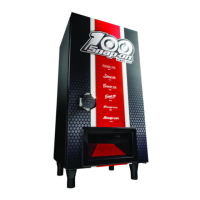
Snap-on Beverage Dispenser
SSX20P132
Operation Manual
For questions call 414-449-2000 or email fridge@joncoind.com
Electronic versions of the English and French version of the manual can be found at
joncopromos.com/ssx20p132
password: SSX20P132
(all caps)

Questions and Answers

  • J
    jameswilliamsonAug 5, 2025
    What to do if my Snap-On SSX20P132 Dispenser does not run?
    • M
      Mr. James ValdezAug 5, 2025
      If your Snap-On Dispenser isn't running, there are several things to check. First, ensure the plug is tightly pushed into the electrical outlet. Also, the fuse may be disconnected or blown, so check and replace the fuse with a 15-amp time delay fuse, or reset the circuit breaker. Finally, make sure the beverage dispenser controls are not turned to “Stop”.
  • B
    Brandon KempAug 10, 2025
    Why is my Snap-On SSX20P132 too warm?
    • S
      Steven KhanAug 10, 2025
      If your Snap-On Dispenser is too warm, try setting it to a colder setting and allow 24 hours for the temperature to stabilize, then adjust as needed. Also, check if the unit is exposed to direct sunlight or if there is any blockage around it. Ensure the door is properly closed and not opened too frequently.
  • K
    Kathy BakerAug 15, 2025
    How to adjust the temperature on a Snap-On Dispenser that is too cold?
    • J
      johnsonsamanthaAug 15, 2025
      If your Snap-On Dispenser is too cold, set it to a warmer setting. Allow 24 hours for the temperature to stabilize, then adjust as needed.
  • K
    Kelly PowersAug 20, 2025
    Why is my Snap-On Dispenser noisy or vibrating?
    • I
      imorrisonAug 20, 2025
      If your Snap-On Dispenser is making noise or vibrating, several factors could be the cause. Check if the unit is level and adjust the feet if necessary. Ensure the floor is strong enough to support the dispenser. Make sure the equipment isn't touching a wall or other objects and that all accessories are properly placed. Also, check if there is faradic electricity outside the equipment and ensure the equipment is grounded.
  • A
    Ann PorterAug 25, 2025
    What to do if cans will not dispense from my Snap-On SSX20P132 Dispenser?
    • D
      Donald AdamsAug 26, 2025
      If cans are not dispensing from your Snap-On Dispenser, start by visually checking for tilted cans within the shelves and look for any empty spots in the can line-up. Try straightening the cans or tapping the shelves to encourage the cans to roll into place. If necessary, unscrew the top bar to remove shelves down to the area where cans are tilted, straighten the cans, and re-insert the shelves, ensuring they lock into place. Then, place the screws back onto the bar to lock the shelves in place.
  • G
    Garrett WarrenAug 30, 2025
    Why is there condensate water outside my Snap-On Dispenser?
    • C
      Caitlyn CooperAug 30, 2025
      Condensation outside of your Snap-On Dispenser is usually due to humidity in the air. Simply clean up the water.

Summary

Product Features

Safety Precautions

For your Safety

General safety guidelines for operating the beverage dispenser and avoiding potential hazards during use.

Child & Animal Safety

Precautions regarding unpacking, packaging materials, and preventing suffocation risks for children and animals.

Quick Start Guide

Placement of the Beverage Dispenser

Getting Started

Initial setup procedures, including installing feet, leveling the unit, and attaching the dispensing button.

Temperature Control

Dispensing

Defrost and Condensation;Water

Information on managing frost, condensation, and water within the unit, including proper drainage and evaporation.

Care & Cleaning

Trouble Shooting Problems

Warranty

Parts Listing

Snap-On SSX20P132 Specifications

General IconGeneral
ModelSSX20P132
BrandSnap-On
TypeDispenser
Power Supply115 VAC, 60 Hz
Refrigerant TypesR-134a