RegularMaintenance
BatteryMaintenance
NOTE. This unit is equipped with a maintenance-freeBClU1
battery.
Cleaning the Batteryand Cables
A WARNING
Becarefulwhenhandlingthe battery.Avoidspilling
electrolyte. Keepflames andsparksaway fromthe
battery.
Whenremovingorinstallingbatterycables,disconnect
thenegativecableFIRSTandreconnectitLAST.Ifnot
donein thisorder,the positiveterminalcanbeshortedto
theframeby a tool.
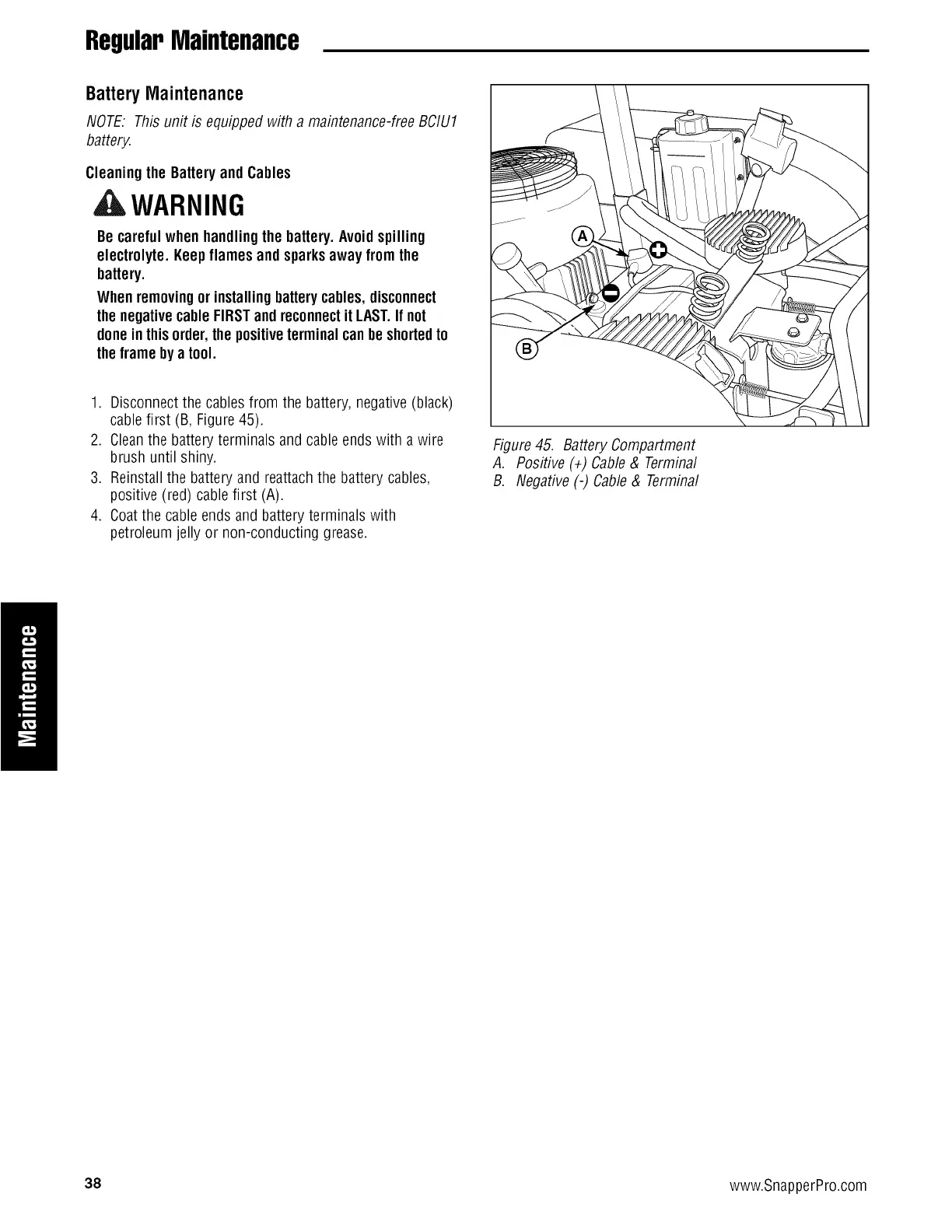
1. Disconnect the cables from the battery, negative(black)
cablefirst (B, Figure 45).
2. Cleanthe battery terminals and cable endswith a wire
brush until shiny.
3. Reinstall the battery and reattachthe battery cables,
positive (red) cable first (A).
4. Coatthe cableends and battery terminals with
petroleum jelly or non-conducting grease.
Figure45. BatteryCompartment
A. Positive (÷) Cable& Terminal
B. Negative (-) Cable& Terminal
1
38 www.SnapperPro.com



 To Next Page