EasyManua.ls Logo

Snapper 2 Series - Page 6

Snapper 2 Series
16 pages
Print Icon
To Next Page IconTo Next Page
To Previous Page IconTo Previous Page
Loading...
OPERATING
INSTRUCTIONS
TO
RELEASE
PARKING
BRAKE
Push
NEUTRAL
RETURN/BRAKE
PEDAL
down
to
release
PARKING
BRAKE.
TO
ROLL
MACHINE
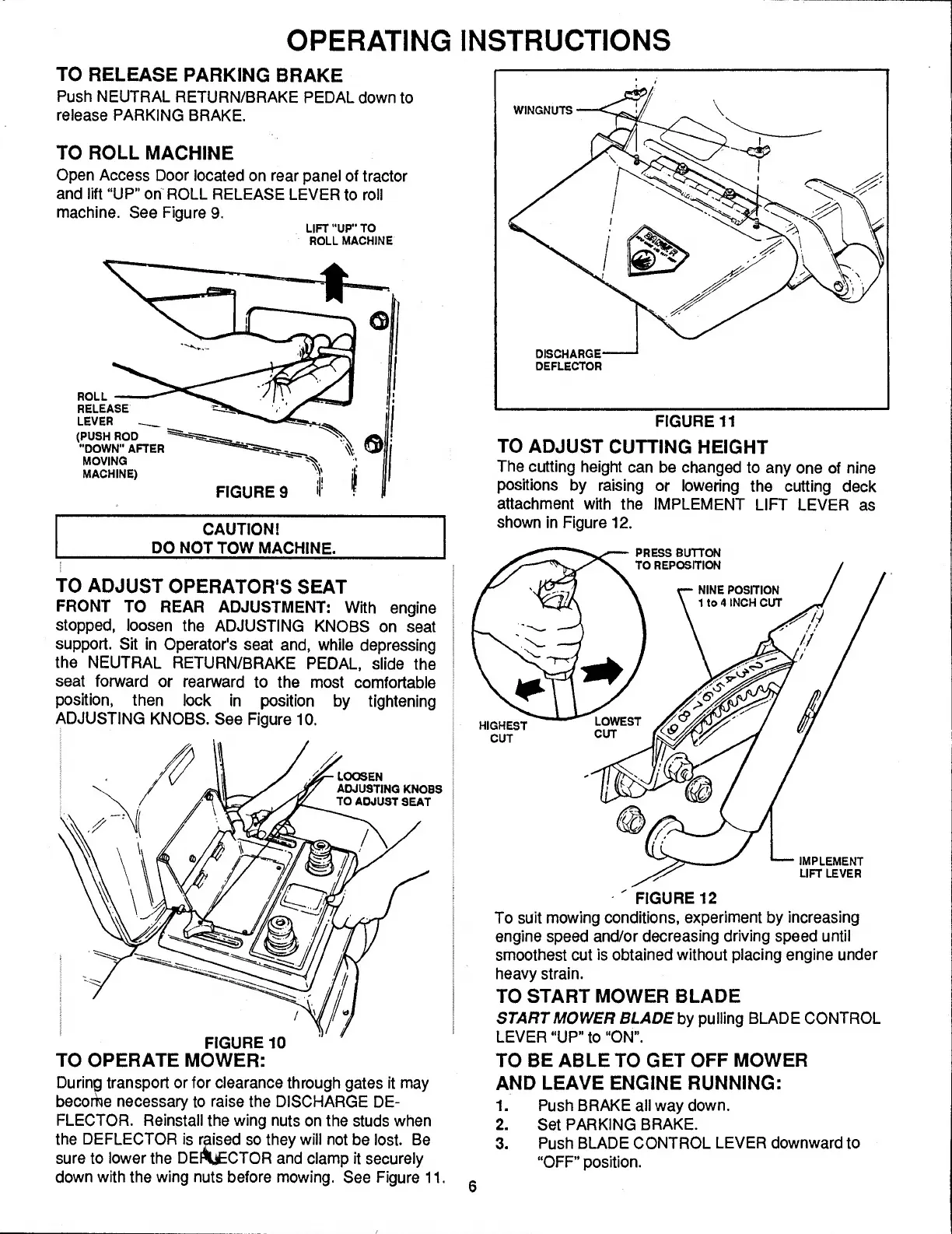
Open
Access
Door
located
on
rear
panel
of
tractor
and
lift
“UP"
oh
ROLL
RELEASE
LEVER
to
roll
machine.
See
Figure
9.
LIFT
"UP"
TO
ROLL
MACHINE
TO
ADJUST
OPERATOR'S
SEAT
FRONT
TO
REAR
ADJUSTMENT:
With
engine
?
stopped,
loosen
the
ADJUSTING
KNOBS
on
seat
?
support.
Sit
in
Operator's
seat
and,
while
depressing
^
the
NEUTRAL
RETURN/BRAKE
PEDAL,
slide
the
j
seat
forward
or
rearward
to
the
most
comforlabie
i
position,
then
lock
in
position
by
tightening
ADJUSTING
KNOBS.
See
Figure
10.
I
TO
OPERATE
MOWER:
During
transport
or
for
clearance
through
gates
it
may
becoi^e
necessary
to
raise
the
DISCHARGE
DE¬
FLECTOR.
Reinstall
the
wing
nuts
on
the
studs
when
the
DEFLECTOR
is
raised
so
they
will
not
be
lost.
Be
sure
to
lower
the
DEi^CTOR
and
clamp
it
securely
down
with
the
wing
nuts
before
mowing.
See
Figure
11
FIGURE
11
TO
ADJUST
CUTTING
HEIGHT
The
cutting
height
can
be
changed
to
any
one
of
nine
positions
by
raising
or
lowering
the
cutting
deck
attachment
with
the
IMPLEMENT
LIFT
LEVER
as
shown
in
Figure
12.
'
FIGURE
12
To
suit
mowing
conditions,
experiment
by
increasing
engine
speed
and/or
decreasing
driving
speed
until
smoothest
cut
is
obtained
without
placing
engine
under
heavy
strain.
TO
START
MOWER
BLADE
START
MOWER
BLADE
hy
puiling
BLADE
CONTROL
LEVER
“UP"
to
“ON".
TO
BE
ABLE
TO
GET
OFF
MOWER
AND
LEAVE
ENGINE
RUNNING:
1.
Push
BRAKE
all
way
down.
2.
Set
PARKING
BRAKE.
3.
Push
BLADE
CONTROL
LEVER
downward
to
“OFF”
position.
6

Related product manuals