10
For All Models
Choosing Cable
We recommend minimum 16-gauge high-quality speaker cable
or thicker for runs up to 25 feet (8m) and 12-gauge wire or
thicker for longer runs. (We use a custom-configured 12-gauge
oxygen-free cable in our crossover networks.)
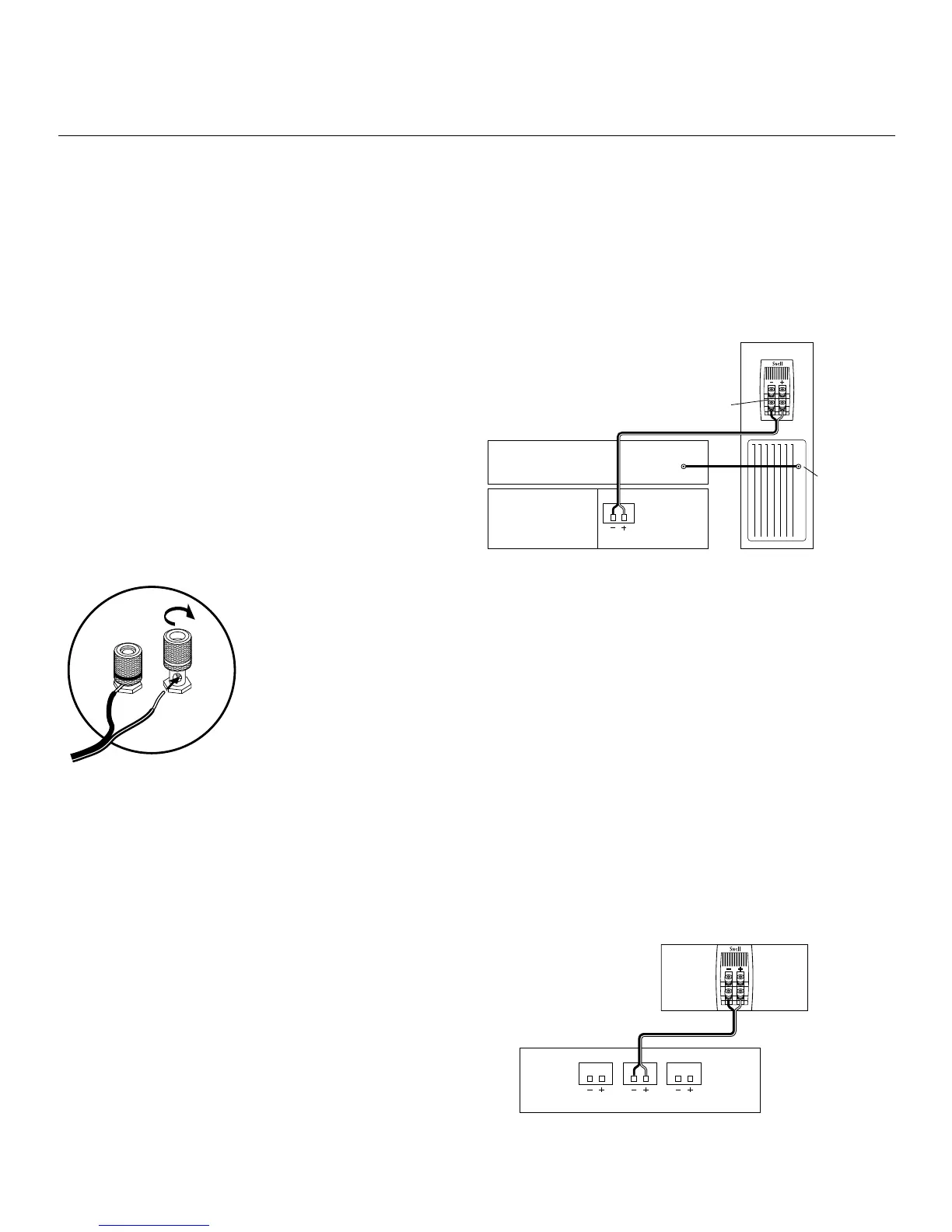
Connecting with Bare Wire
Insert bare wire into holes and tighten.
Connecting with Banana Plugs, Spade Lugs, or Pins
The binding posts accept standard banana plugs and pins, and
can accommodate 5/16" or larger spade lugs.
Warning! To prevent electrical shock, always switch off the
amplifier or receiver when making connections to the speaker
system.
Basic Connections
¤ Keep the speaker terminal jumper straps in place.
¤ When making connections, be sure to connect + to + (red)
and – to – (black).
Connecting the XA Towers
CONNECTING THE SPEAKERS
Connecting the XA 55
cr
Connecting the XA 55
cr
to a Surround Processor
¤ Select the ”small” or ”normal” setting on your receiver or
processor for the center channel. This routes all bass
information (typically below 120Hz) to the subwoofers of
the XA Towers.
¤ When making connections, be sure to connect
+ to + (red) and – to – (black).
Match the sound levels of each speaker.
¤ Your home theater system most likely includes a test signal
that simplifies level matching. Refer to the instructions
provided with these electronics.


 To Next Page