45
Conguring the Deskset
You can congure the deskset using one of two methods:
1. The Features and User settings menus on the deskset.
2. The WebUI, which you access using your Internet
browser.
This section describes settings you can change using the
menus on your deskset. For information about settings you
can change on the WebUI, see “WebUI” on page 56.
The system administrator can congure additional settings,
including Network settings, Provisioning, and the PIN code
by using the Admin settings menu. For more information about this menu, see
the M100 KLE Administrator and Provisioning Manual.
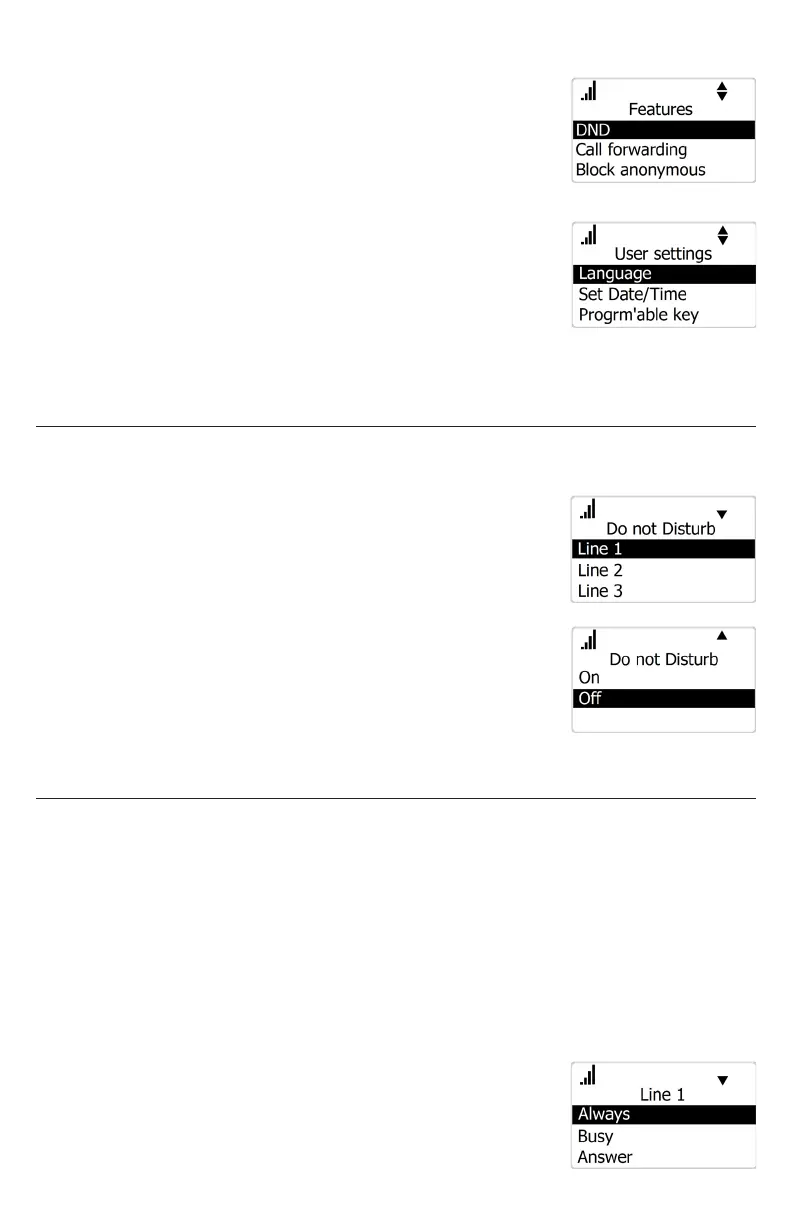
Setting Do Not Disturb
When Do Not Disturb (DND) is on for an account, calls to that account will be
rejected.
To turn DND on or o:
1. Press MENU/FUNC.
2. Press q to highlight Features and press SELECT.
3. With DND highlighted, press SELECT.
4. Press q or p to select which account DND should
apply to*, and press SELECT.
5. Press q or p to select On or O.
6. Press SELECT to save.
* Note that DND will apply to all desksets and handsets assigned the account.
Setting call forwarding
Calls can be forwarded to another phone number always, only when busy, or
after a set number of rings.
To set call forward:
1. Press MENU/FUNC.
2. Press q to highlight Features and press SELECT.
3. Press q to highlight Call forwarding and press SELECT.
4. Press q or p to select which account Call forward should apply to*, and then
press SELECT.
5. Press q or p to choose the desired option:
• Always
• Busy
• No answer



 To Next Page