3.6.4 Auto arrange Multi-route
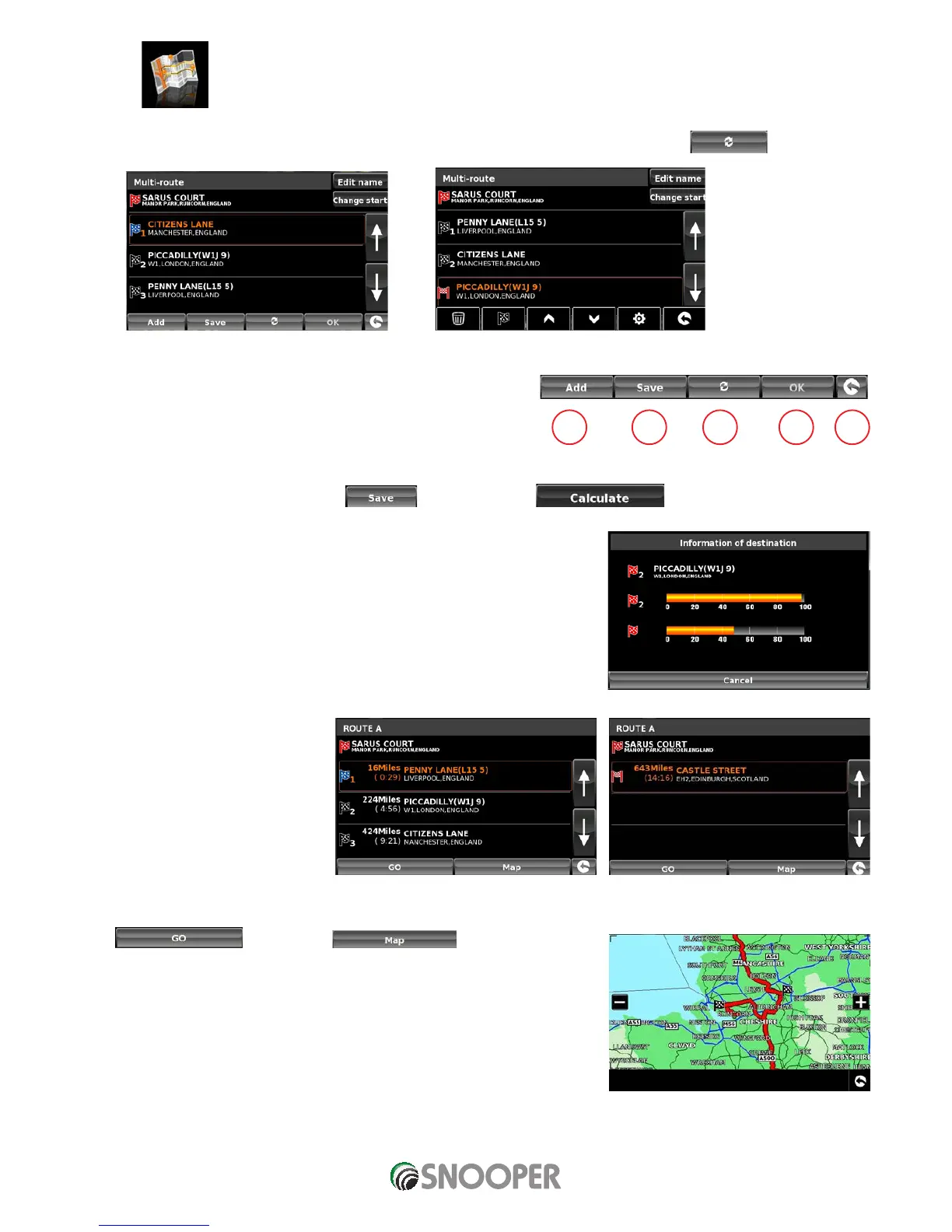
Once you create a multi-route Snooper can arrange the multi-route into a logical order by pressing the
icon
Before
After
1. Add an additional destination to Multi-route
2. Save the Multi-route without making any further changes.
3. Rearrange the multi-route into the most efficient/logical order
(based on route options and vehicle parameters)
4. OK - greyed out if no changes have been made
5. Return to previous screen
Once the route has been arranged press the
icon then OK. Press
Snooper will now calculate the multi-routes estimated time and distances
Then displays the route summary
Use the up and down arrows to view
additional stops or the final destination.
Press
to continue or to display the route on a
map.
Use the + and - buttons to zoom in and out of the map view. You can also ‘drag’ the map
using your finger on the touch screen
1 2 3 4 5












 To Next Page