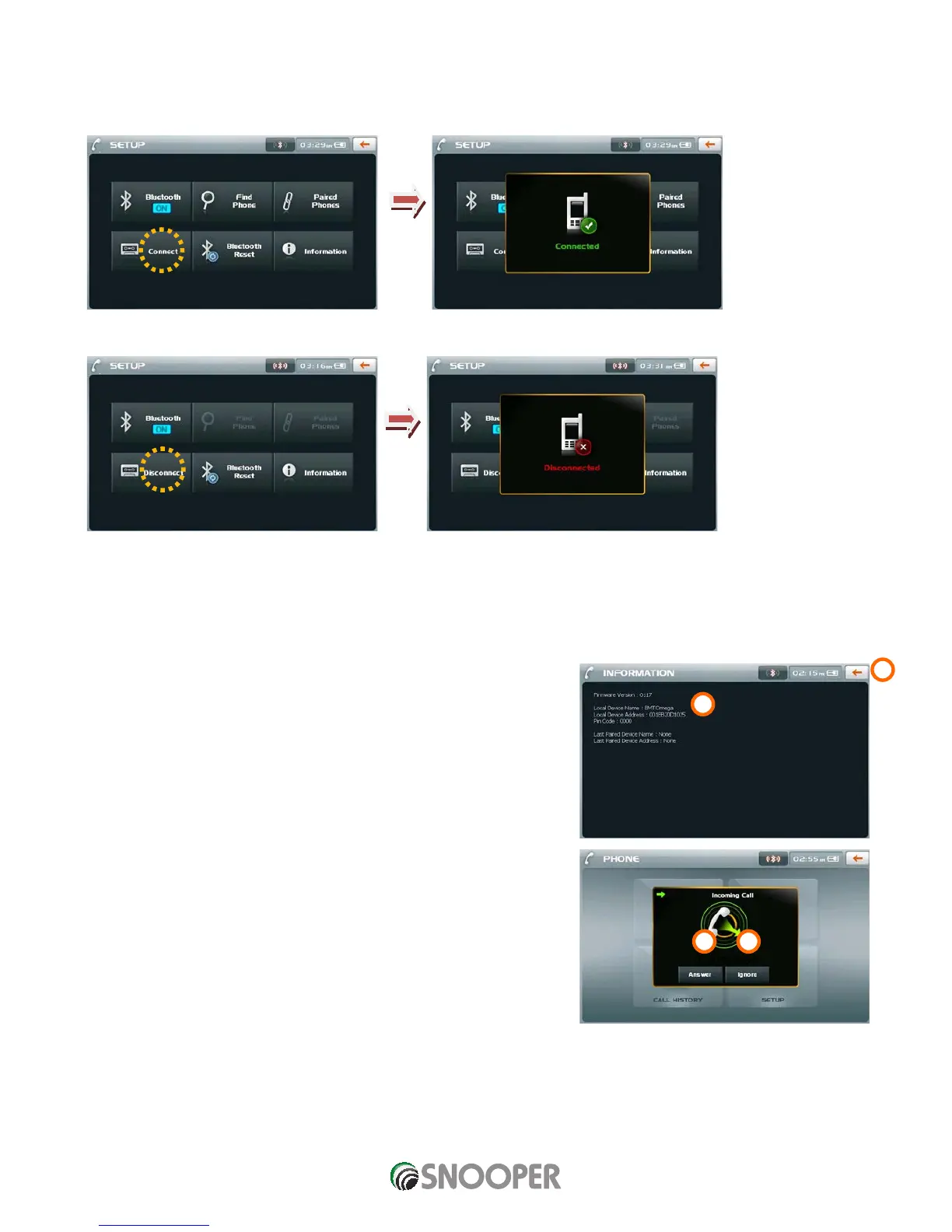
Connect / Disconnect
1. When a connection between the mobile phone and a tool is done through “Pairing” on the “Setup” screen, press the
“Connect” button and activate the Bluetooth connection.
2. To disconnect, press the “Disconnect” button.
CAUTION: THERE ARE SOME FUNCTIONS WHICH CAN ONLY BE PERFORMED ON THE MOBILE PHONE DEPENDING ON THE
MOBILE PHONE TYPE.
Information Screen
The following screen appears when you press “Information” on a Bluetooth Setup screen.
1. Returns to the previous screen.
2. Indicates the “Firmware” version of Bluetooth, name and address of the device,
Pin code, and name and address of the device which was last paired.
Incoming Call Screen
The following screen appears when receiving a phone call if it is connected with a
mobile phone which has Bluetooth function.
1. Answers an incoming phone call.
2. Ignores an incoming phone call.












 To Next Page