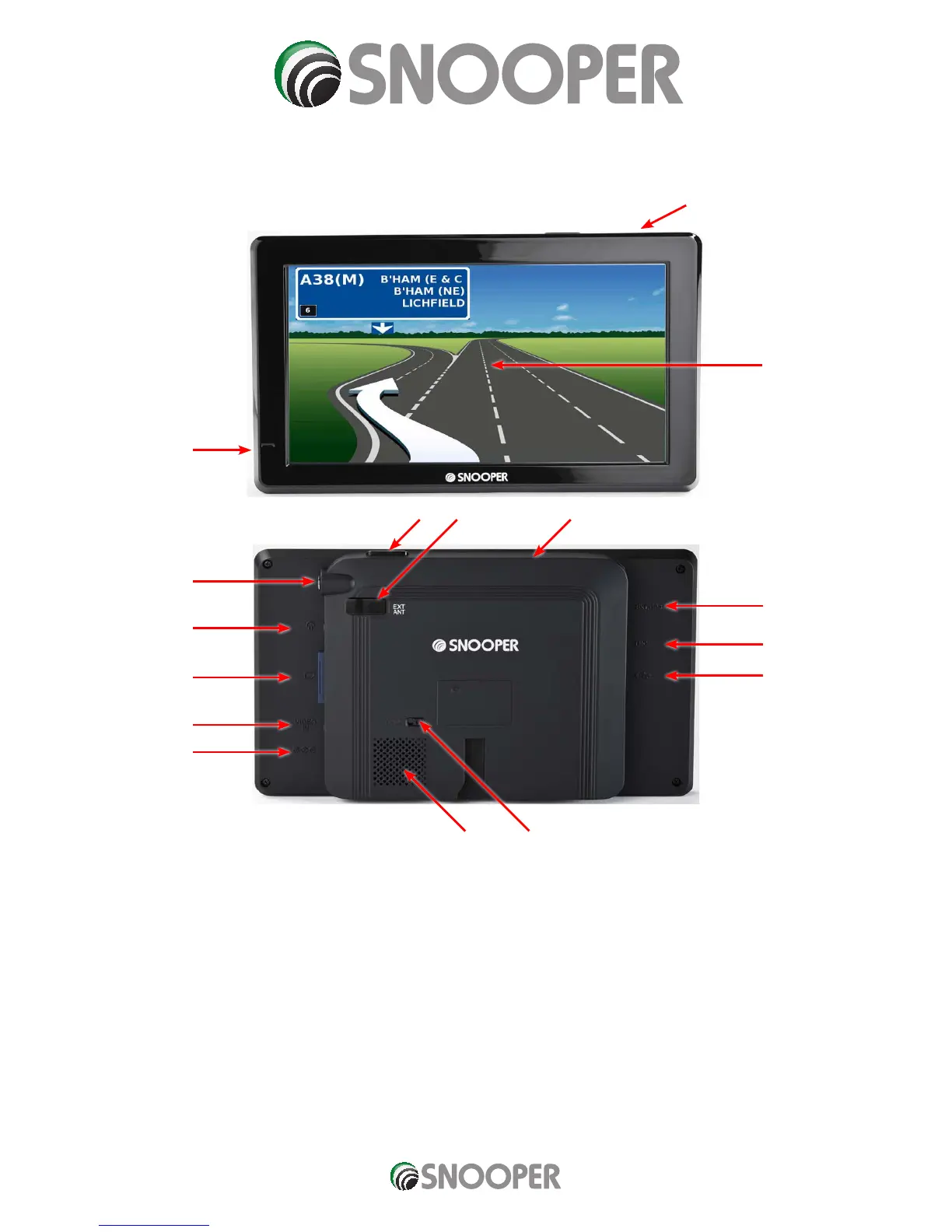
Overview
1. Power/MENU Button
Press and hold to switch on or off. Press and release to
switch between functions.
LED Status:
LED Off: Unit is switched off
LED RED: The unit is powered by the mains or in vehicle
charger.
LED Green: The unit powered by the internal battery.
2. Microphone for Blue Tooth
3 Touch screen LCD
4. Retractable DAB/DVB-T antenna
5. Earphone Jack
6. SD Card slot
7. Video-In can be used for rear camera input (not supplied)
8. External Power socket
9. DVB-T Antenna
Extend antenna when watching DVB-T digital TV
10. TMC Antenna socket
11. USB Socket
12. Speaker
13. Battery on/off switch
NOTE: The battery switch MUST be in the ON position to
charge or operate the 8 Series
14. External Antenna
15. Internal GPS antenna Do not cover
1
1
14
12 13
9
10
11
4
5
6
7
8
15. Internal GPS antenna
Do not cover
2
3
8 SERIES












 To Next Page