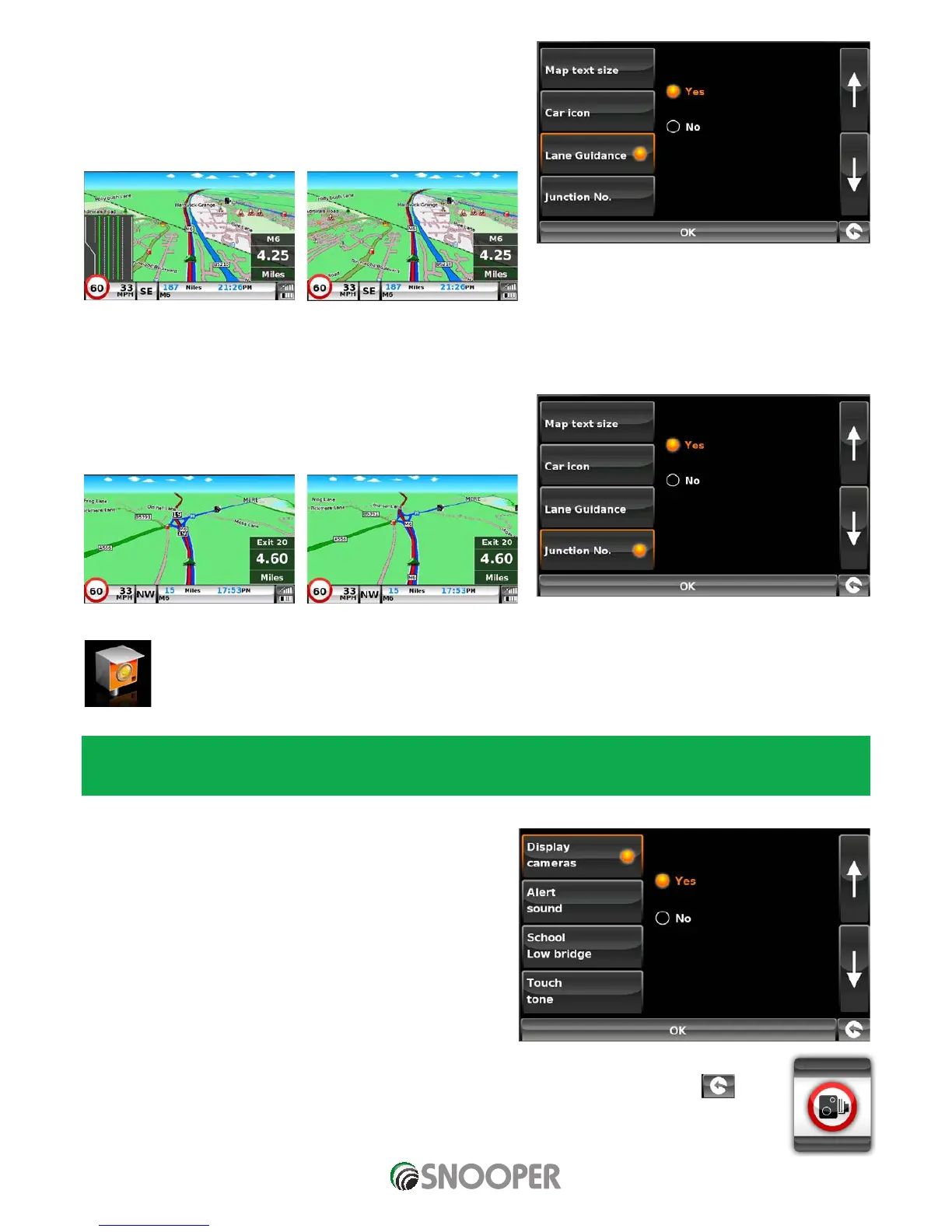
5.6.7 Lane Guidance
Lane guidance will show which lane you should take at a junction, road
merges and/or road exits.
Note: A route must be active for lane guidance to operate.
Note: Lane guidances currently only available on Motorway’s and major trunk roads.
5.6.8 Junction Number
Choose between whether you want the junction numbers to be displayed
or not.
Camera alert
In order for these features to operate you will need to subscribe to and download the AURA™ Camera Database onto Snooper.
See ‘Registering Snooper’ (Page 7) and ‘System Requirements & Downloading’ (page 11) for further details.
5.6.9 Display Cameras
You can choose between the following options:
Yes: A safety camera visual warning will be displayed on the left
hand side of the navigation screen as they are approached.
No: No fixed speed safety camera warnings are displayed on the
navigation screen.
To make your selection, touch the relevant radio button.
To save the changes press ‘OK’ at the bottom of the display.
If you wish to keep the settings unchanged you can exit the ‘Setup’ menu by pressing the return arrow
located in the bottom right hand corner of the display.
Lane Guidance On
Junction Numbers On
Lane Guidance Off
Junction Numbers Off












 To Next Page