Digital Audio Broadcasting (DAB) DB8500 ONLY
Press the DAB icon on the Home screen to enter the DAB menu
Note: This function will only work in areas which have DAB transmissions
Reception will vary according to the strength of the signal transmitted, other
factors which can affect DAB reception are geographic and atmospheric
conditions.
Not all DAB features and functions are available in all areas.
Programming and searching for channels
To listen to DAB broadcasts on your device you will need to program/tune the
DAB receiver. Firstly extract and fully extent the antenna located in the rear of the unit. Additional antenna’s which may improve the
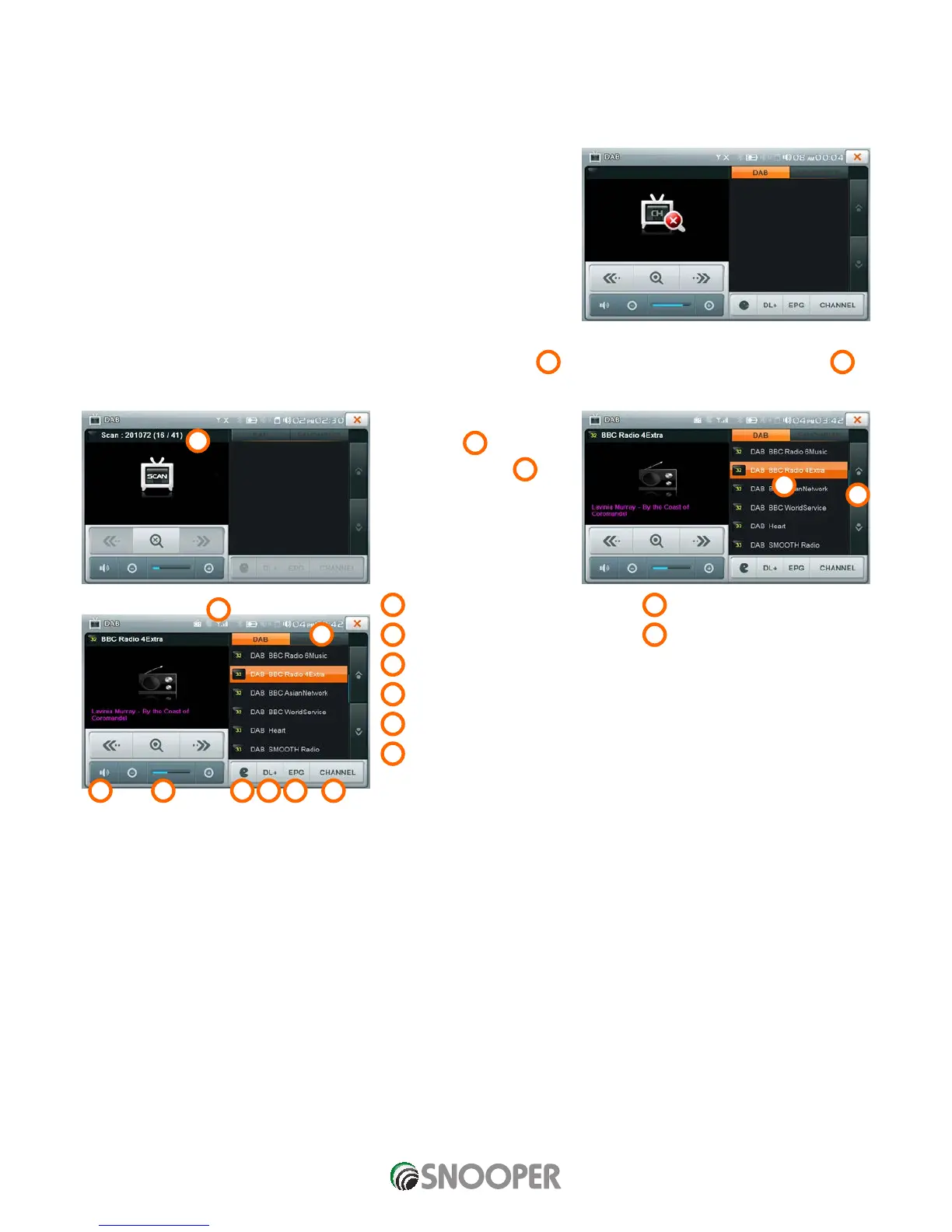
DAB reception are available from your Snooper dealer. Press the scan button
1
the unit will begin to scan the DAB channels.
2
A list of available stations will be
displayed on the unit,in the left
hand window
3
. Use the
up and down buttons
4
4
to scroll through the the list of
available stations.
To select a station press the
station name.
5
Mute
11
Favourite - see infromation below
6
Volume
12
Signal strength indicator
7
Announcement see information below
8
Dynamic Label - see information below
9
Electronic Program Guide (EPG)
10
Channel see information below
2
4
3
1
12
11
1098765












 To Next Page