PLEASE SWITCH ON AND CONNECT YOUR DEVICE TO THE PC USING THE USB CABLE PROVIDED.
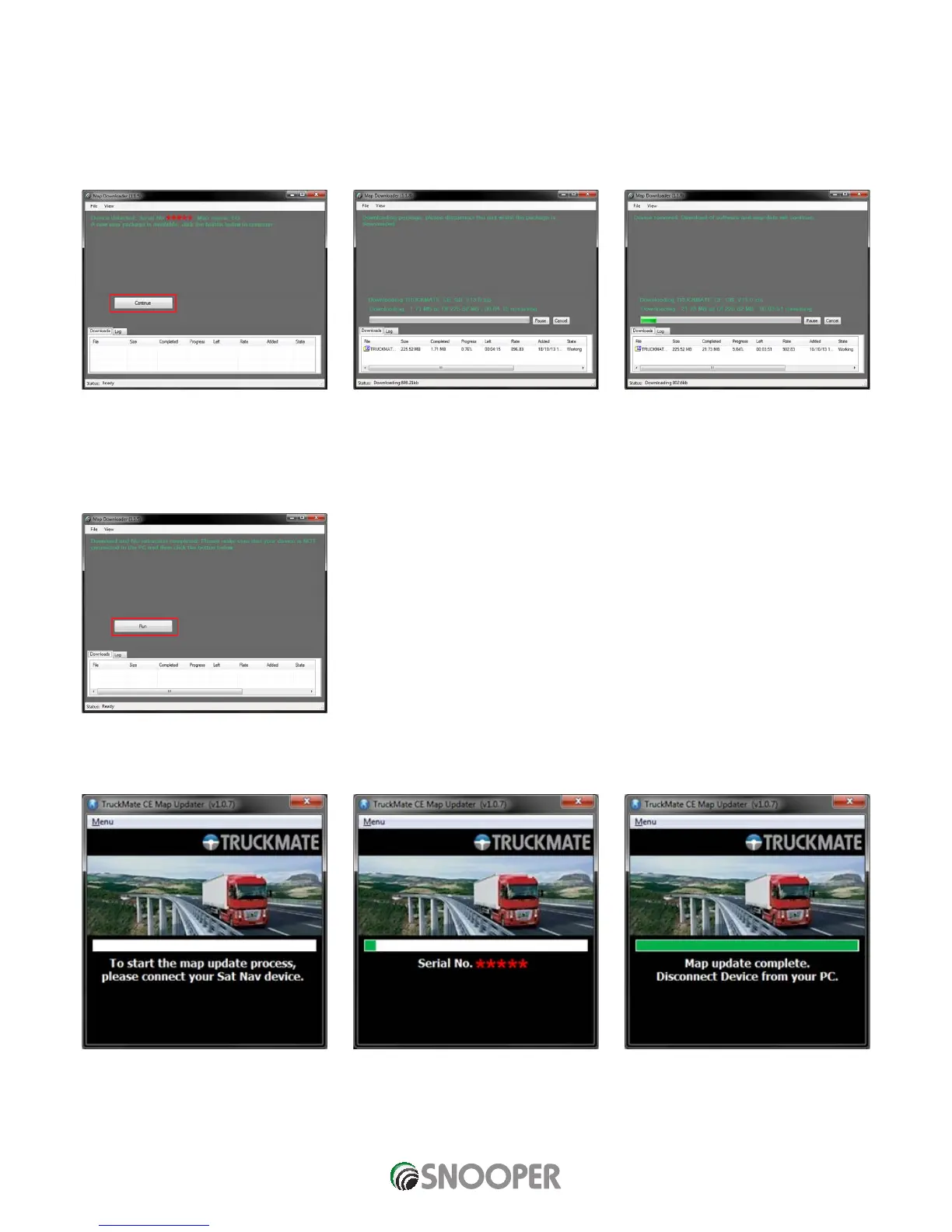
9. The Map Downloader program will read your device’s serial number and you will see tthe screen shown below.
Note: Where the ***** appears, your serial number will be displayed. Click ‘Continue’ to start the download process.
IMPORTANT: AFTER CLICKING ‘CONTINUE ‘DISCONNECT THE DEVICE FROM THE PC.
Note: the version shown here will be different than the downloaded one and the download duration is dependent on the internet connection speed.
10. Once the download has completed the Map Downloader will unpack the package in readiness for updating your device.
11. Click ‘Run’ to proceed.
12. If you have not already done so, switch on your device and reconnect it to the PC via a USB cable.
13. The update is complete, disconnect your device from the PC and close the program.
IMPORTANT: FOR SUBSEQUENT MAP UPDATES YOU DO NOT NEED TO CARRY OUT STEPS 1 to 6 AND THE MAP DOWNLOADER IS
ALREADY INSTALLED ON YOUR PC.












 To Next Page