© Trynex International 2009 L1040
7 — 23
Operating the Spreader
Continued
SPREADER OPERATION
PIVOT-PRO 1075 / MINI-PRO 575
• The variable speed controller has nger-tip dial action, digital system status with warning protection and blast feature.
• To start, press power switch on controller and spreader will accelerate to speed set on dial.
• To stop, press power switch on controller to o position.
• Adjust speed of spinner by using dial on right side of controller.
• If more salt is needed in certain areas, press the blast switch to give maximum power.
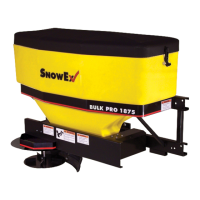
BULK-PRO 1875
• The Dual Variable Speed Control has dual nger-tip dials for maximum performance, digital system status with warning
protection and built-in Vibrator Switch.
• To start, press power switch on controller and spreader will accelerate to speed set on spinner and auger dials.
• To stop, press power switch on controller to o position.
• Speed of auger and spinner may be adjusted separately to get desired ow and spread distance
from spreader.
• The Vibrator Switch is needed for dense material or to increase the ow to the auger. This eliminates bridging of material
in hopper.
•
A Material Bae (Part #D6330) has been installed in your spreader to stop ne material from free-owing. If using dense
or damp material, or if more ow is desired, remove Material Bae. However, it is recommended that the Material Bae
remain in place if using bulk salt.
• It is important that the Inverted Vee (Part #D6328) not be removed except when servicing.
AUTO-REVERSE “AR” FUNCTION (BULK-PR0 1875 ONLY)
• If your controller displays “OL” this could indicate a jammed auger.
• To engage the Auto-Reverse “AR” function:
Step 1: Shut the Main Power Switch OFF for 3 seconds.
Step 2: Turn the Main Power Switch ON. When the machine starts back up the “AR” sequence will automatically start and
the auger will reverse for several rotations to clear the jam.
• After a pause of several moments, the auger will automatically return to correct rotation.
• If the jam is still not cleared, the controller will again display “OL”.
•
You may repeat Steps 1 & 2 for a second and third time.
• If after the third try the controller displays “OL” — you must extract the material that is causing the problem.
• Follow all warning directions when clearing jams.
WARNING PROTECTION
• If audible beeping occurs, read display to identify problem. If display reads “OL” (overload) or “OH” (overheat), shut
controller down and carefully clear jammed auger. If display reads “E1“ this means there is a dead short in system.
Do not use until problem is corrected. If display reads “E0”, this means that the motor is not getting any power. Check all
connections. If display reads “LB”, the vehicle battery is extremely low and could damage system or a poor connection
exists.
• If there are any problems while operating the spreader, refer to Troubleshooting Guide.


 To Next Page
 Loading...