SCANNER SETUP
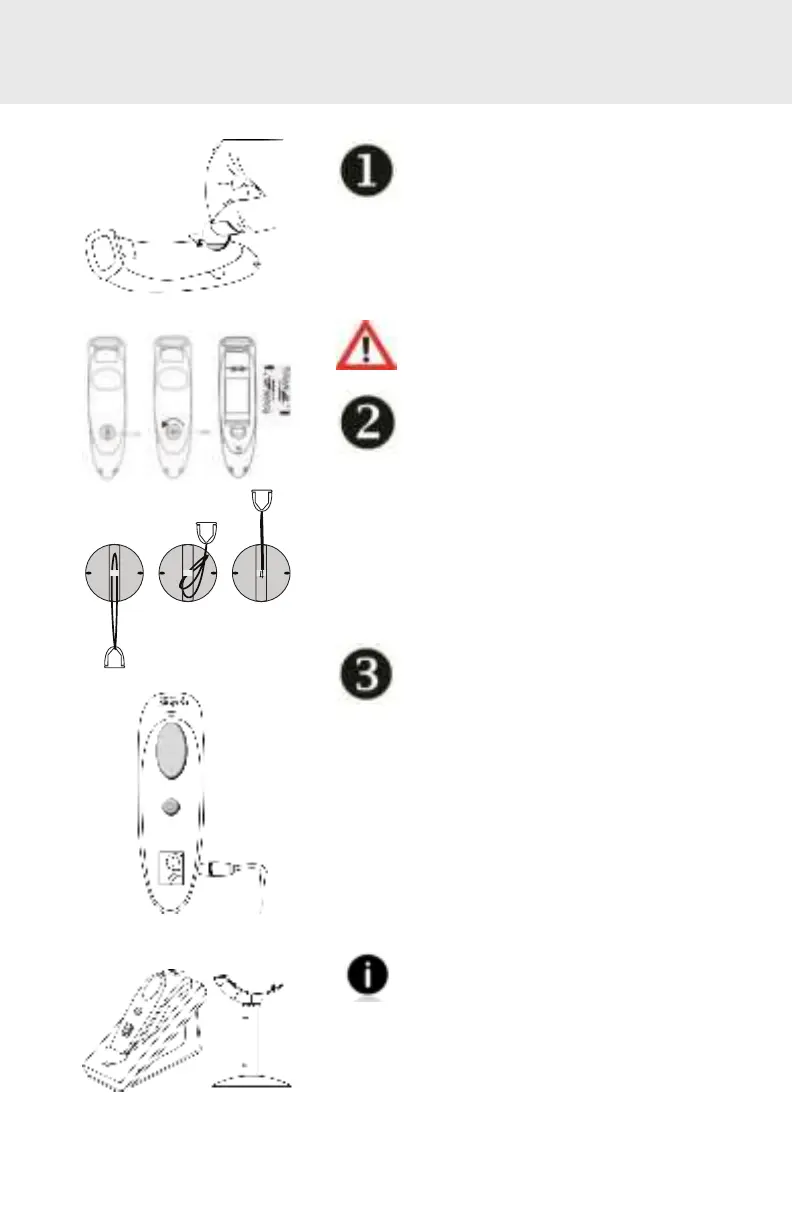
Insert the Batteries
Unlock t he Bat t ery door by using
a t hin coin t o t urn t he l ock under
t he CHS t o a horizont al posit ion (t urn 90
degrees).
Inst all t he bat t eries in t heir correct posit ion
as indicat ed by t he +/ - symbols.
Important: Only use NiMH Recharge-
able batteries. Do NOT use Alkaline
Batteries
Attach the Lanyard (opt ional)
Det ach t he st ring loop of t he t et her
from t he lanyard. Then feed t he
st ring loop t hrough t he slot in t he Twist -lock
and t hen t hrough t he end of t he loop. Pul l
t ight so t he st ring loop is secure t o t he Twist -
lock, Reat t ach t he st ring loop t o t he t et her
from t he Lanyard.
If desired, at t ach t he t et her t o a
lanyard or belt .
Charge the CHS
The CHS must be fully charged bef ore
rst use. Please allow 5 hours uninter-
rupt ed charging f or t he init ial bat t ery
charge.
For the 7Di or 7DiRx, lift the rubber ap to
access t he power connect or.
• Red LED = Charging
• Green LED = Fully charged
Charging f rom a comput er USB port is
not reliabl e and not recommended.
Charging Cradles & Charging QX St and
avail abl e separat ely.
4















 To Next Page