CHAPTER 5: SETUP FOR WINDOWS PC 51
To pair the CHS with a Windows computer with Toshiba Bluetooth Stack:
1. Turn on Bluetooth on your computer. Refer to your computer’s documentation for instructions.
2. Double-click on the Bluetooth icon in the system tray (notification area).
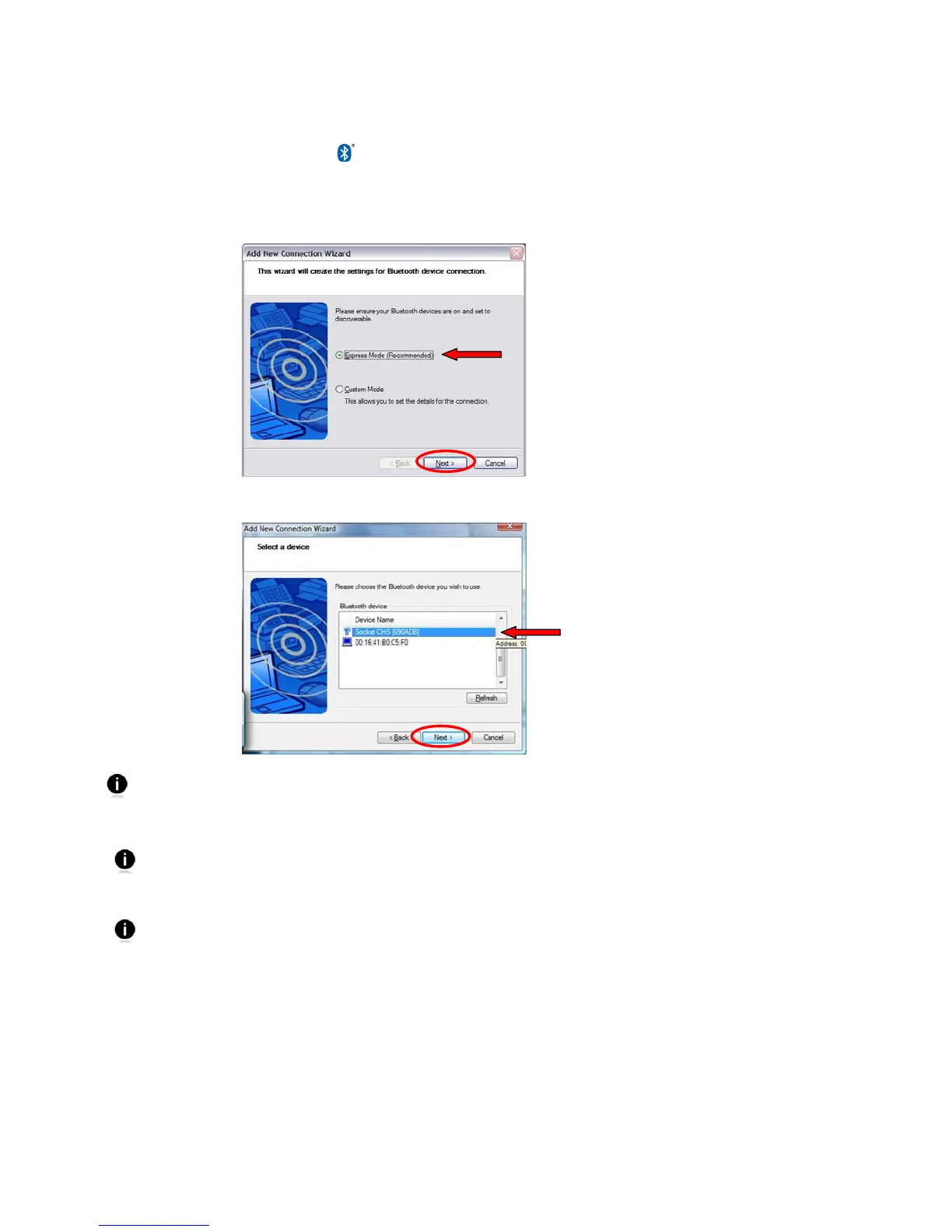
3. In Bluetooth Settings, click New Connection.
4. In the connection wizard, select Express Mode. Click Next. A device search will begin.
5. In the device list, select Socket CHS [xxxxxx]. Click Next.
The characters in brackets are the last six characters of the CHS Bluetooth Address,
which is labeled inside the battery compartment.
6. If a passkey is requested, enter 0000 (four zeroes). Click OK.
Only computers running Bluetooth 2.0 will prompt for a passkey.
7. Follow the remaining screens to complete the wizard.
The CHS will beep once when it has connected and is ready to scan barcodes.
The LED will also blink blue once every 3 seconds.















 To Next Page