17
7. The Soho App supports two methods of pairing your device to the App�
Choose one of the two methods, starting with ‘EZ MODE’� If pairing with ‘EZ
MODE’ is not successful, try ‘AP MODE’�
A. HOW TO PAIR USING THE DEFAULT ‘EZ MODE’
Check that ‘EZ MODE’ is selected on the top right of the screen�
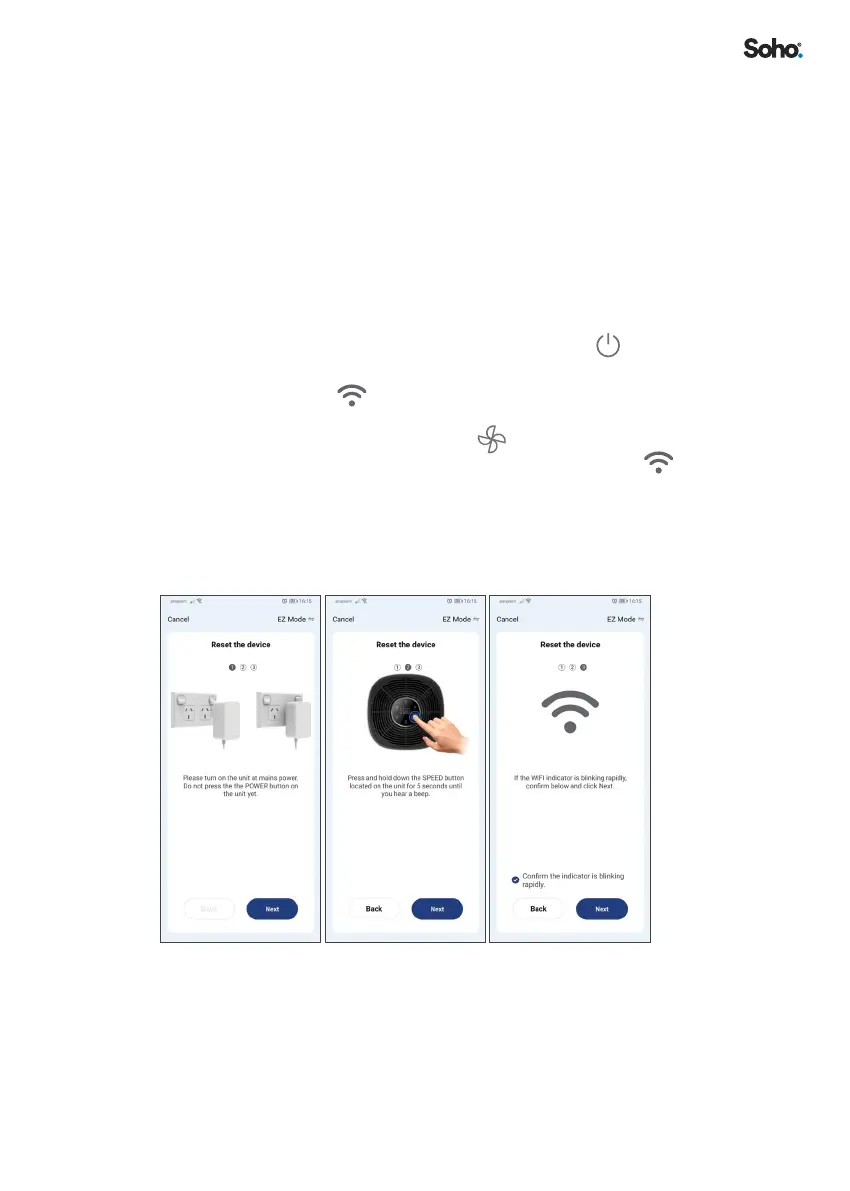
i. Check that the SO-255WUI Air Purier is plugged in and powered at
the socket�
ii. Conrm that although the unit is turned on at the wall plug, you
have not turned the unit on from the control panel, and that
the SO-255WUI Air Purier is in standby mode (this means all
functions are switched o, leaving only the
POWER slowly
blinking)�
iii. Conrm the
indicator is blinking rapidly on the control panel�
Otherwise, you need to reset the SO-255WUI into pairing mode by
taping on and holding SPEED
on your purier control panel
for 5 seconds until you hear a beep sound and the
indicator
start blinking rapidly�
iv. Then click ‘NEXT’�
v. Choose ‘CONFIRM THE INDICATOR IS BLINKING RAPIDLY’
and click ‘NEXT’�


 To Next Page