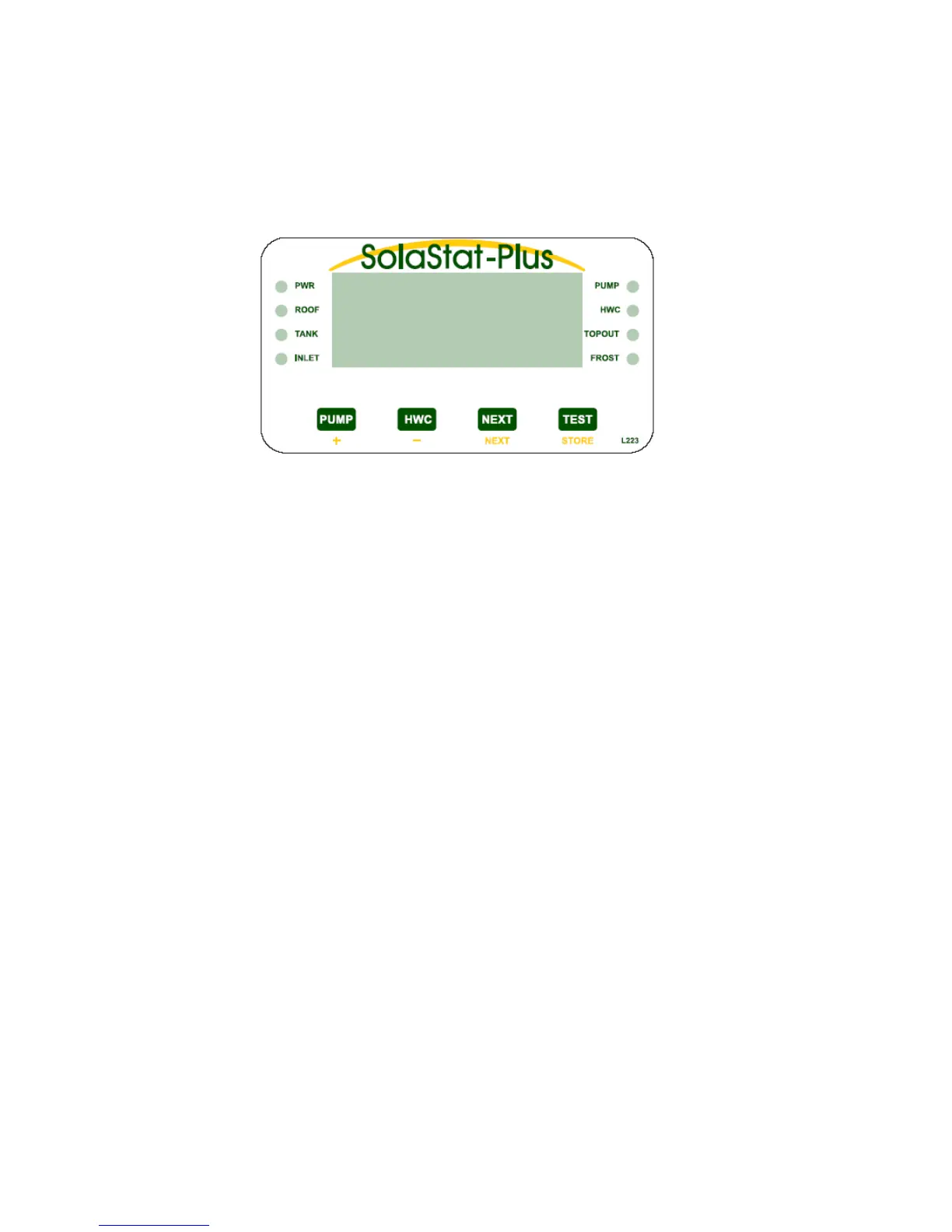
· The ‘PWR’ light on indicates that power is being applied to the unit.
· ‘ROOF’, ‘TANK’ and ‘INLET’ lights will be on to indicate which temperature is being displayed. Only 1
of the 3 can be on in normal operation. If more than 1 of these lights are on then it is in Smart Shutdown
mode and ‘SSd’ will be on the display.
· The ‘PUMP’ light will be on when the pump is on. The exception to this is, if the Pump Timer is on a
1minute recovery cycle, the light will be on but the pump will not be running during that minute. (see ‘Pump
Timer’ explanation on previous page).
· The ‘HWC’ light indicates the hot water storage tank’s electric element status. (SolaStat-Plus-2 Only).
· If the HWC light is off, there is no power on the electric element.
· If the light is on, the HWC control is no longer in ‘Holdoff Timer’ and is maintaining the
temperature at a preset value called the ‘Reheat Upper’ value referred to as Thermostat Mode.
· The light slowly flashing (once a second) means the hot water tank has become too cold and is
now heating up (Reheat).
· The light quickly flashing (3 times a second) means there might soon be a risk of biological
contamination of the water so the tank is heating up to minimize the risk (BioSafe).
· ‘TOPOUT’ light on indicates the value stored as the maximum allowable hot water tank temperature
has been reached. If lit the pump will be disabled until the temperature drops at least 2C lower.
·
The ‘FROST’ light comes on when the value stored for the onset of a frost condition has been detected
on the solar collector. To stop the collector freezing and bursting, the pump will come on just enough to raise
the temperature of the collector by 2C. Only a small amount of warm water is needed to protect the collector.
· The ‘PUMP’ button will turn the pump on as long as the button is held down, unless of course the
pump is already on in normal operation.
· For SolaStat-Plus-2, pressing the ‘HWC’ button will manually initiate a reheat of the Hot Water Tank.
However if Reheat Mode is active, pressing the ‘HWC’ button will turn off reheat of the Hot Water Tank.
Refer examples and explanation of ‘Reheat Adjustable Values’ for more information. For SolaStat-Plus-1
pressing the ‘HWC’ button will flash the HWC light but has no effect on unit operation.
· The ‘NEXT’ button will step from Roof to Tank to Inlet and the display will show the relevant tempera-
ture in C. If a sensor is below -20C the display reads ‘Lo’. If a sensor is above 140C the display reads ‘Hi’.
If a sensor is outside the specified temperature range of -40C to 150C then the Display will read ‘SSd’ and
the ‘NEXT’ button is disabled.
· The ‘TEST’ button will check the system (all lights flash) then display the number of times the pump
has been on. This count will reset and start again after ‘999’.
Optional System Enhancements.
SolaStat-Rmt A remote display which repeats the display information of the SolaStat-Plus.
SolaStat-Rly An external Slave Relay Module for HWC control.
SolaData A data comms option that will send what the SolaStat-Plus is doing to your PC and
visually present the information with graphs, logic states and status information.
SolaStat-Plus Users Guide, Cont.
· HWC Override: For SolaStat-Plus-2, pressing the ‘HWC’ button will manually initiate a reheat of the
Hot Water Tank. However if Reheat Mode is active, pressing the ‘HWC’ button will turn off reheat of the Hot
Water Tank. Refer examples and explanation of ‘Reheat Adjustable Values’ for more information. For SolaStat-
Plus-1 pressing the ‘HWC’ button will flash the HWC light but has no effect on unit operation.
· Test: Briefly pressing this button will cause all the lights to flash on for 3 seconds then display for 3
seconds the number of times the SolaStat-Plus has operated the pump. This count will reset and start again
after ‘999’.
SolaStat-Plus Display Panel Description.
19.01-5


 To Next Page