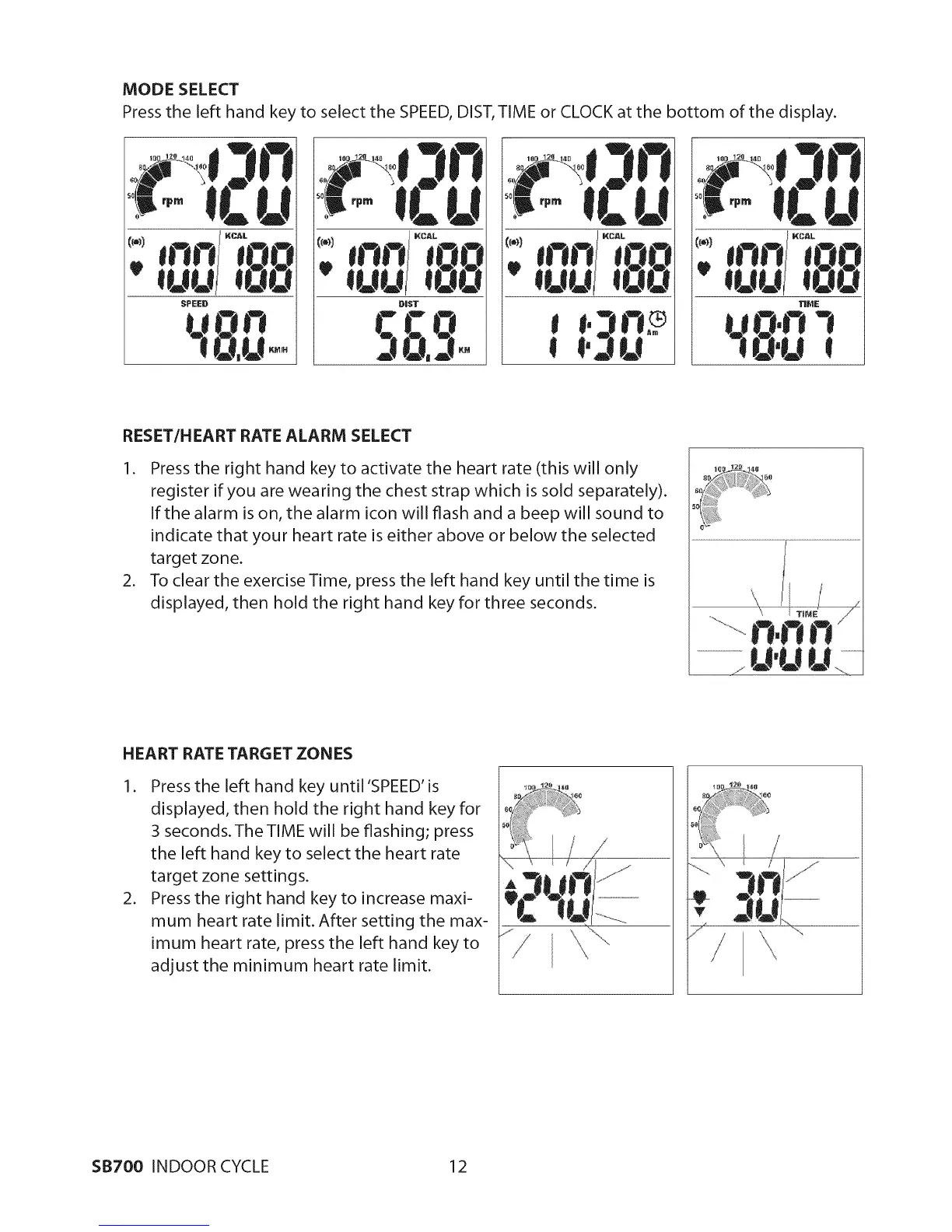
MODESELECT
Press the left hand key to select the SPEED, DIST, TIME or CLOCK at the bottom of the display.
_) [_Q))
RESET/H EART RATE ALARM SELECT
I. Press the right hand key to activate the heart rate (this will only
register if you are wearing the chest strap which is sold separately).
Ifthealarm is on, the alarm icon will flash and a beepwill sound to
indicate that your heart rate is either above or below the selected
target zone.
2. To clear the exercise Time, press the left hand key until the time is
displayed, then hold the right hand key for three seconds.
HEART RATE TARGET ZON ES
I. Press the left hand key until 'SPEED' is
displayed, then hold the right hand key for
3 seconds.The TIME will be flashing; press
the left hand key to select the heart rate
target zone settings.
2. Press the right hand key to increase maxi-
mum heart rate limit. After setting the max-
imum heart rate, press the left hand key to
adjust the minimum heart rate limit.
/
SB700 INDOOR CYCLE 12


 To Next Page