APT250/APT500/APT1000 Operation Manual
9
True Soltec Co., Ltd.
7. How to use software
The specially designed software can display a peak pull force value and force waves and output
data.
7.1. Connection with a PC
1. Connect the serial port on the APT back panel with a serial port on the PC via an RS232C
cable.
Note: When the PC has only USB ports, a USB/Serial converter is needed.
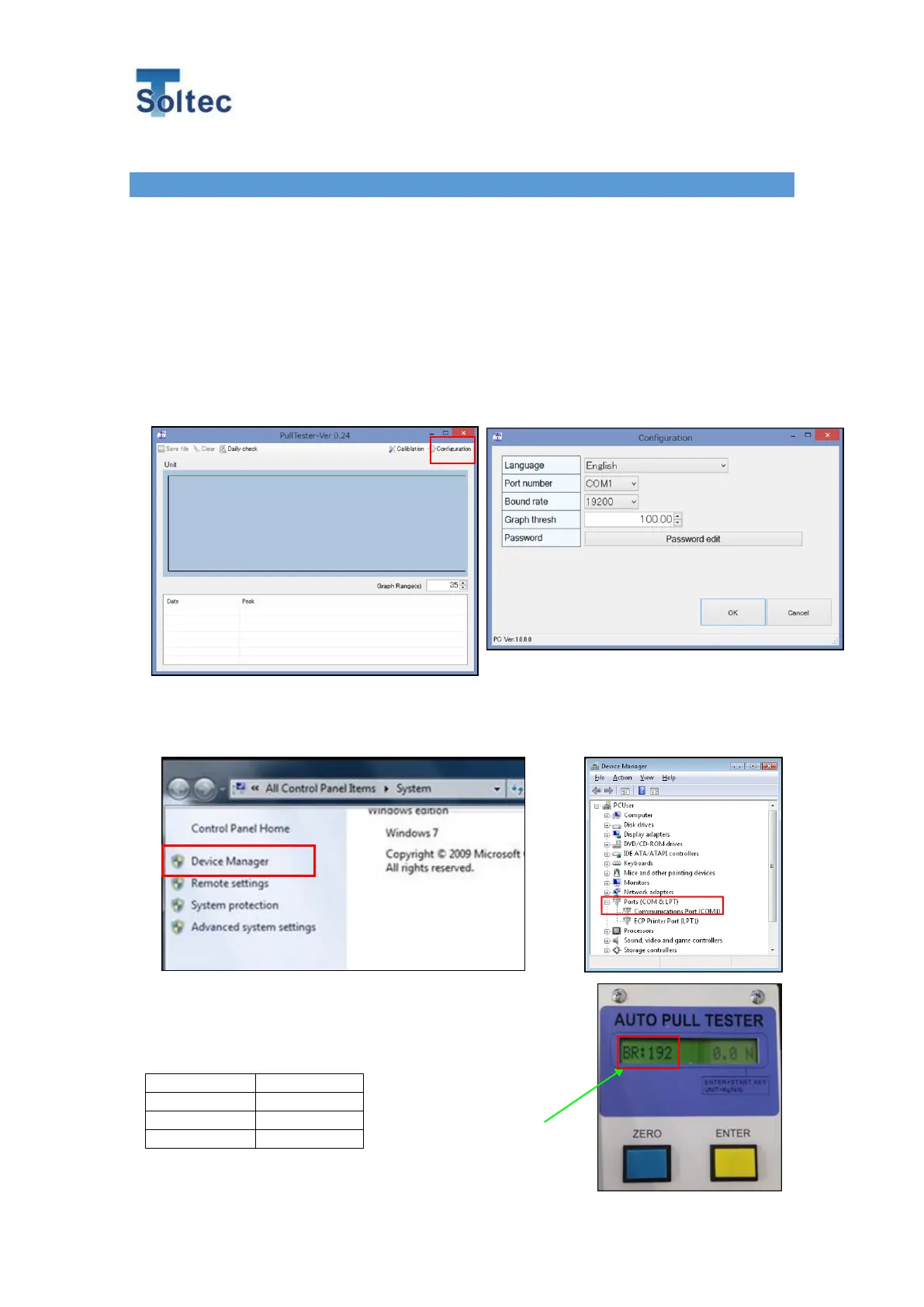
2. After turning the power supply to ON, run the software and click the Configuration button on
the upper right side of the display.
1) Select a language in the Language item. Japanese, Chinese, and English are available.
2) A COM port must be selected as communication port. After checking the communication port
on the PC’s Device Manager, match the communication port on APT with it.
3) Select a communication speed for the baud rate. Match the
communication speed on APT with the value. Three values
(9800, 19200 and 38400) are available. Pushing the ZERO
button just after pushing ENTER button allows setting the baud
rate on APT.



 To Next Page