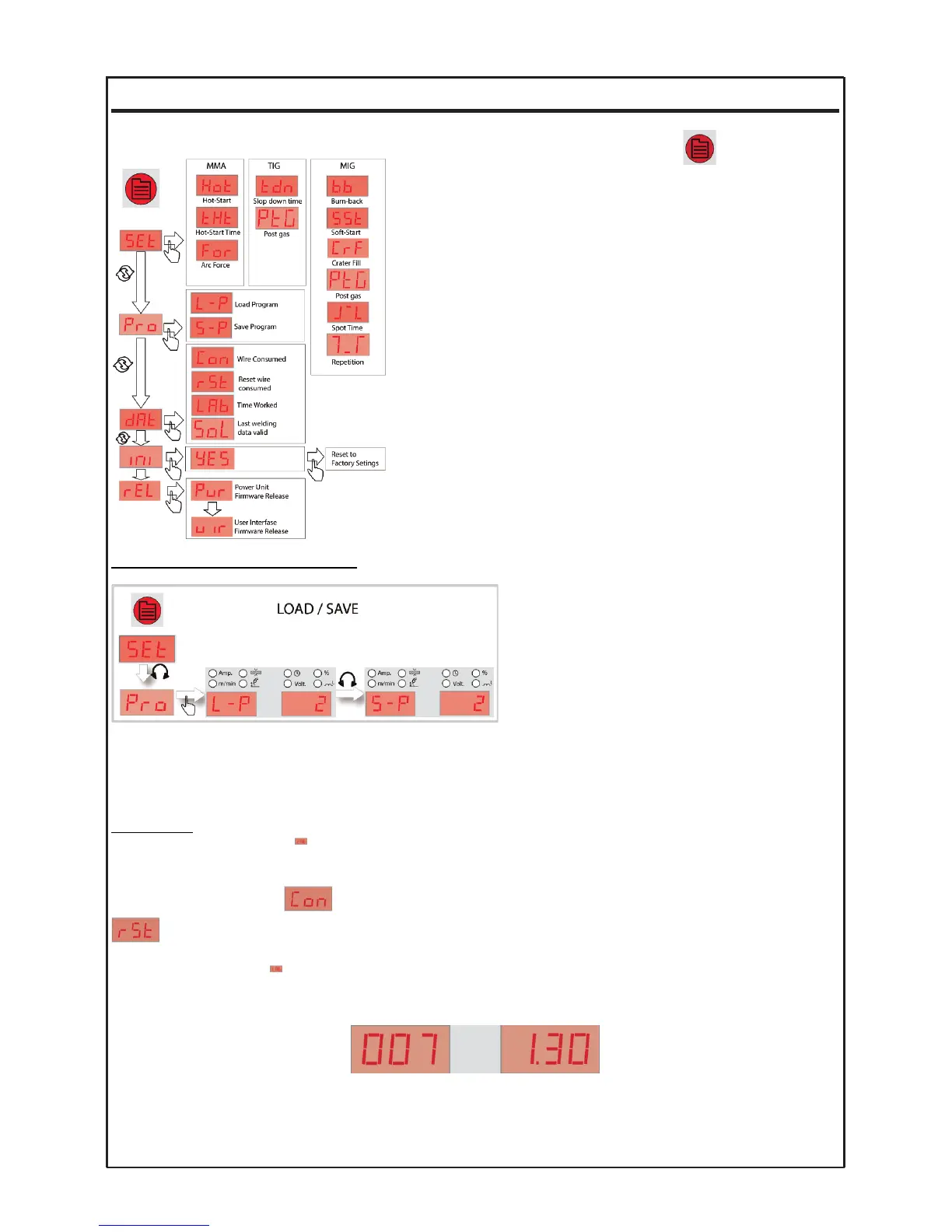
OPERATING THE MENU
To access the machine menu press key (17) .
The first option of SET menu is displayed. From this point, with the
main selector (19), select the desired menu.
Once the desired option appears, press the main selector to access
the different parameters of the selected menu, allowing to check the
v
alue or change it (press the main selector to modify the value (flas-
hing mode) + press again the main selector to confirm the new
value). To exit the menu from any position, use the 17 key.
The changes made are automatically saved and will be in effect until
they are changed. If we want to save the data in a given program,
proceed according to the operation of the program memories.
PROGRAM MEMORY MANAGEMENT
The machine can store any program in memory
with all data, both primary and secondary.
To manage the reading/writing of these programs,
select the program menu (enter menu mode and
select "Pro"). After that, you can choose between
the options “read a program (L-P)” or “save a pro-
gram (S-P)”. Having selected the option, select the
program number with the main selector and confirm
the action by pressing the same selector.
The recovered data can be edited and will be saved as the current program, but the original program in the memory
will not be changed, being safeguarded from accidental changes.
DATA MENU
Enter menu mode and select . In this menu, we have the possibility to read the wire consumption data and
the worked hours of the machine.
The wire consumption data will be displayed in m and cm. You can reset this value at any moment using the
option from the menu. If you don’t reset the value manually, this value will be reset automatically when it arri-
ves to 600m.
The operating time value is displayed in hours and minutes (hhhh.mm) and cannot be reset. The value on
this time meter increases with the real welding time.
Example: 71h 30 minutes
SOLTER SOLDADURA S.L.
AEROPROCESS
12


 To Next Page