EasyManua.ls Logo

SOMFY sonesse 40 - User Manual

SOMFY sonesse 40
2 pages
Print Icon
To Next Page IconTo Next Page
Loading...
Instructions
Somfy Sonesse 40 Remote Control Programming
Programming Upper and Lower Limit Positions
NOTE: If you are using Somfy Telis 4 multi channel remote to programme more than one blind, start at
step 1. If you are using Somfy Telis 1 single channel remote to programme one blind, start at step 3.
1. Plug in power to the first motor. The blind will jog (move up and
down briefly). Make sure only the motor which is being programmed
is powered or ‘awake’.
2. Press the SELECTION button to select the channel on the handset to
be used for the blind. The indicator light for the corresponding
channel will come on for a few seconds and then turn off.
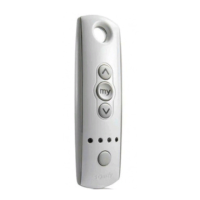
3. Press the UP and DOWN buttons simultaneously until the blind jogs.
4. Check the direction of the UP and DOWN buttons. When pressing
the UP button, the blind should go up. To change direction press and
hold the MY button until the blind jogs.
5. Set the limit positions. Use the UP and DOWN buttons to position
the blind so that it is at the desired upper limit/fully open position.
6. Briefly press and release the MY and DOWN buttons simultaneously.
The blind will lower.
7. Press the MY button to stop the blind when it is approximately at the
lower limit/fully closed position.
8. Use the UP and DOWN buttons to position the blind so that it is
exactly at the desired lower limit/fully closed position.
9. Briefly press and release the MY and UP buttons simultaneously. The
blind will move up and stop at the programmed upper limit/fully open
position.
10. To confirm both limits press the MY button until the blind jogs.
11. Briefly press and release the PROGRAMME button on the back of
the handset (using a screwdriver or sharp pencil). The blind will jog.
Your programming has been recorded.
12. If programming further blinds onto further channels, unplug the
power to the current blind before repeating these steps with the
next blind. Only when all blinds and channels have been programmed
can power to all blinds be plugged back in.

Other manuals for SOMFY sonesse 40

Question and Answer IconNeed help?

Do you have a question about the SOMFY sonesse 40 and is the answer not in the manual?

Summary

Somfy Sonesse 40 Remote Control Programming

Programming Upper and Lower Limit Positions

Detailed steps to set the blind's fully open and fully closed positions using the remote control.

Copying Programmed Channel to 5 th Channel

Instructions to duplicate programmed settings from channels 1-4 to channel 5 for simultaneous blind control.

Programming the Intermediate My Position

Guide to setting a favorite blind position for quick access using the 'My' button on the remote.

Adjusting Up and Down Limits

Steps to fine-tune the previously set upper and lower limit positions of the blind.

Factory Reset

Procedure to erase all programming and restore the remote to its default factory settings.

Summary

Somfy Sonesse 40 Remote Control Programming

Programming Upper and Lower Limit Positions

Detailed steps to set the blind's fully open and fully closed positions using the remote control.

Copying Programmed Channel to 5 th Channel

Instructions to duplicate programmed settings from channels 1-4 to channel 5 for simultaneous blind control.

Programming the Intermediate My Position

Guide to setting a favorite blind position for quick access using the 'My' button on the remote.

Adjusting Up and Down Limits

Steps to fine-tune the previously set upper and lower limit positions of the blind.

Factory Reset

Procedure to erase all programming and restore the remote to its default factory settings.

Overview

This document provides comprehensive instructions for programming and managing Somfy Sonesse 40 remote-controlled blinds, covering initial setup, limit adjustments, and advanced features like 'My' position programming and channel copying. It is designed for users who wish to set up new blinds, modify existing settings, or perform a factory reset.

Function Description

The Somfy Sonesse 40 remote control system allows for the automated operation of blinds, providing convenience and precision in managing light and privacy. The core function involves setting upper and lower limit positions for the blind's movement, ensuring it stops exactly where desired. This system also supports an intermediate 'My' position, which can be programmed to a user's preferred setting, offering quick access to a frequently used blind position without having to manually adjust it each time. The remote control, typically a Somfy Telis handset, can manage multiple blinds through different channels, or a single blind with a single-channel remote. For multi-channel remotes, there's a feature to copy programming from one channel to a fifth channel, enabling simultaneous operation of several blinds, which is particularly useful for rooms with multiple windows or for creating a unified look across an entire space. The system is designed to be user-friendly, with tactile buttons for up, down, and 'My' functions, and a hidden 'PROGRAMME' button for advanced settings. Indicator lights on the remote provide visual feedback on the selected channel, enhancing the user experience.

Usage Features

The usage features of the Somfy Sonesse 40 remote control system are designed for intuitive and flexible operation.

Initial Programming of Upper and Lower Limit Positions:

  • Powering On and Channel Selection: Begin by plugging in the power to the motor. The blind will briefly "jog" (move up and down) to indicate it's active. For multi-channel remotes, the SELECTION button is used to choose the specific channel for the blind being programmed. An indicator light confirms the selection.
  • Entering Programming Mode: Simultaneously pressing the UP and DOWN buttons initiates the programming sequence, causing the blind to jog.
  • Direction Check and Correction: It's crucial to verify that the UP button moves the blind up and the DOWN button moves it down. If the direction is incorrect, holding the MY button until the blind jogs will reverse it.
  • Setting Upper Limit: The UP and DOWN buttons are used to precisely position the blind at its desired upper limit (fully open position).
  • Setting Lower Limit: After setting the upper limit, briefly pressing and releasing the MY and DOWN buttons simultaneously will cause the blind to lower. The MY button can then be pressed to stop the blind near its lower limit. The UP and DOWN buttons are then used for fine-tuning the blind to its exact lower limit (fully closed position).
  • Confirming Limits: To confirm the lower limit, briefly press and release the MY and UP buttons simultaneously. The blind will move to and stop at the programmed upper limit.
  • Saving Settings: The final step in setting limits involves holding the MY button until the blind jogs, confirming both limits. To permanently record the programming, the hidden PROGRAMME button on the back of the handset must be briefly pressed and released (using a small tool like a screwdriver or pencil). The blind will jog again, signifying that the programming has been saved.
  • Programming Multiple Blinds: When programming multiple blinds, it's essential to unplug the power from the current blind before moving on to the next one to avoid interference. All blinds can be reconnected to power once all programming is complete.

Programming the Intermediate 'My' Position:

  • Setting the Position: To set a favorite intermediate position, simply use the UP and DOWN buttons to move the blind to the desired spot.
  • Saving 'My' Position: Hold the MY button for approximately 5 seconds until the blind jogs. This saves the current position as the 'My' position.
  • Activating 'My' Position: Once programmed, a brief press of the MY button will move the blind directly to this saved position.
  • Deleting 'My' Position: To remove a previously set 'My' position, first press the MY button to move the blind to that position. Then, press and hold the MY button again for about 5 seconds until the blind jogs, indicating the 'My' position has been deleted.

Adjusting Up and Down Limits:

  • Entering Adjustment Mode: To adjust an existing limit, position the blind at the limit you wish to modify. Simultaneously press the UP and DOWN buttons for approximately 5 seconds until the blind jogs.
  • Making Adjustments: Use the UP and DOWN buttons to move the blind to the new desired limit position.
  • Confirming New Limit: Press and hold the MY button for approximately 2 seconds until the blind jogs to confirm and save the new limit position.

Copying Programmed Channel onto 5th Channel (for multi-channel remotes):

  • Selecting Source Channel: Press the SELECTION button to choose the channel you want to copy.
  • Initiating Copy: Press and hold the PROGRAMME button on the back of the handset until the blind jogs.
  • Selecting Destination Channel: Press the SELECTION button to select channel 5 (all four indicator lights will illuminate).
  • Completing Copy: Briefly press the PROGRAMME button. The blind will jog, confirming that the programming has been copied to channel 5, allowing simultaneous control of multiple blinds. This process can be repeated for other channels.

Maintenance Features

The Somfy Sonesse 40 system is designed for minimal ongoing maintenance, primarily focusing on resetting and troubleshooting.

Factory Reset:

  • Purpose: A factory reset is used to erase all programming and return the blind to its original factory settings. This is useful for resolving complex programming issues or when reconfiguring the system entirely.
  • Preparation: Move the blind to the middle of the window. Ensure that only the motor to be reset has power.
  • Reset Procedure:
    1. Cut the power supply to the motor for 2 seconds.
    2. Restore power for 10-15 seconds.
    3. Cut the power supply again for 2 seconds.
    4. Restore power once more. The blind will move or jog for 5 seconds.
    5. Press and hold the PROGRAMME button on the back of the handset until the blind jogs twice. This double jog confirms that all programming has been reset to factory mode.

Troubleshooting:

  • The document implicitly suggests troubleshooting by providing clear steps for re-programming and resetting. If issues arise, following the programming steps carefully can often resolve them.
  • For persistent problems or questions about programming, the document directs users to contact THEBLINDSHOP.COM, providing contact details for support. This indicates that complex issues may require professional assistance.

The overall design emphasizes ease of use, with clear, step-by-step instructions for each function. The remote control's tactile buttons and visual indicators contribute to a straightforward user experience, making it accessible for individuals to manage their automated blinds effectively. The provision of a factory reset option ensures that users can always revert to a clean slate if programming becomes complex or incorrect, adding to the system's robustness and user-friendliness.

SOMFY sonesse 40 Specifications

General IconGeneral
Voltage230V AC
Motor TypeAC motor
Warranty5 years
ApplicationInterior window coverings
Control OptionsWired
Noise Level44 dB

Related product manuals