OSD Menu Operation
16
mode, press Back Button to return to the main menu.
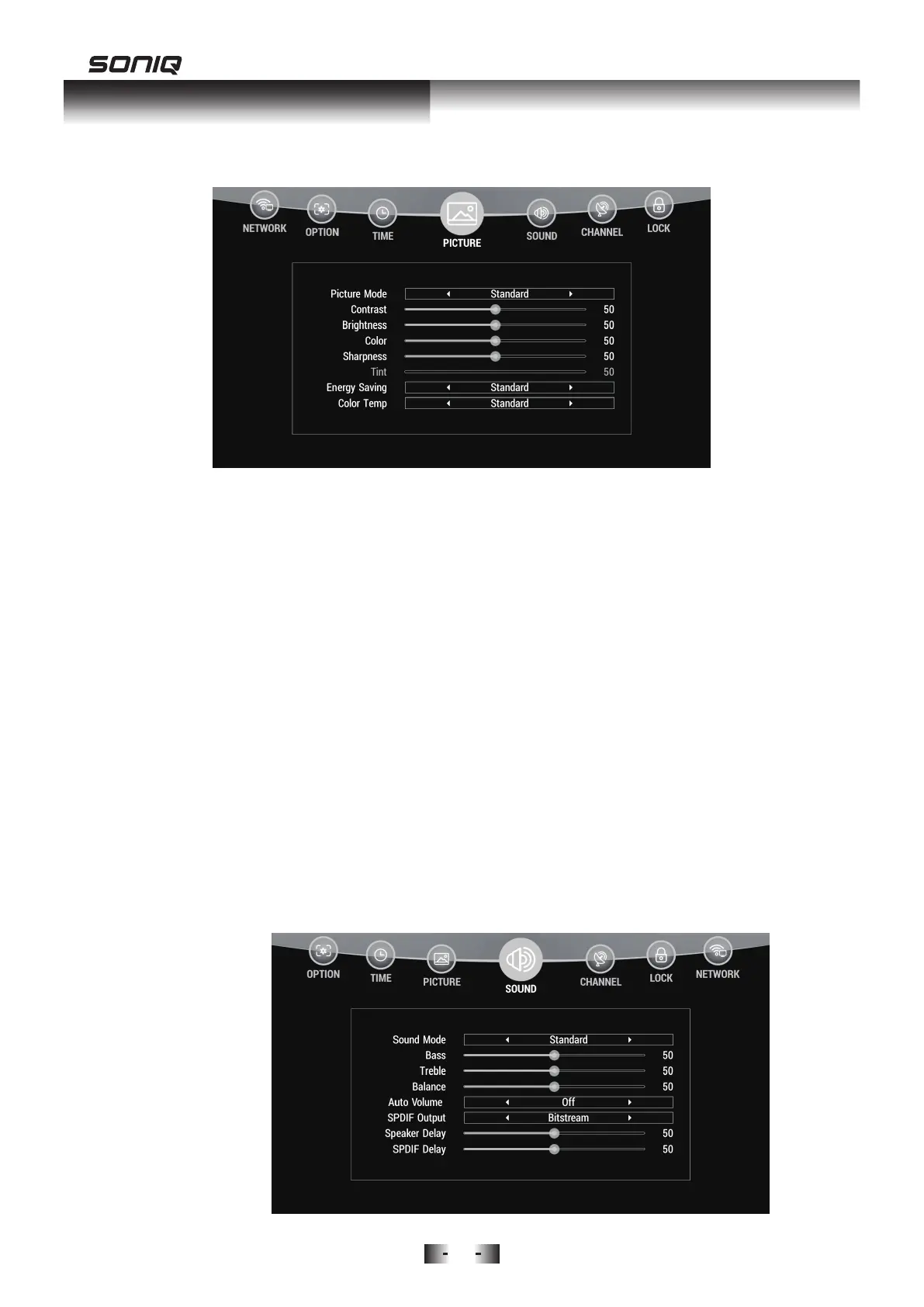
2. Tint: Only available on NTSC system.
3. Energy Saving: Adjust the brightness of your TV to reduce power
consumption. Press Up/Down to select Energy Saving, and press
Left/Right Buttons to select Standard or High.
4. Color Temp: Press Up/Down to choose Color Temp. Press Left/Right
Button to select Cool, Standard, Warm mode.
5. Aspect Ratio: Press Up/Down to choose Aspect Mode. Press Left/Right to
select Full, 4:3 or Auto.
6. Noise Reduction: Press Up/Down to choose Noise Reduction. Press
Left/Right to select On/Off.
7. VGA Settings: Available under VGA mode.
8. Screen Mode: HDMI mode only.
9. Color Space: Available under HDMI mode.
SOUND MENU
Press MENU Button to display the main menu. Press Left/Right to access
SOUND menu.



 To Next Page