
 Need help?
Do you have a question about the Sony Ericsson Aino and is the answer not in the manual?
Instructions highlighted by a gray line refer to touch screen functions only.
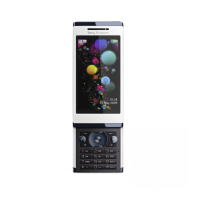
Lists and labels major external parts of the phone.
Step-by-step guide on inserting the SIM card into the phone.
Details on SIM card usage, PIN entry, and blocking.
Description of the phone's standby screen.
Guide on how to access the User guide, tips, and demo tour.
Guide on how to connect the charger and charge the phone's battery.
Tips for extending battery life and usage.
Tips to conserve power, such as turning off unused features.
Explanation of various icons displayed on the phone screen.
Details on tap, drag, flick, and touch-and-hold gestures for interaction.
Overview of the phone's main menu structure and categories.
Instructions to access the main menu using navigation keys.
Guide on using navigation keys to move through menus and select items.
Using navigation key shortcuts for direct access to functions.
Handling alarms and notifications, including turning off or snoozing.
Details on using microSD cards for additional storage.
Steps to select the preferred language for the phone interface.
Overview of multitap and Quick text input methods.
Instructions for entering numbers, punctuation, and symbols.
Guide to using the Quick text input method for typing.
Instructions for using the multitap method for text entry.
How to add custom words to the phone's dictionary.
Steps to answer or reject calls, with or without screen lock.
How to mute the microphone during an active call.
Instructions for turning on the loudspeaker during a call.
Procedure for dialing numbers directly or from contacts.
How to end an ongoing call.
Steps to mute and unmute the microphone.
Introduction to making and handling video calls.
Requirements and steps for initiating a video call.
How to make emergency calls and find local emergency numbers.
Information on automatic network switching between GSM and 3G.
Options for setting default contact views (phone or SIM).
Step-by-step guide to adding new contacts to phone memory.
Methods for calling contacts, including Smart search.
Instructions for copying contacts to SIM or memory card.
How to delete all contacts from the phone or SIM.
Checking available memory for storing contacts.
Steps to create groups for messaging and accepted callers.
How to assign contacts to speed dial numbers.
Setting up and calling the voicemail service.
Using voice commands for dialing and call management.
Recording and using voice commands for dialing.
Activating and configuring voice commands for answering calls.
Activating call waiting to be notified of a second incoming call.
Managing multiple calls, switching between them, and conference calls.
Steps to add new participants to a conference call.
Setting options for accepting calls from specific numbers.
Options for restricting outgoing and incoming calls.
Viewing last call duration, outgoing calls, and total call times.
Steps to hide your phone number when making calls.
Instructions for taking photos using the screen or shutter key.
Using face detection to improve focus in portrait photos.
Enhancing photos with a one-tap operation for brightness and contrast.
Using predefined scenes to optimize camera settings for various situations.
Controlling focus for different subjects and distances.
Using the flash for low-light conditions.
Selecting resolution and aspect ratio for photos.
Tagging photos with location data for later reference.
Advice on composition, stability, lighting, and backgrounds for better photos.
Steps to record videos using the screen or shutter key.
Configuring video format, night mode, light, and microphone.
Steps to delete individual photos from the phone.
Procedures for editing photos, including applying effects.
How to zoom in and out of photos.
Accessing photos and videos via camera or media browser.
Displaying geo-tagged photos on a map.
Organizing photos by creating and assigning tags.
Setting photos as phone wallpaper or screen saver.
Connecting to a printer via USB to print photos.
Methods for sending photos and videos to web albums, messages, or via Bluetooth.
Uploading photos and videos to online web albums.
Steps to play videos from the media browser.
Using controls for pausing, fast-forwarding, and rewinding videos.
Navigating through video files.
Adjusting video zoom and managing subtitle display.
Stopping playback and adjusting volume or screen size.
Connecting and using stereo Bluetooth handsfree for music.
Browsing and playing music files through the media player.
Using controls for playing, pausing, and fast-forwarding music.
Navigating through music tracks.
Minimizing the music player for background operation.
Playing music tracks in a random order.
Using phone movement to shuffle music tracks.
Manually adjusting equalizer settings for audio output.
Using predefined equalizer presets for audio enhancement.
Steps to create playlists by adding tracks manually.
Using SensMe™™ to create playlists based on music mood.
Creating playlists from all tracks using the SensMe™™ All view.
Listening to audio books transferred to the phone.
How to mark tracks for later purchase via a music service.
Accessing the PlayNow™™ arena for downloads and content.
Using TrackID™™ to identify music playing on the phone or radio.
Selecting a data account for streaming content.
Steps to stream music and video clips from the Internet.
Connecting handsfree and tuning into radio stations.
Methods for finding radio channels, manually or automatically.
Adjusting radio frequency for better reception.
Saving preset radio channels for quick access.
Steps to record voice memos or calls.
Accessing and playing recorded sounds.
Managing files and viewing memory status using File manager.
Sharing files with other devices via messages or Bluetooth.
Connecting the phone to a computer via USB for data transfer.
Steps to install Sony Ericsson PC software for phone management.
Using Media Go™™ for transferring media between phone and computer.
Configuring Media Home for automatic content transfer and DLNA.
Enabling the Bluetooth function for wireless connectivity.
Steps to pair the phone with other Bluetooth-enabled devices.
Setting options for allowing connections from Bluetooth devices.
Creating backups of phone data using PC Suite software.
Procedure for restoring phone data from a backup using PC Suite.
Updating phone software using a USB cable and PC Suite.
Updating phone software over the air using the Update Service.
Sending and receiving text and picture messages.
Options for saving incoming messages to memory card or SIM.
Setting default options for all messages.
Viewing communication threads with contacts.
Recording and sending sound messages.
Creating an email account and configuring settings.
Composing and sending email messages.
Checking for new emails and saving received messages.
Changing the active email account on the phone.
Configuring how often the phone checks for new email messages.
Steps to start browsing the web and exit the browser.
Explanation of icons and functions in the web browser toolbar.
Using keypad shortcuts for web browser functions.
Viewing previously visited web pages.
Turning Smart-Fit rendering on or off for web page display.
Searching for specific text within a web page.
Accessing security certificates stored on the phone.
Using the File transfer manager to access downloaded files.
Subscribing to new web feeds from a web page.
Downloading content from subscribed web feeds.
Displaying web feed updates on the standby screen.
Listening to audio podcasts downloaded via web feeds.
Accessing video podcasts downloaded via web feeds.
Subscribing to photo feeds for downloading images.
Opening the Facebook application on the phone.
Connecting to the internet wirelessly using Wi-Fi.
Configuring the phone as a DLNA server for media sharing.
Streaming music from the phone to another DLNA device.
Connecting the phone to a PLAYSTATION 3 for remote media access.
Ending the Remote Play session with PLAYSTATION 3.
Using Assisted GPS (A-GPS) for faster location calculation.
Saving current location and accessing saved places.
Managing external services' access to location information.
Viewing current location and finding other locations using Google Maps.
Launching the Wisepilot application for voice-guided navigation.
Initiating a GPS-based sports tracking session.
Accessing and comparing past training session results.
Configuring personal profile for energy consumption tracking.
Using PC Suite or Bluetooth to sync phone data with a computer.
Syncing phone data with online services like SyncML.
Activating flight mode to disable network transceivers.
Setting alarms, recurring alarms, and alarm signals.
Adjusting the snooze duration for alarms.
Adding, viewing, and editing calendar appointments.
Creating and saving notes, and showing them in standby.
Creating and managing tasks, including setting reminders.
Changing settings like ring volume and vibration alert.
Configuring the phone's time zone.
Changing the phone's appearance with themes and wallpapers.
Switching between landscape and portrait screen orientation.
Selecting and setting ringtones and their volumes.
Launching preloaded or downloaded games.
Managing and setting permissions for Java applications.
Identifying and removing viruses from installed applications.
Managing SIM card lock, PIN, and PUK codes.
Setting a phone lock code to prevent unauthorized use.
Modifying the existing phone lock code.
Finding the phone's International Mobile Equipment Identity number.
Identification of the headset's microphone, keys, and connectors.
Instructions for charging the headset battery.
Steps to power the headset on and off.
Connecting the headset to a phone via Bluetooth.
Controlling speaker or music volume on the headset.
Using the headset to make, answer, and end calls.
Playing music and tuning into the radio using the headset.
Restoring the headset to its default settings.
Understanding the meaning of headset battery color indicators.
Troubleshooting problems with redialing and answering second calls.
Resolving problems with music or radio not playing through headset.
Addressing issues with the headset automatically turning off.
Steps to resolve issues with no phone connection to the headset.
Answers to frequently asked questions about phone operation.
Resolving slow performance or memory capacity problems.
Troubleshooting phone battery charging and capacity problems.
Instructions for downloading phone settings from the internet.
Troubleshooting issues with sending messages, MMS, and service center numbers.
Resolving issues with the phone not ringing or sounding too soft.
Troubleshooting errors related to SIM card insertion and recognition.
Resolving issues with incorrect PIN/PIN2 or codes not matching.
Addressing problems related to network signal strength or availability.
List of trademarks, registered trademarks, and licensing information.
 General
| Brand | Sony Ericsson |
|---|---|
| Model | Aino |
| Category | Cell Phone |
| Language | English |










 To Next Page