Getting started: Using the T68 as a modem
4
Creating a GPRS Dial-up connection on Windows® 98
You have to create a new dial-up connection and configure it, to be able to connect to
the Internet via GPRS.
To create a new GPRS dial-up connection
1.On the desktop, double-click My Computer.
2.Double-click Dial-Up Networking and then double-click Make New Connection.
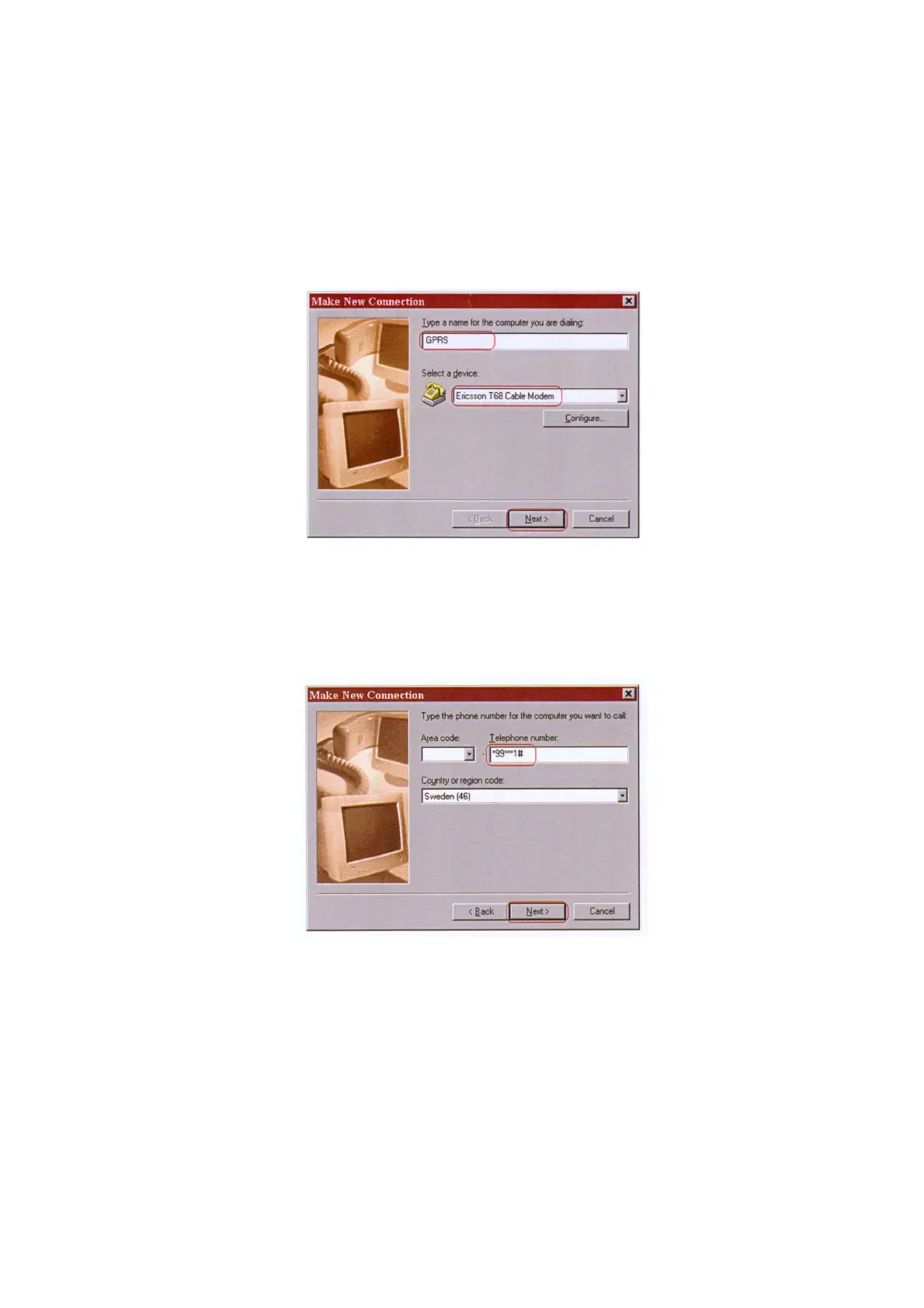
3.Enter a name for the connection, select the modem you want to use and then click Next.
4.In the Telephone number box, enter the special dial string used for GPRS services
*99***1#.
The number before the hash mark should be the same as the CID for the phone’s data
account.
• To check CID in the phone, scroll to:
Connect/Data comm./Data accounts. Open the account
you use for GPRS and check what CID is used for that account. If, for example, the CID is 3,
the dial string above should be
*99***3#. Click Next.
5.Check the name of the connection and click Finish.
6.Right-click your new dial-up networking connection icon, and then click Properties.
7.On the General tab:
• In the Telephone number box, the telephone number string you entered in step 4 above
should already be entered.
• Make sure the Use area code and Dialing Properties check box is cleared.












 To Next Page