ILCE-1
5-025-480-11(1)
GB
32
C:\Users\gotanda\Desktop\5025480111_分分分\5025480111ILCE1UC21\01GB-ILCE1UC2\040SHT.indd
DTP data saved: 2020/11/20 14:50
PDF file created: 2020/11/20 14:53
Note
• [ Focus Area] is locked to [Wide] in the following situations:
– [Intelligent Auto]
• The focus area may not light up during continuous shooting or when the
shutter button is pressed all the way down at once.
• When the mode dial is set to (Movie) or (S&Q Motion), or during
movie shooting, [Tracking] cannot be selected as the [ Focus Area].
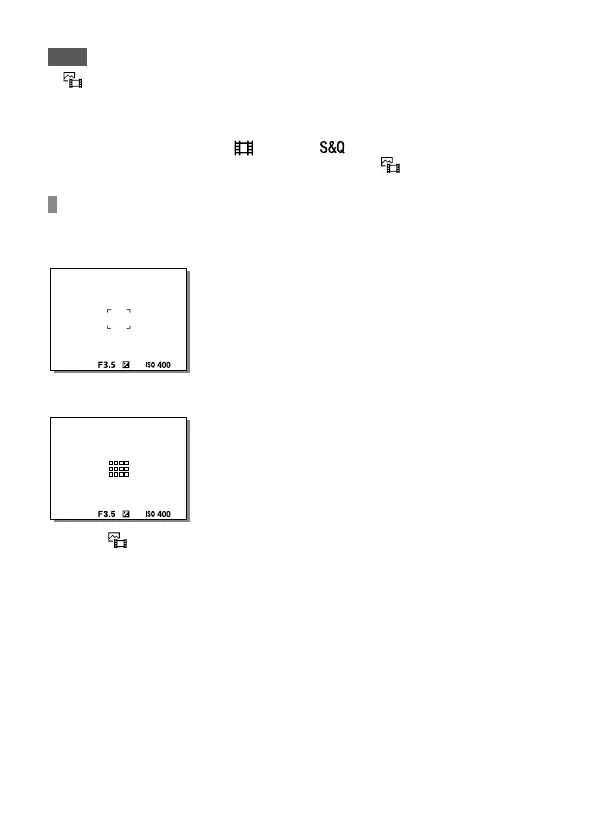
Examples of the focusing frame display
The focusing frame differs as follows.
When focusing on a larger area
When focusing on a smaller area
• When [ Focus Area] is set to [Wide] or [Zone], the focusing frame may
switch between “When focusing on a larger area” and “When focusing
on a smaller area” depending on the subject or situation.
• When you attach an A-mount lens with a Mount Adaptor (LA-EA3 or
LA-EA5) (sold separately), the focusing frame for “When focusing on a
smaller area” may be displayed.



 To Next Page