C:\d832100911\d832100911ILCE9AP2\01GB-ILCE9AP2\020PRE.indd
2019/02/19 16:35
ILCE-9
d-832-100-91(1)
GB
23
Preparations for shooting
* For details on compatible
accessories for the multi interface
shoe and the Multi/Micro USB
Terminal, visit the Sony website, or
consult your Sony dealer or local
authorized Sony service facility.
Accessories for the Accessory Shoe
can also be used. Operations with
other manufactures’ accessories
are not guaranteed.
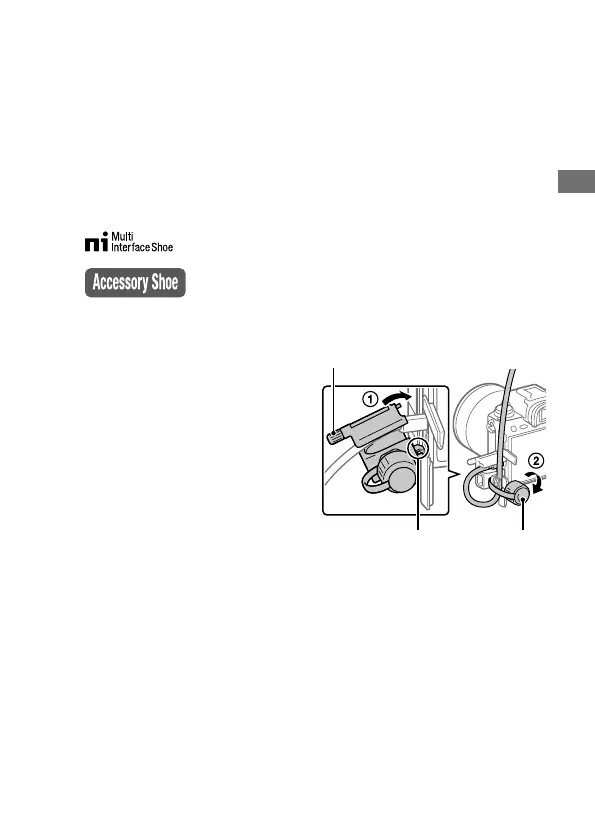
To attach the cable protector
Use the cable protector to prevent
the HDMI cable from being
disconnected when shooting
images connected by the HDMI
cable. Open both of the jack
covers and insert an HDMI cable
into the camera. Swing the HDMI
micro jack cover downward and
attach the cable protector as
illustrated so that the end of the
cable protector fits in the slit under
the Multi/Micro USB Terminal.
Secure the cable protector with the
attachment screw. Then secure the
HDMI cable with the fixing dial.
Fit the end in the slit Fixing dial
Attachment screw



 To Next Page