C:\d832100911\d832100911ILCE9AP2\01GB-ILCE9AP2\020PRE.indd
2019/02/19 16:35
ILCE-9
d-832-100-91(1)
GB
33
Preparations for shooting
2
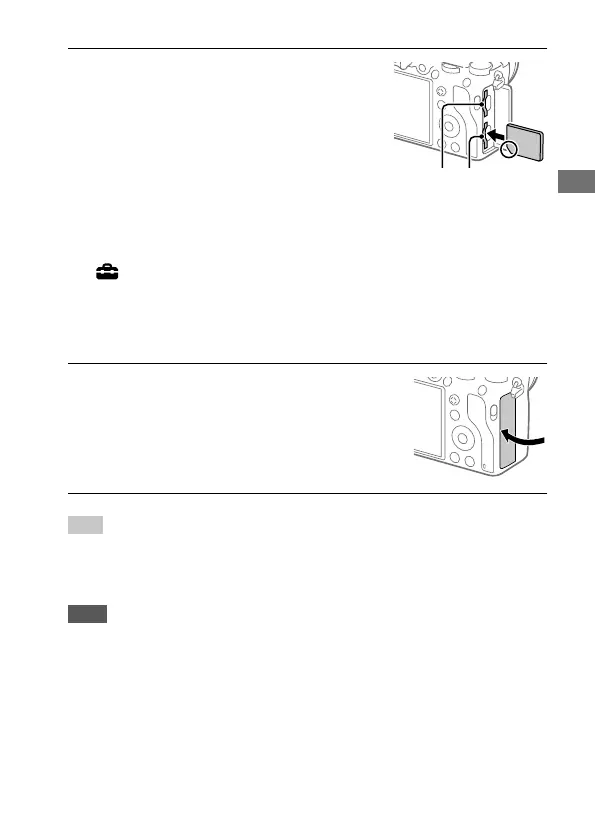
Insert the SD card into the
slot 1.
Slot 1 (lower): Supports SD cards
(compatible with UHS-I and
UHS-II)
Slot 2 (upper): Supports SD cards
(compatible with UHS-I) and
Memory Stick PRO Duo media
Slot 2 Slot 1
• With the notched corner facing in the direction illustrated, insert the
memory card until it clicks into place.
• You can change which memory card slot to use by selecting MENU
(Setup) [Select Rec. Media].
The slot 1 is used in the default settings.
• Use the slot 1 when you are only using one SD card.
• Use the slot 2 when you are using Memory Stick media. In this case,
set [Select Rec. Media] to [Slot 2].
3
Close the cover.
Hint
• When you use a memory card with the camera for the first time, it is
recommended that you format the card on the camera for more stable
performance of the memory card (page 83).
Note
• Do not insert a Memory Stick media into the slot 1. It may cause a malfunction.



 To Next Page