EasyManua.ls Logo

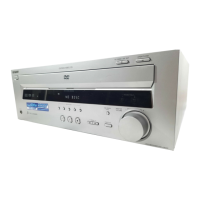
Sony AVD-S50 - User Manual

Sony AVD-S50
168 pages
Print Icon
To Next Page IconTo Next Page
Loading...
4-240-933-24(1)
© 2002 Sony Corporation
AVD-S50
Super Audio CD/
DVD RECEIVER
Operating instructions
Mode d’emploi
FR
FR
FR
GB

Table of Contents

Other manuals for Sony AVD-S50

Question and Answer IconNeed help?

Do you have a question about the Sony AVD-S50 and is the answer not in the manual?

Summary

Warning Information

Precautions

Safety and Installation Guidelines

Essential safety measures and proper installation procedures for the receiver.

Disc Compatibility and Restrictions

Rear Panel Connections

Remote Control Overview

Getting Started Guide

Quick Overview and Unpacking

Initial introduction to the receiver and a checklist of package contents.

Initial Setup Procedures

Remote Battery Installation and Speaker Hookup

Instructions for installing remote batteries and connecting speakers for surround sound.

Antenna Connections

TV Hookup Instructions

Connecting External Components

Speaker Setup and Placement

Speaker Placement Guidelines

Recommendations for optimal speaker positioning for surround sound.

Specifying Speaker Parameters

Specifying Speaker Parameters

Setting speaker size, distance, and height for optimal surround sound.

Adjusting Speaker Balance and Level

Adjusting Speaker Balance and Level

Fine-tuning speaker balance and volume levels using test tones.

Presetting Radio Stations

Playing Discs

Basic Playback and Power Management

Steps to start disc playback and manage receiver power states.

Resume Playback and Operation Controls

Playing MP3 Audio Tracks

Sound Adjustments

Changing Audio Tracks and Formats

Selecting desired audio languages or formats for DVDs and CDs.

Auto Decoding and Surround Sound Modes

Auto Decoding and Surround Sound Modes

Automatically decoding audio signals and selecting surround sound fields.

Cinema Studio EX Sound Modes

Cinema Studio EX Sound Modes

Utilizing special sound fields simulating movie theater acoustics.

Other Sound Field Options

2-Channel Stereo Mode

Adjusting Speaker Level Parameters

Fine-tuning individual speaker volume levels for optimal sound.

Enjoying Movies

Displaying and Changing Subtitles

Advanced Disc Functions

Disc Locking (Parental Control)

Setting playback restrictions for discs using custom or preset parental controls.

Custom Parental Control Setup

Radio Functions

Settings and Adjustments

Language Setup Options

Screen Setup Options

Speaker Setup Configuration

Speaker Setup Configuration

Setting speaker size, distance, and type for optimal surround sound.

Adjusting Speaker Volume and Level

Adjusting Speaker Volume and Level

Fine-tuning speaker volume and test tone settings for calibration.

Troubleshooting Guide

Power and Picture Issues

Solutions for problems related to power, no picture, or picture quality.

Sound and Connection Problems

Addressing issues like no sound, unbalanced audio, hum, or noise.

Sound Playback Troubleshooting

Sound Playback Troubleshooting

Resolving issues with stereo effect, surround sound, and speaker output.

MP3 Playback and Function Errors

MP3 Playback and Function Errors

Troubleshooting MP3 playback, display messages, language, and angle settings.

General Operational and Display Issues

General Operational and Display Issues

Solutions for abnormal operation, display errors, or tray lock issues.

Self-Diagnosis Function

Interpreting Error Codes

Understanding service numbers and their causes for troubleshooting.

Technical Specifications

Summary

Warning Information

Precautions

Safety and Installation Guidelines

Essential safety measures and proper installation procedures for the receiver.

Disc Compatibility and Restrictions

Rear Panel Connections

Remote Control Overview

Getting Started Guide

Quick Overview and Unpacking

Initial introduction to the receiver and a checklist of package contents.

Initial Setup Procedures

Remote Battery Installation and Speaker Hookup

Instructions for installing remote batteries and connecting speakers for surround sound.

Antenna Connections

TV Hookup Instructions

Connecting External Components

Speaker Setup and Placement

Speaker Placement Guidelines

Recommendations for optimal speaker positioning for surround sound.

Specifying Speaker Parameters

Specifying Speaker Parameters

Setting speaker size, distance, and height for optimal surround sound.

Adjusting Speaker Balance and Level

Adjusting Speaker Balance and Level

Fine-tuning speaker balance and volume levels using test tones.

Presetting Radio Stations

Playing Discs

Basic Playback and Power Management

Steps to start disc playback and manage receiver power states.

Resume Playback and Operation Controls

Playing MP3 Audio Tracks

Sound Adjustments

Changing Audio Tracks and Formats

Selecting desired audio languages or formats for DVDs and CDs.

Auto Decoding and Surround Sound Modes

Auto Decoding and Surround Sound Modes

Automatically decoding audio signals and selecting surround sound fields.

Cinema Studio EX Sound Modes

Cinema Studio EX Sound Modes

Utilizing special sound fields simulating movie theater acoustics.

Other Sound Field Options

2-Channel Stereo Mode

Adjusting Speaker Level Parameters

Fine-tuning individual speaker volume levels for optimal sound.

Enjoying Movies

Displaying and Changing Subtitles

Advanced Disc Functions

Disc Locking (Parental Control)

Setting playback restrictions for discs using custom or preset parental controls.

Custom Parental Control Setup

Radio Functions

Settings and Adjustments

Language Setup Options

Screen Setup Options

Speaker Setup Configuration

Speaker Setup Configuration

Setting speaker size, distance, and type for optimal surround sound.

Adjusting Speaker Volume and Level

Adjusting Speaker Volume and Level

Fine-tuning speaker volume and test tone settings for calibration.

Troubleshooting Guide

Power and Picture Issues

Solutions for problems related to power, no picture, or picture quality.

Sound and Connection Problems

Addressing issues like no sound, unbalanced audio, hum, or noise.

Sound Playback Troubleshooting

Sound Playback Troubleshooting

Resolving issues with stereo effect, surround sound, and speaker output.

MP3 Playback and Function Errors

MP3 Playback and Function Errors

Troubleshooting MP3 playback, display messages, language, and angle settings.

General Operational and Display Issues

General Operational and Display Issues

Solutions for abnormal operation, display errors, or tray lock issues.

Self-Diagnosis Function

Interpreting Error Codes

Understanding service numbers and their causes for troubleshooting.

Technical Specifications

Sony AVD-S50 Specifications

General IconGeneral
BrandSony
ModelAVD-S50
CategoryStereo Receiver
LanguageEnglish

Related product manuals