12
HOME
Enters the player’s home menu.
Displays the wall paper when
pressed on the category icon of the
home menu.
RETURN
Returns to the previous display.
</M/m/,
Moves the highlight to select a
displayed item.
Centre button (ENTER)
Enters the selected item.
E ./> (previous/next)
Skips to the previous/next chapter,
track, or file.
X (pause)
Pauses or re-starts playback.
m/M (fast reverse/fast
forward)
• Fast reverse/fast forward the disc
when you press the button during
playback. The search speed
changes each time you press the
button during video playback.
• Plays in slow motion, when
pressed for more than one second
in pause mode.
• Plays one frame at a time, when
you press for a short time in pause
mode.
N (play)
Starts or re-starts playback.
KEY CTRL (page 21)
Opens [Key Control] function.
x (stop)
Stops playback and remembers the
stop point (resume point).
The resume point for a title/track is
the last point you played or the last
photo for a photo folder.
SEN (page 22)
Accesses the “Sony Entertainment
Network™” online service.
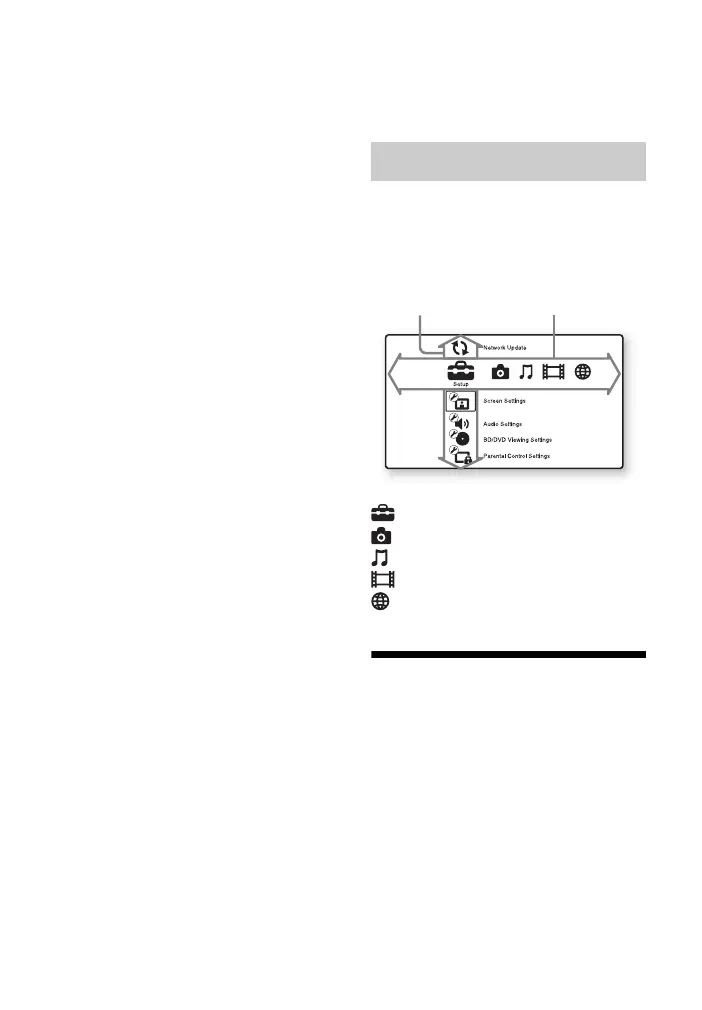
The home menu appears when you press
HOME. Select a category using
</,. Select an item using M/m, and
press ENTER.
[Setup]: Adjusts the player settings.
[Photo]: Displays photos.
[Music]: Plays music.
[Video]: Plays videos.
[Network]: Displays network items.
Step 1: Supplied
Accessories
Check that you have the following items:
• Audio/video cable (phono plug ×3) (1)
• Remote commander (remote) (1)
• R6 (size AA) batteries (2)
Home menu display
Item
Category


 To Next Page