16
Step 3: Preparing for
Network Connection
If you are not going to connect the player
to a network, proceed to “Step 4: Easy
Setup” (page 17).
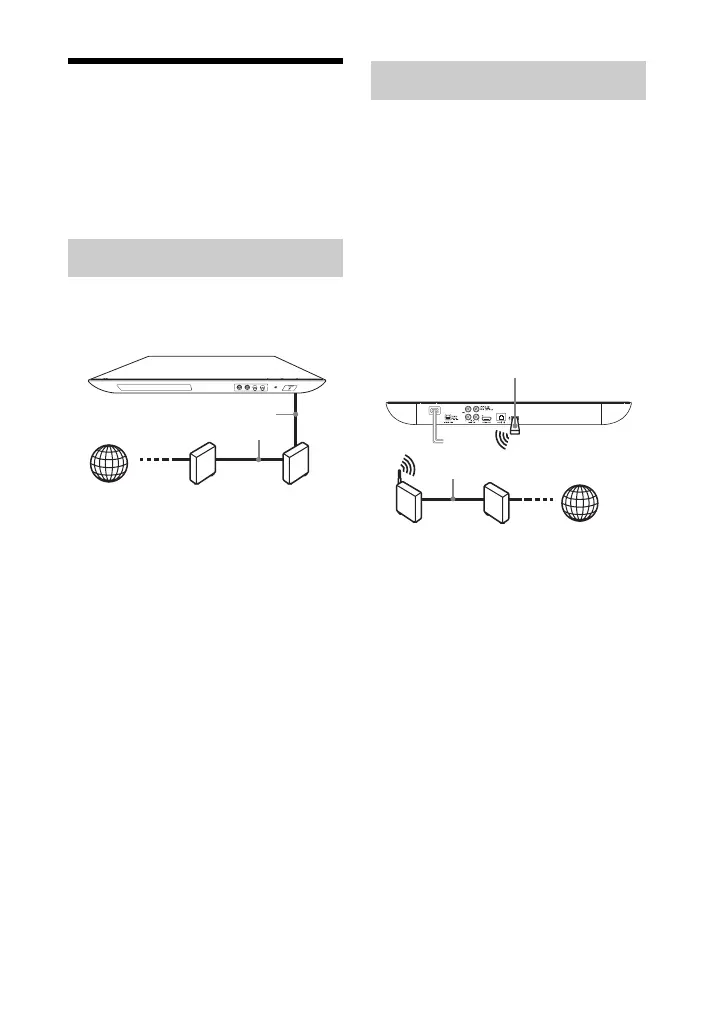
Use a LAN cable to connect to the LAN
(100) terminal on the player.
z
Using a shielded interface cable (LAN cable),
straight or crossing, is recommended.
Turn off the player, then connect the
USB Wireless LAN Adapter
(UWA-BR100 as of December 2011) to
the USB jack on the rear of the player.
b
• The USB Wireless LAN Adapter may not be
available in some regions/countries.
• The receiving sensitivity changes depending
on the environment. Use the extension cable
supplied with the USB Wireless LAN
Adapter if necessary.
Wired Setup
ADSL modem/
Cable modem
Broadband
router
LAN cable
(not supplied)
Internet
USB Wireless Setup
Wireless LAN
router
ADSL modem/
Cable modem
Internet
USB Wireless LAN Adapter
LAN cable (not supplied)


 To Next Page