26
GB
Getting Started
Do not plug the AC power cord (mains lead) for the main unit into a wall outlet (mains) until you have
made all other connections.
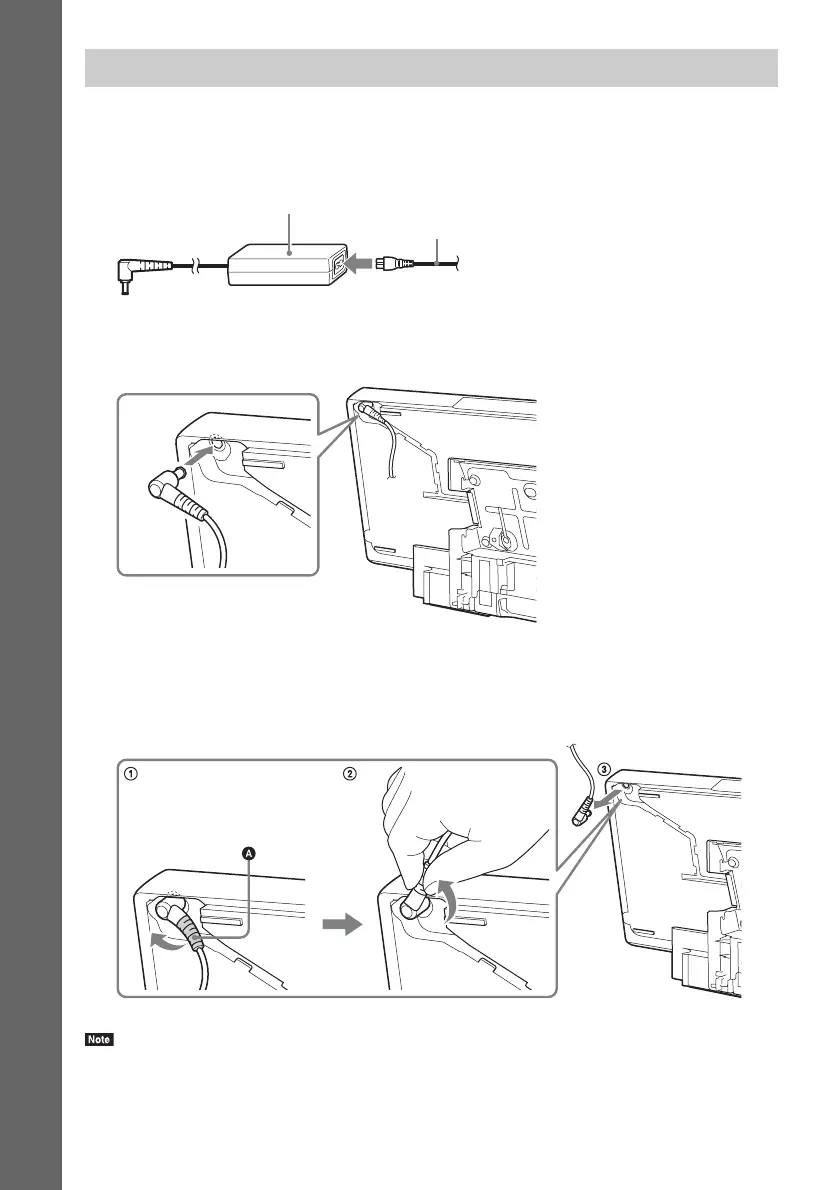
1 Connect the AC power cord (mains lead) to the AC adapter.
2 Plug the connector of the AC adapter into the DC IN 14V connector on the rear of the
main unit.
To unplug the AC adapter cord
Lift (A) of the connector of the AC adapter out gently to remove it from the gap on the main unit (1),
turn the connector counterclockwise by 90 degrees (2), and then pull it out from the main unit (3).
• Do not pull by the cord when you unplug the AC adapter cord.
Connecting the AC power cord (mains lead) to the main unit
AC adapter (supplied)
AC power cord (mains lead) (supplied)



 To Next Page