6
GB
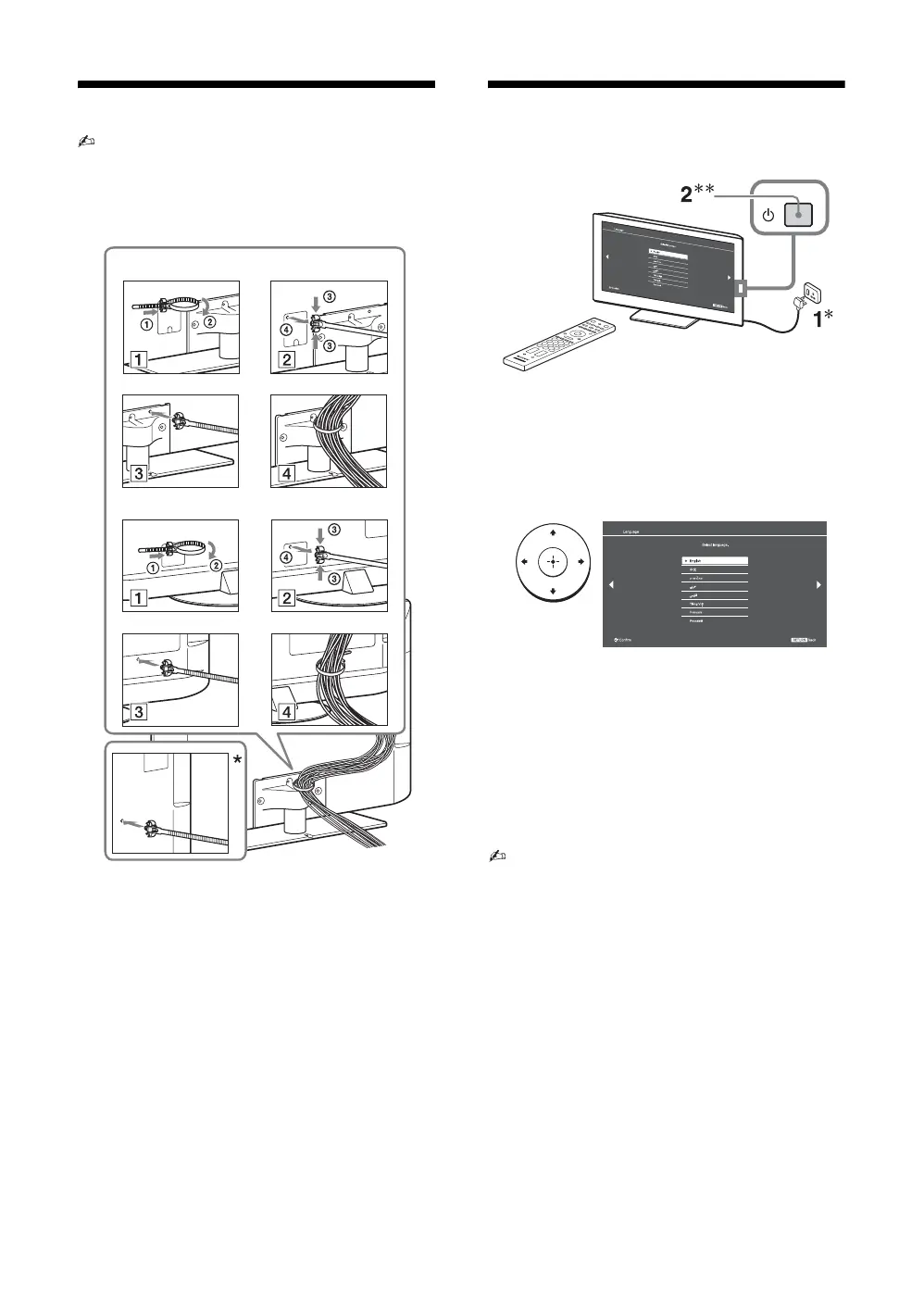
4: Bundling the cables
• Before bundling the cables, remove the cable holder
from the AC cover (see step 1 and 2).
Reuse the cable holder (see step 3) to bundle the other
cables (see step 4).
• Do not bundle the AC power cord (mains lead)
together with other cables.
* When installing on the wall, attach the cable holder under
the terminals.
5: Performing the initial
set-up
• You can also tune channels manually (page 28).
• Language options vary depending on model.
KLV-42EX410/KLV-32EX310
KLV-22EX310
* The shapes of AC power plug and AC power outlet
differ depending on the region.
**When the TV is in standby mode (the 1 (standby)
indicator on the TV front panel is red), press "/1 on
the remote to turn on the TV (the " (power) indicator
will light green).
3
Follow the instructions on the screen.
“Location”: Select “Home” for the best
TV settings to use the TV in the home.
“Programme Sorting”: If you want to
change the order of channels, follow the
steps in “Programme Sorting” (page 28).
Press HOME to exit.




 To Next Page