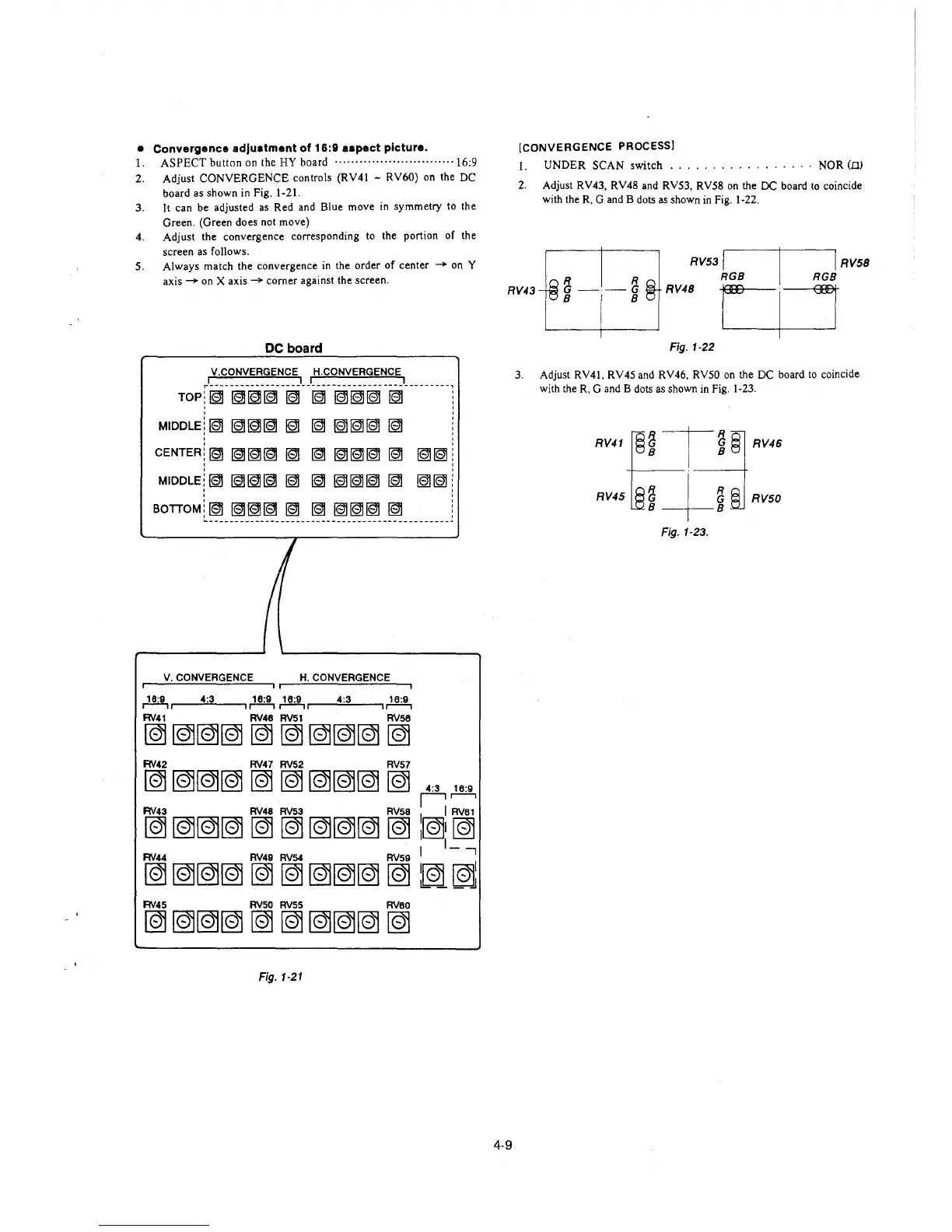
• Convergence adjuatment of 16:9 aapect picture.
1. ASPECT button on the HY board ······················· .. ···· 16:9
2. Adjust CONVERGENCE controls (RV41 - RV60) on the DC
board as shown in Fig. 1-21.
3. It can be adjusted as Red and Blue move in symmetry to the
Green. (Green does not move)
4. Adjust the convergence corresponding to the portion of the
screen as follows.
5. Always match the convergence in the order of center - on Y
axis - on X axis - corner against the screen.
DC board
V.CONVERGENCE H.CONVERGENCE
rl _________________ I I ________________ I _______ _
TOP:~~~~~
~
~~~
~
'
'
MIDDLE!~~~~~
~
~~~
~
'
CENTER!~~~~~
~
~~~
~
~~
'
'
MIDDLE/~~~~~ ~
~~~
~
~~
'
BOTTOM!~~~~~
~
~~~
~
._ __ ----- ----- -- ---------- --- ---- -- --- ----- ------
/
I
V.CONVERGENCE H.CONVERGENCE
~
4:3 ~~,---4=:3'-----,~
RV41 RV48 RV51 RV58
~~~~~~~~~~
RV42 RV47 RV52 RV57
~~~~~~~~~~
4:3 16:9
I:.-,
RVsa
I
I RVet
~
~~~
~ ~
~~~
~ l~I ~
I I_-,
RV44 RV49 RV54 RV59 I
~
~~~
~ ~
~~~
~
I~~
lb,; __ ,!]
RV43 RV48 RV53
R\/45 RV50 RV55 RVeo
~~~~~~~~~~
Fig. 1-21
[CONVERGENCE PROCESS]
1. UNDER SCAN switch ................ · NOR (IlJ
2. Adjust RV43, RV48 and RV53, RV58 on the DC board to coincide
with the R. G and B dots as shown in Fig. 1-22.
RV53 I I I RV58
R R RGB RGB
RV43
~s--~· Rm r I J
4-9
Fig. 1-22
3. Adjust RV41, RV45 and RV46, RVS0 on the DC board to coincide
with the R, G and B dots as shown in Fig. 1-23.
RV41E~ T3~ § RV46
RV45
~
I
~
RV50
s-f-e
Fig. 1-23.








 To Next Page