44
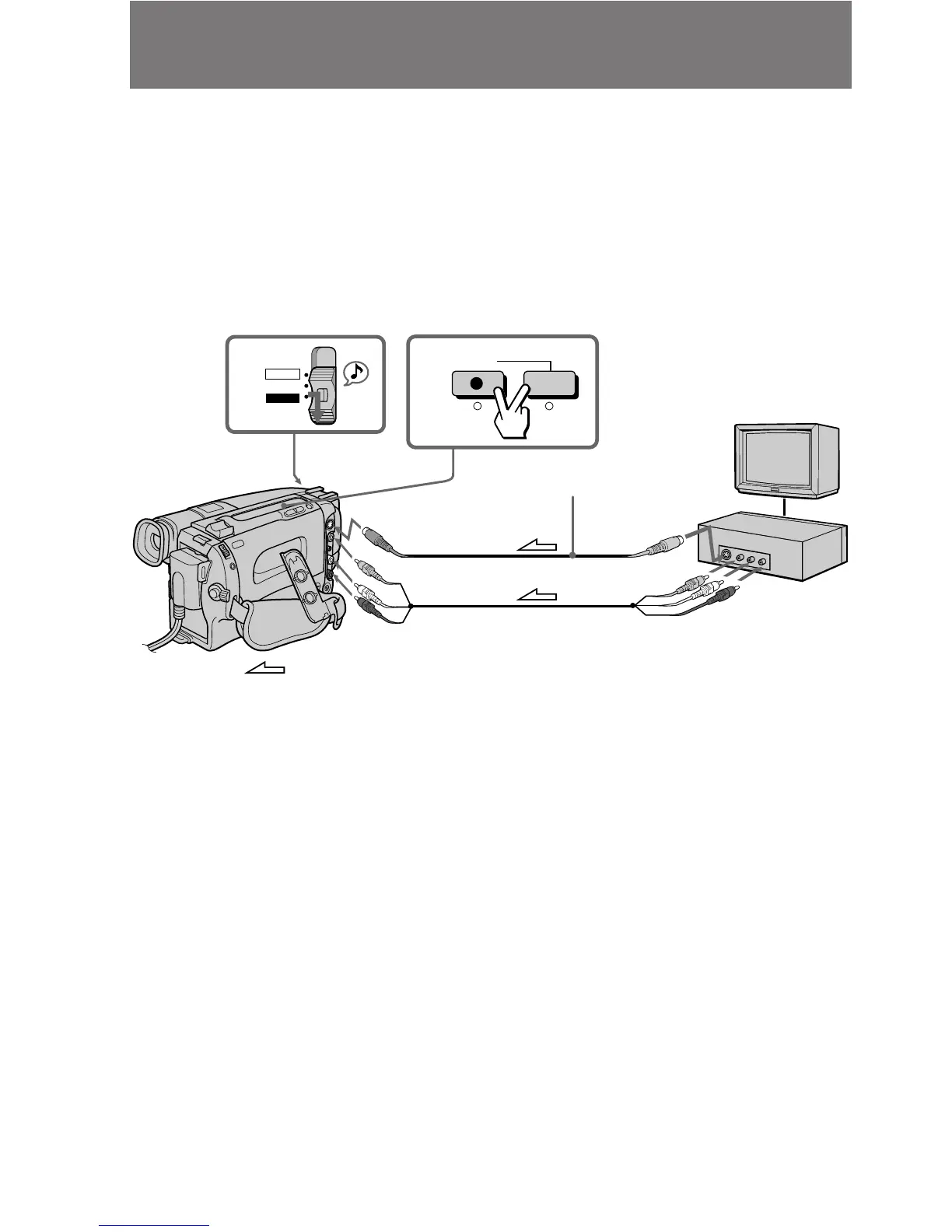
Recording from a VCR or TV
You can record a tape from another VCR or a TV program from a TV that has audio/
video outputs. Connect the camcorder to the VCR or TV.
(1) While pressing the small green button on the POWER switch, slide it to VTR.
(2) Press REC r and the button on the right together at the point where you want
to start recording.
In recording and recording pause mode, S VIDEO and VIDEO/AUDIO jacks
automatically work as input jacks.
If your VCR or TV has an S video jack, connect using the S video cable (not supplied)
[a] to obtain a high quality picture.
: Signal flow
If your VCR or TV is a monaural type, connect only the white plug for audio on both
the camcorder and the VCR or TV.
If you are going to connect the camcorder using the S video cable (not supplied) [a], you
do not need to connect the yellow (video) plug of the A/V connecting cable [b].
To check the picture from a VCR or TV before recording
Press P after pressing r. You can check the picture in the viewfinder.
To stop recording
Press π.
TV
VCR
[a]
[b]
1
2
REC
CAMERA
POWER
OFF
VTR
AUDIO
VIDEO
VIDEO OUT
S VIDEO OUT
AUDIO OUT
S VIDEO
(not supplied)











 To Next Page