26
1
ON
4
CAMERA VTR
2
3
MENU
COMMANDER
EDIT
HiFi SOUND
REC MODE
NTSC PB
TBC
DNR
[MENU]: END
OFF
MENU
WIND
COMMANDER
ORC TO SET
REC MODE
TITLE COL
TITLE POS
TITLE1 SET
[MENU]: END
1
1
2
2
OFF
MENU
WIND
COMMANDER
ORC TO SET
REC MODE
TITLE COL
TITLE POS
TITLE LANG
[MENU]: END
ON
OFF
MENU
BEEP
[MENU]: END
ON
OFF
MENU
BEEP
[MENU]: END
OFF
MENU
TITLE1 SET
TITLE2 SET
D ZOOM
LCD B.L.
LCD COLOUR
BEEP
DISPLAY
[MENU]: END
MENU
MENU
SEL/
PUSH
EXEC
SEL/
PUSH
EXEC
SEL/
PUSH
EXEC
SEL/
PUSH
EXEC
ON
MENU
WIND
COMMANDER
ORC TO SET
REC MODE
TITLE COL
TITLE POS
TITLE LANG
[MENU]: END
ON
MENU
TITLE1 SET
TITLE2 SET
D ZOOM
LCD B.L.
LCD COLOUR
BEEP
DISPLAY
[MENU]: END
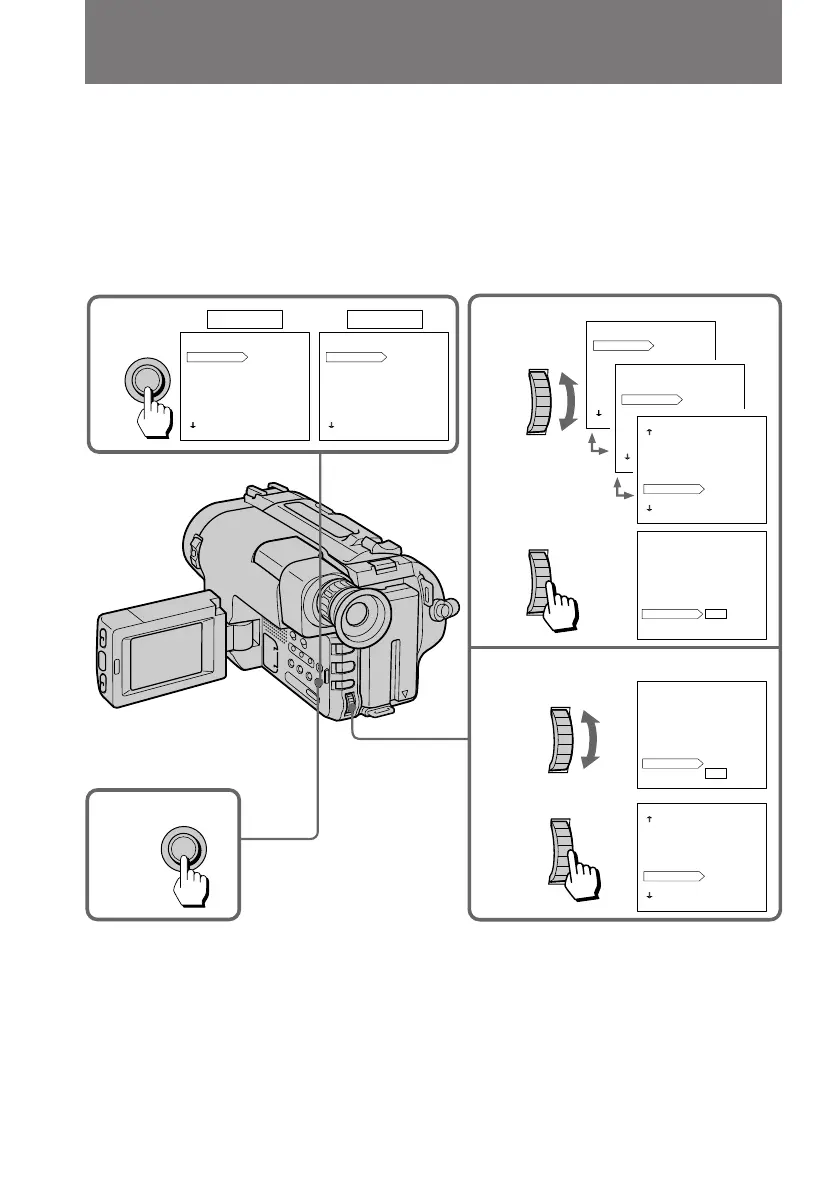
Changing the mode settings
You can change the mode settings in the menu system to further enjoy the features and
functions of the camcorder.
(1) Press MENU to display the menu.
(2) Turn the control dial to select the desired item, then press the dial.
(3) Turn the control dial to select the desired mode, and press the dial. If you
want to change the other modes, repeat steps 2 and 3.
(4) Press MENU to erase the menu display.
While recording in mirror mode
The menu does not appear on the LCD screen.



 To Next Page