33
Advanced Recording Operations
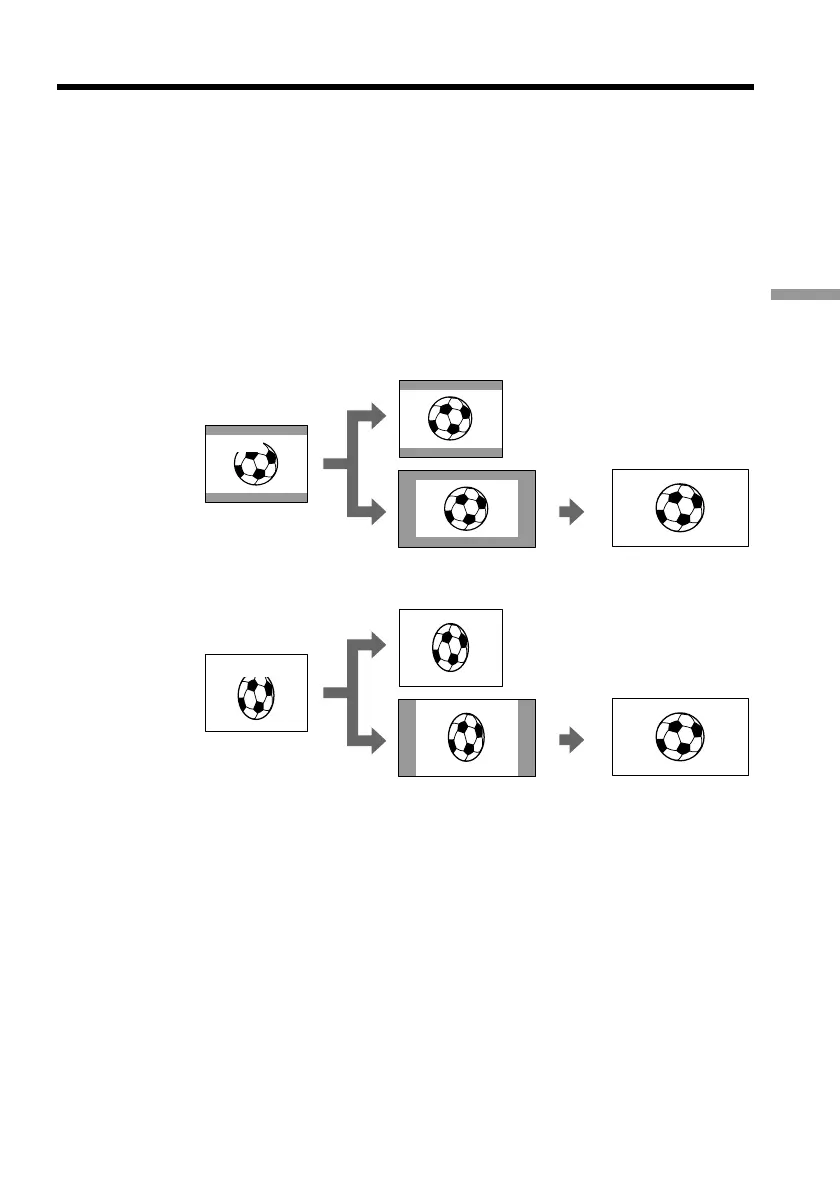
You can record a cinema-like picture (CINEMA) or a 16:9 wide picture to watch on the
16:9 wide-screen TV (16:9FULL). Refer to the operating instructions of your TV.
CINEMA
Black bands appear on the screen during recording in the CINEMA mode [a], playing
back on a normal TV [b] or a wide-screen TV [c]. If you set the screen mode of the wide-
screen TV to the zoom mode, a picture without black bands appears [d].
16:9FULL
The picture during recording in the 16:9FULL mode [e], or playing back on a normal TV
[f] or a wide-screen TV [g] is horizontally compressed. If you set the screen mode of the
wide-screen TV to the full mode, you can watch correctly proportioned images in wide-
screen format [h].
— Advanced Recording Operations —
Using the wide mode
[b]
CINEMA
[a]
[c]
[f]
[g]
CINEMA
16:9FULL
16:9FULL
[e]
[d]
[h]



 To Next Page
 Loading...










