– 26 –
Light Off
(
During continuous
playback (servo all
on)
Stop state
(servo all off)
Ñ
P
Tracking and sled
servo off
Tracking and
sled servo on
Ñ
REC
Recording mode on
Recording
mode off
Ñ
CLOCK
CLV lock state
CLV unlock
state
Ñ
TRACK
Pit mode Groove mode
Ñ
DISC
High reflection rate
disc
Low reflection
rate disc
Ñ
DATE
Spindle servo
CLV-S
(pull-in mode)
Spindle servo
CLV-A
(playing mode)
Ñ
A.SPACE
ABCD adjustment
completed
Not adjustment
Ñ
AÐB
Focus auto gain and
tracking auto gain
successful
Ñ
Display
Blinking
Contents
Focus
auto
gain
suc-
cessful,
tracking
auto
gain
failed
Mode
display
Error rate
display
Address display
ADIP address
display
SUB Q address
display
Auto gain
display
IVR
display
Change over the display with the
SCROLL button.
4-8. EEP MODE
This mode reads and writes the contents of the non-volatile
memory.
It is not used in servicing. If set accidentally, press the
EDIT/NO button immediately to exit it.
Note: Auto gain display and IVR display are not used in servicing.
Note: The erasing-protection tab in not detected during the test
mode. Recording will start regardless of the position of
the erasing-protection tab when the r REC button is
pressed.
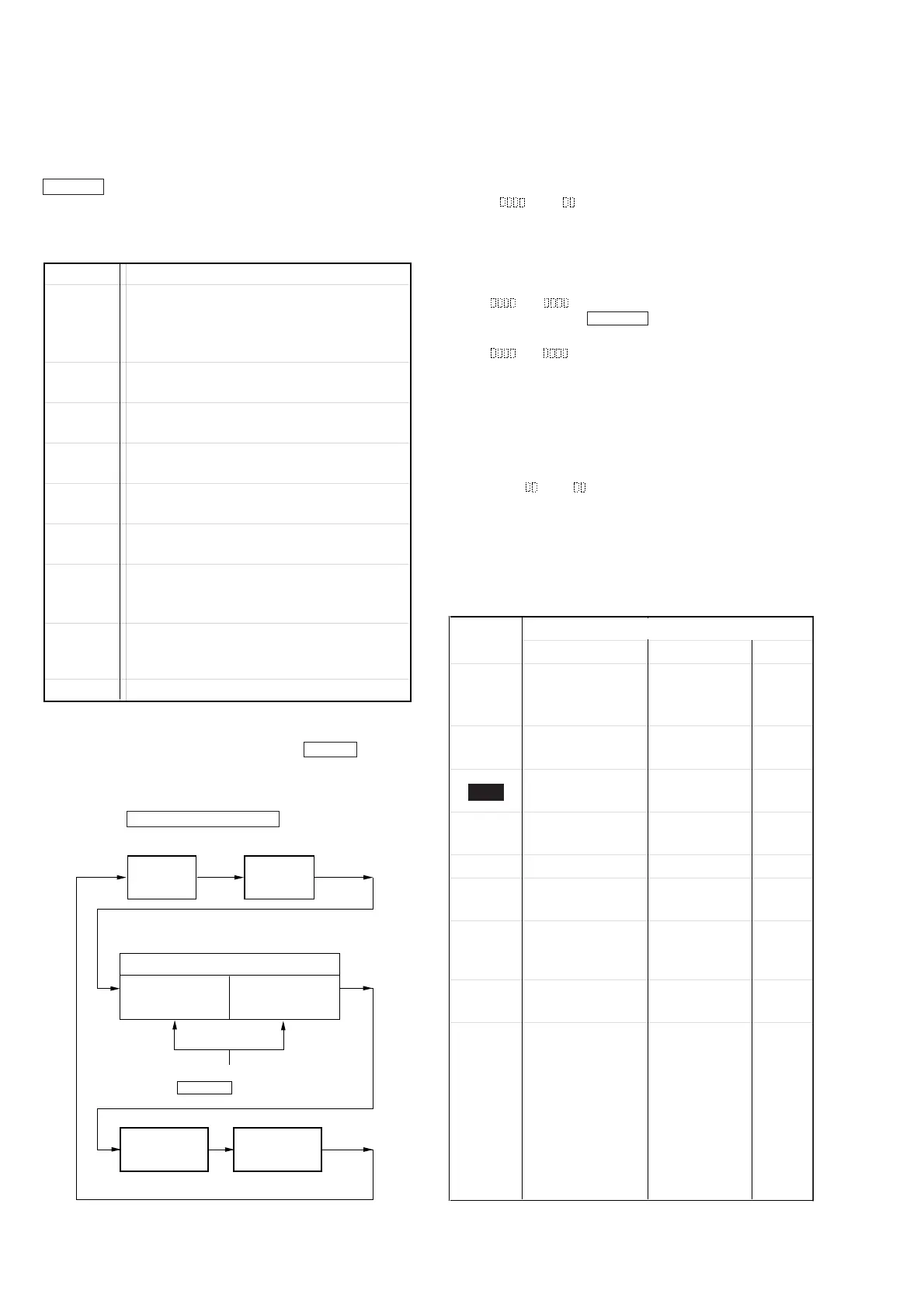
4-10. TEST MODE DISPLAYS
Each time the DISPLAY/CHARACTER button pressed, the dis-
play changes in the following order.
Table 4-3.
4-9. FUNCTIONS OF OTHER BUTTONS
1. MODE display
Displays “TEMP ADJUST”, “CPLAY MODE”, etc..
2. Error rate display
Error rates are displayed as follows.
C1=
AD=
C1= : Indicates C1 error
AD=: Indicates ADER
3. Address display
Address are displayed as follows.
h=
a= (MO groove)
With this display, if SCROLL button is pressed, the follow-
ing will be displayed.
h=
s= (MO pit and CD)
h=: Header address
s=: SUB Q address
a=: ADIP address
Note: “—” is displayed when the address cannot be read.
4. Auto gain display
Auto gain are displayed as follows.
AG F=
T=
F= Focus auto gain collection value
T= Tracking auto gain collection value
4-11. MEANINGS OF OTHER DISPLAYS
Table 4-4.
Button Contents
fl
Sets continuous playback when pressed in the
STOP state. (servo all on)
When pressed during continuous playback, the
tracking and sled servo turns on/off.
p
Stop continuous playback and continuous
recording. (servo all off)
)
The sled moves to the outer circumference
only when this is pressed.
0
The sled moves to the inner circumference
only when this is pressed.
r REC
Turns recording on/off when pressed during
continuous playback.
SCROLL
Switches between the pit and groove modes
when pressed.
PROGRAM
Switches between the CLV-S (pull-in mode)
and CLV-A (playing servo) modes when
pressed. (Switches the spindle servo mode.)
DISPLAY/
CHARAC-
TER
Switches the display when pressed.
Returns to previous step. Stop operations.
§ EJECT Disc eject
REC



 To Next Page