EasyManua.ls Logo

Sony CDP-X339ES - Chapter 2 Getting Started

Sony CDP-X339ES
40 pages
Print Icon
To Next Page IconTo Next Page
To Previous Page IconTo Previous Page
Loading...
Chapter
2
Getting
Started
Unpacking
Choosing
a
Good
Location
*
Place
the
player
in
a
location
with
adequate
air
circulation
to
prevent
internal
heat
build
up
in
the
player.
*
Do
not
place
the
player
on
a
soft
surface,
such
as
a
rug
that
would
block
the
ventilation
holes
on
the
bottom.
¢
Do
not
install
the
player:
—near
heat
sources
such
as
radiators
or
air
ducts.
-in
a
place
subject
to
direct
sunlight,
excessive
dust,
mechanical
vibration
or
shock.
Checking
the
Supplied
Accessories
Make
sure
that
all
supplied
accessories
are
included
with
your
player.
This
manual
and
the
following
items
are
included
with
your
CDP-X339ES/CDP-X229ES.
¢
Audio
connecting
cords
(1)
¢
Wireless
remote
commander
RM-D991
(1)
*
Sony
SUM-3
(NS)
batteries
(2)
Note
on
Packing
Material
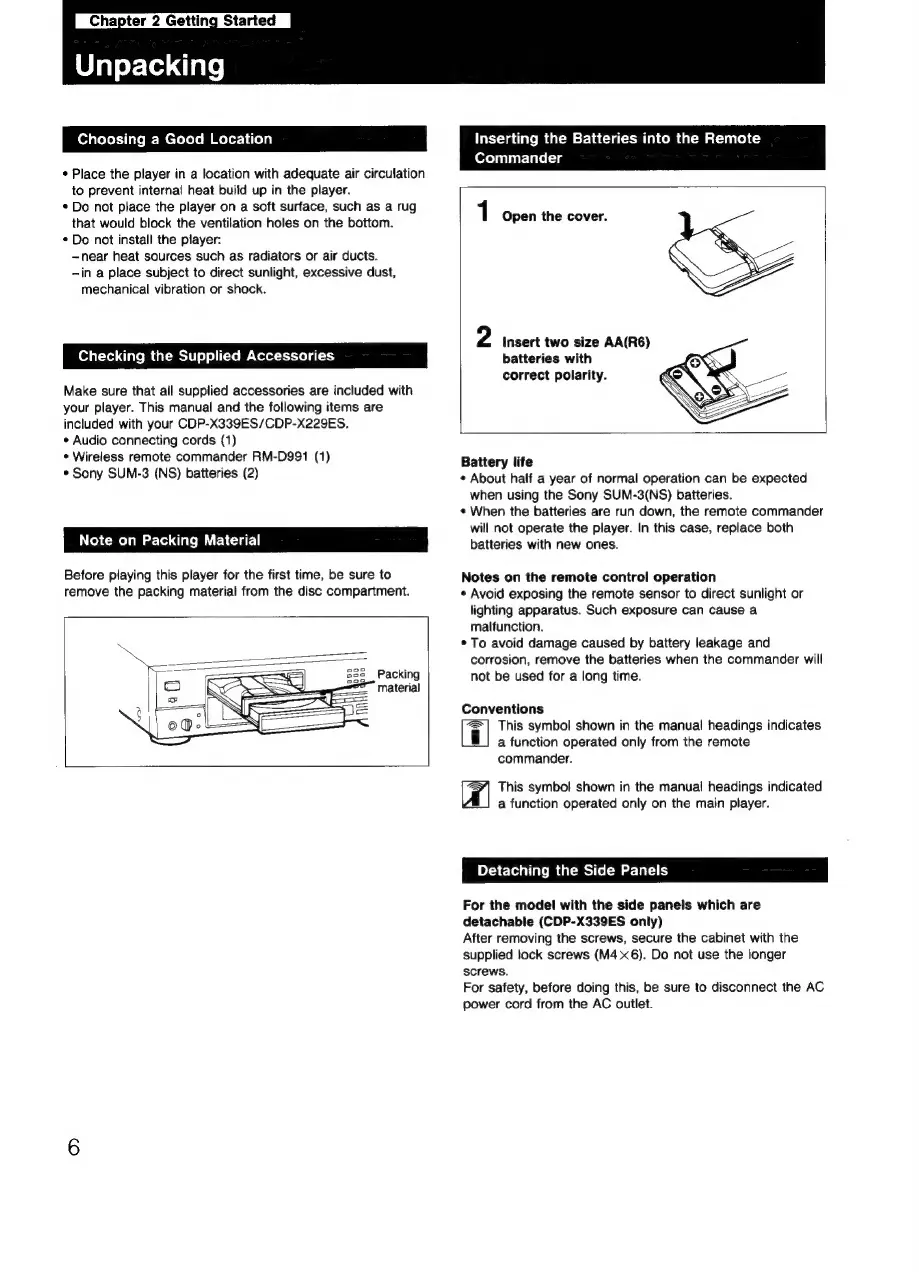
Before
playing
this
player
for
the
first
time,
be
sure
to
remove
the
packing
material
from
the
disc
compartment.
Packing
material
Inserting
the
Batteries
into
the
Remote
Commander
1
Open
the
cover.
2
Insert
two
size
AA(R6)
batteries
with
correct
polarity.
Battery
life
¢
About
half
a
year
of
normal
operation
can
be
expected
when
using
the
Sony
SUM-3(NS)
batteries.
«
When
the
batteries
are
run
down,
the
remote
commander
will
not
operate
the
player.
In
this
case,
replace
both
batteries
with
new
ones.
Notes
on
the
remote
control
operation
¢
Avoid
exposing
the
remote
sensor
to
direct
sunlight
or
lighting
apparatus.
Such
exposure
can
cause
a
malfunction.
©
To
avoid
damage
caused
by
battery
leakage
and
corrosion,
remove
the
batteries
when
the
commander
will
not
be
used
for
a
long
time.
Conventions
This
symbol
shown
in
the
manual
headings
indicates
i
a
function
operated
only
from
the
remote
commander.
Al
This
symbol
shown
in
the
manual
headings
indicated
a
function
operated
only
on
the
main
player.
Detaching
the
Side
Panels
For
the
model
with
the
side
panels
which
are
detachable
(CDP-X339ES
only)
After
removing
the
screws,
secure
the
cabinet
with
the
supplied
lock
screws
(M4
x6).
Do
not
use
the
longer
screws.
For
safety,
before
doing
this,
be
sure
to
disconnect
the
AC
power
cord
from
the
AC
outlet.

Related product manuals