EasyManua.ls Logo

Sony CDP-X339ES - Indexing a Disc-Custom Index

Sony CDP-X339ES
40 pages
Print Icon
To Next Page IconTo Next Page
To Previous Page IconTo Previous Page
Loading...
Indexing
a
Disc
-
custom
index
A
custom
index
is
a
special
index
that
can
be
assigned
to
any
position
you
want
on
the
disc.
If
you
assign
custom
indexes
to
the
positions
on
a
disc,
you
can
easily
locate
the
positions
during
play,
or
enjoy
repeat
play
between
two
adjacent
custom
indexes.
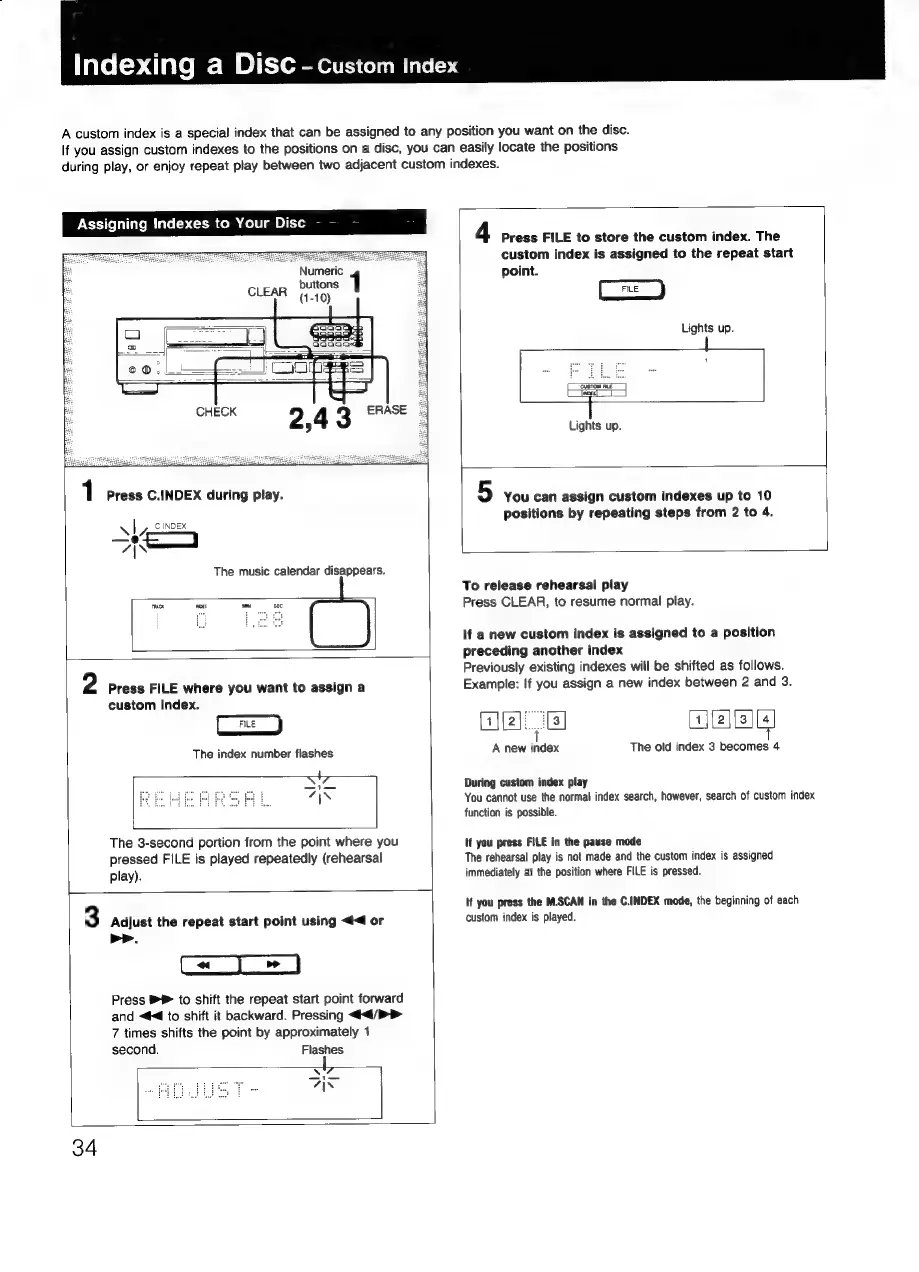
Assigning
Indexes
to
Your
Disc
Numeric
Al
C
INDEX
—e4
7“\\
1
Press
C.INDEX
during
play.
The
music
calendar
disappears.
mA
woe
custom
index.
2
Press
FILE
where
you
want
to
assign
a
The
index
number
flashes
play).
The
3-second
portion
from
the
point
where
you
pressed
FILE
is
played
repeatedly
(rehearsal
>>.
second.
3
Adjust
the
repeat
start
point
using
<4
or
a
a
Press
to
shift
the
repeat
start
point
forward
and
«#4
to
shift
it
backward.
Pressing
<<4/>>
7
times
shifts
the
point
by
approximately
1
Flashes
34
4
Press
FILE
to
store
the
custom
index.
The
custom
index
is
assigned
to
the
repeat
start
point.
Lights
up.
1
CUSTOM
FE
Jeony
|
Lights
up.
5
You
can
assign
custom
indexes
up
to
10
positions
by
repeating
steps
from
2
to
4.
To
release
rehearsal
play
Press
CLEAR,
to
resume
normal
play.
If
a
new
custom
index
is
assigned
to
a
position
preceding
another
index
Previously
existing
indexes
will
be
shifted
as
follows.
Example:
If
you
assign
a
new
index
between
2
and
3.
{1jl2].
[3
1|{2|[3][4
t
A
new
index
The
old
index
3
becomes
4
During
custom
index
play
You
cannot
use
the
normal
index
search,
however,
search
of
custom
index
function
is
possible.
If
you
press
FILE
in
the
pause
mode
The
rehearsal
play
is
not
made
and
the
custom
index
is
assigned
immediately
at
the
position
where
FILE
is
pressed.
If
you
press
the
M.SCAN
in
the
C.INDEX
mode,
the
beginning
of
each
custom
index
is
played.