EasyManua.ls Logo

Sony CDP-X339ES - Recording Programmed Selections on a Tape

Sony CDP-X339ES
40 pages
Print Icon
To Next Page IconTo Next Page
To Previous Page IconTo Previous Page
Loading...
Recording
Programed
Selections
on
a
Tape
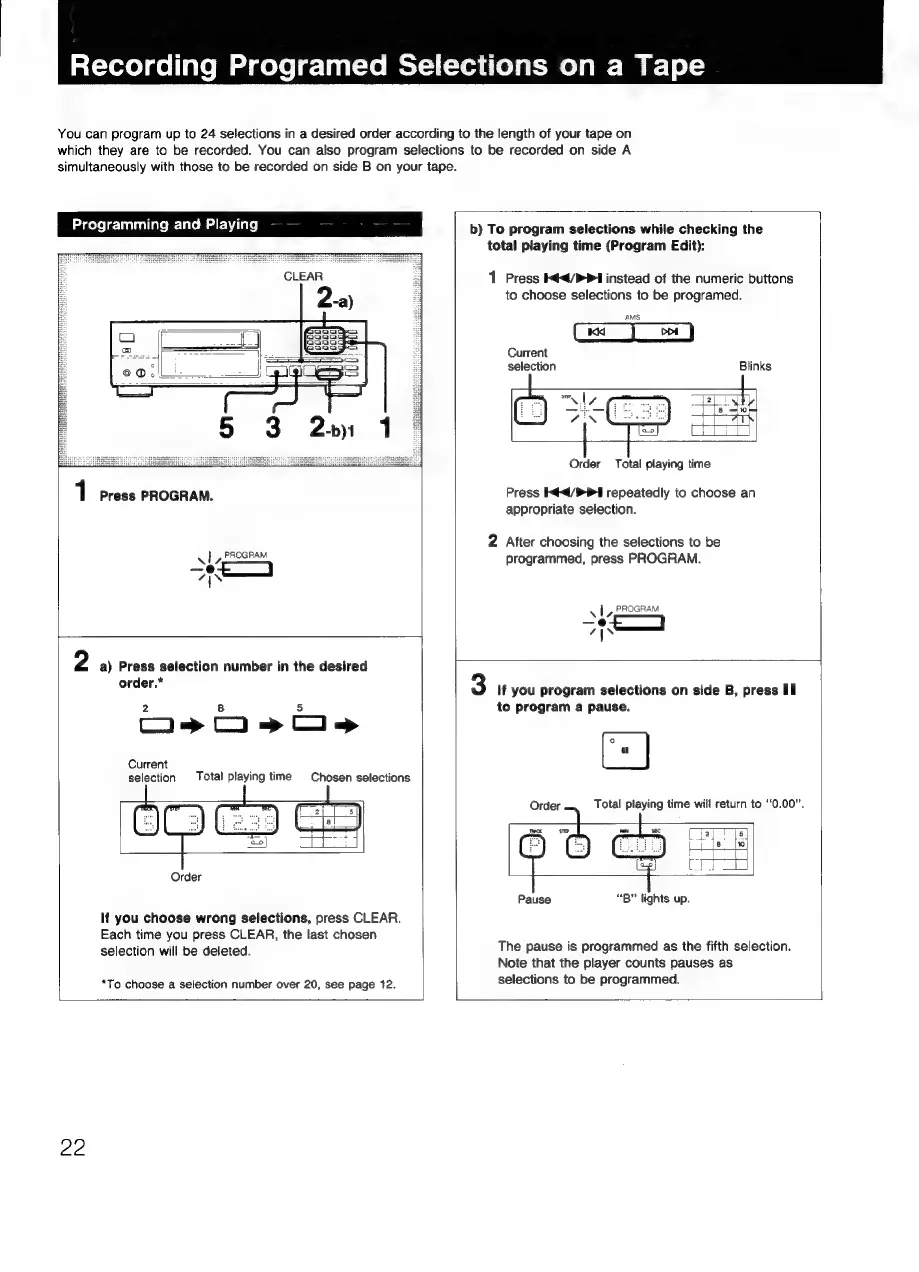
You
can
program
up
to
24
selections
in
a
desired
order
according
to
the
length
of
your
tape
on
which
they
are
to
be
recorded.
You
can
also
program
selections
to
be
recorded
on
side
A
simultaneously
with
those
to
be
recorded
on
side
B
on
your
tape.
Programming
and
Playing
1
Press
PROGRAM.
PROGRAM
AL,
—e@
7
|
N
2
a)
Press
selection
number
in
the
desired
order,*
Os
Oo»s>c»>
Current
bast
selection
Total
playing
time
Chosen
selections
Selenjes
Order
If
you
choose
wrong
selections,
press
CLEAR.
Each
time
you
press
CLEAR,
the
last
chosen
selection
will
be
deleted.
*To
choose
a
selection
number
over
20,
see
page
12.
b)
To
program
selections
while
checking
the
total
playing
time
(Program
Edit):
1
Press
</>
instead
of
the
numeric
buttons
to
choose
selections
to
be
programed.
AMS
Current
selection
Blinks
zs
om
|
ri
he
(5
SKS
honed
i
Order
Total
playing
time
Press
K¢</P1
repeatedly
to
choose
an
appropriate
selection.
2
After
choosing
the
selections
to
be
programmed,
press
PROGRAM.
PROGRAI
vl,
OGRAM
—@
7s
3
If
you
program
selections
on
side
B,
press
Il
to
program
a
pause.
Order
Total
playing
time
will
return
to
“0.00”.
ma
se
wf
sec
PTE
Gey
eee
=i
[ali
Pause
“B”
lights
up.
The
pause
is
programmed
as
the
fifth
selection.
Note
that
the
player
counts
pauses
as
selections
to
be
programmed.
22

Related product manuals