30
Control-S Input Terminal
(CTRL-S)
The Control-S input terminal on the CD recorder can
perform control operations from external devices by
connecting external devices other than the supplied
remote control to the system controller which is
equipped with a CTRL-S terminal.
Controllable Functions
You can control all the same functions as with the
remote control. When the remote is plugged into the
Control-S terminal, the infrared sensor is disabled.
RS-232C
D-sub 9-pin (Male) Terminal
You can control the CD recorder from the outside
using an external control device.
Consult your Sony dealer for protocol details.
Parallel Input/Output
D-sub 9-pin (Female) Terminal
The parallel input/output terminal is used to perform
remote control by connecting a simple circuit to the
outside.
Each function assigned to terminals operates by
connecting the input terminal to GND.
The output terminal is used for the open collector
output of the NPN transistor. The output terminal can
display the mode of the CD recorder by lighting LED.
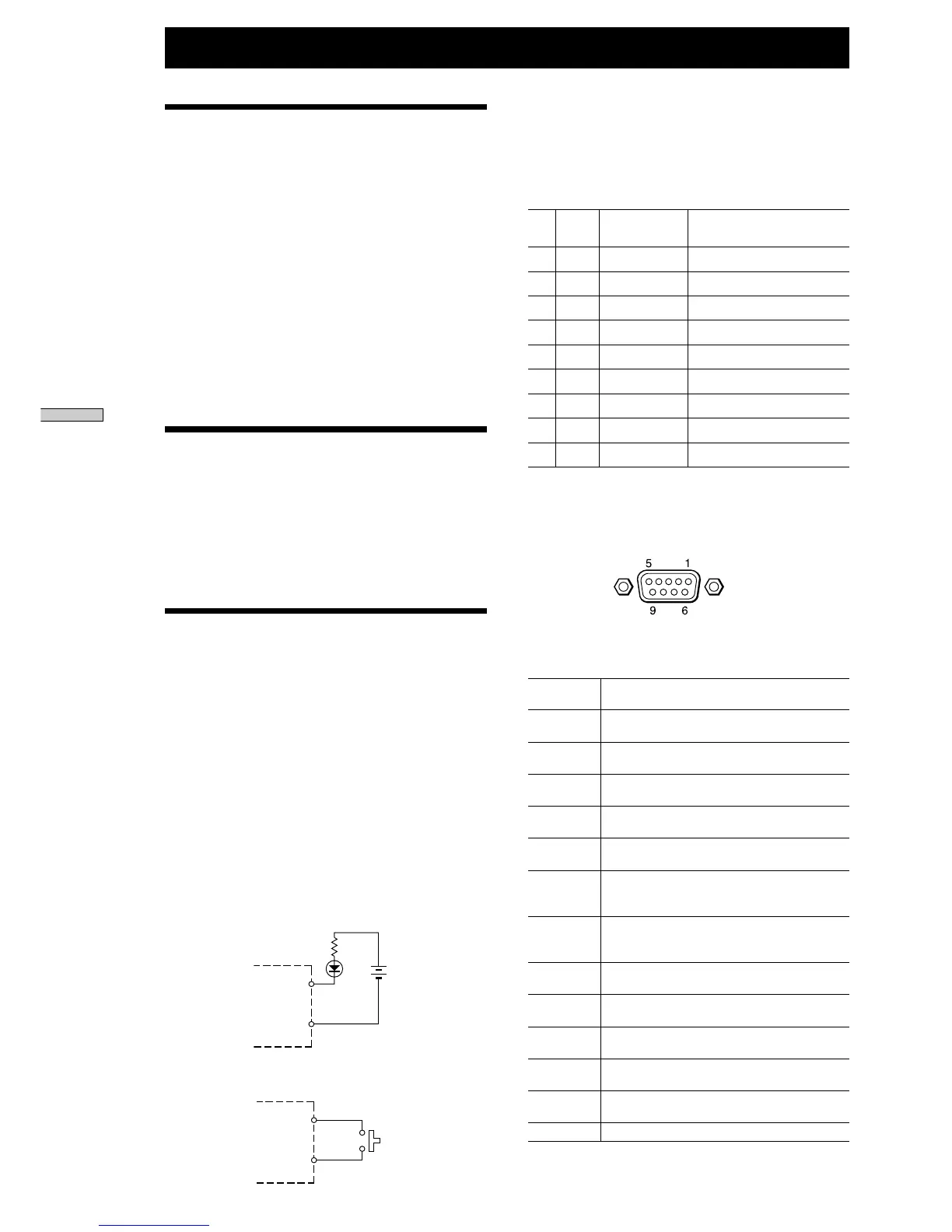
Example of Circuit for Input/Output Terminal
<Example of output circuit>
<Example of input circuit>
CDR-W66
Output pins
(Pins 7 to 9)
GND
(Pin 6)
Input pins
(Pins 1 to 5)
GND
(Pin 6)
Assignment of Each Pin Function
You can select standard setting (Preset) or user setting
(User) from the Setup menu.
Input/output at each terminal and functions for
standard setting (Preset)
Pin . Input/ Functions for Name of terminal in the Setup
No output standard setting menu during user setting
1 Input Play P. Input 1
2 Input Pause P. Input 2
3 Input Stop P. Input 3
4 Input AMS + P. Input 4
5 Input AMS – P. Input 5
6 GND –––– ––––––
7 Output Play P.Output 1
8 Output Pause P.Output 2
9 Output No Disc P.Output 3
For user setting, you can assign the functions below in
P.Input1 to P.Input5, and P.Output1 to P. Output3 in
the Setup menu. Input/output of each pin is always
the same.
Assignment of input pin functions
(P.Input1 to P.Input5)
Play Perform the same operation as for the PLAY
key of the CD recorder.
Pause Perform the same operation as for the Pause
key of the CD recorder.
Rec Perform the same operation as for the REC key
of the CD recorder.
Rec Mute Perform the same operation as for the REC
MUTE key of the CD recorder.
Music Sync Perform the same operation as for the MUSIC
SYNC key of the CD recorder.
Stop Perform the same operation as for the STOP
key of the CD recorder.
AMS + Perform the same operation as when the AMS
control of the CD recorder is turned clockwise
at one click.
AMS – Perform the same operation as when the AMS
control of the CD recorder is turned
counterclockwise at one click.
FF Perform the same operation as for the FF key
of the CD recorder.
REW Perform the same operation as for the REW
key of the CD recorder.
Open/Close Perform the same operation as for the OPEN/
CLOSE key of the CD recorder.
1Tr Play to Perform the same operation as for the Number
25Tr play buttons (1 to 25) of the remote control.
Fader Play Perform fader play.
Refer to page 31, “Fader Play.”
Off No operation (no functions assigned)
Other Functions
Control Terminal Functions and Settings


 To Next Page