•
Operating
an
iPod
directl,y
-
Passenger
control
You
can operate an iPod connected
to
the dock
connector directly.
1 During playback, press and hold
(MODE).
"MODE
IPOD"
appears and you will be able
to operate the iPod directly.
To
change the display item
Press
(DSPL).
The display items change as follows:
Track name
--+
Artist name
--+
Album name
--+
MODE
IPOD
--+
Clock
To
exit the passenger control
Press and hold
(MODE).
Then
"MODE
AUDIO" will appear and the play
mode will change to resuming mode.
Notes
• The volume can be adjusted only by the unit.
•
If
this mode is canceled, the repeat setting will be
turned
off.
Searching
for
a
track
Searching
a
track
by
name
-
Quick-BrowZer™
You can search for a track in a
CD
or
USB
device
easily by category.
1 Press Q. (BROWSE).
The unit enters the Quick-BrowZer mode,
and the list
of
search categories appears.
2 Rotate the control dial to select the
desired search category, then press it
to confirm.
3 Repeat step 2 until the desired track
is
selected.
Playback starts.
To
return to the previous display
Press
~
(BACK).
To
exit the Quick-BrowZer mode
Press Q. (BROWSE).
Note
When entering the Quick-BrowZer mode, the repeat!
shuffle setting is canceled.
Searching by skip items
-Jump
mode
When many items are in a category, you
can
search the desired item quickly.
1 Press
(SEEK)
+
in
Quick-BrowZer
mode.
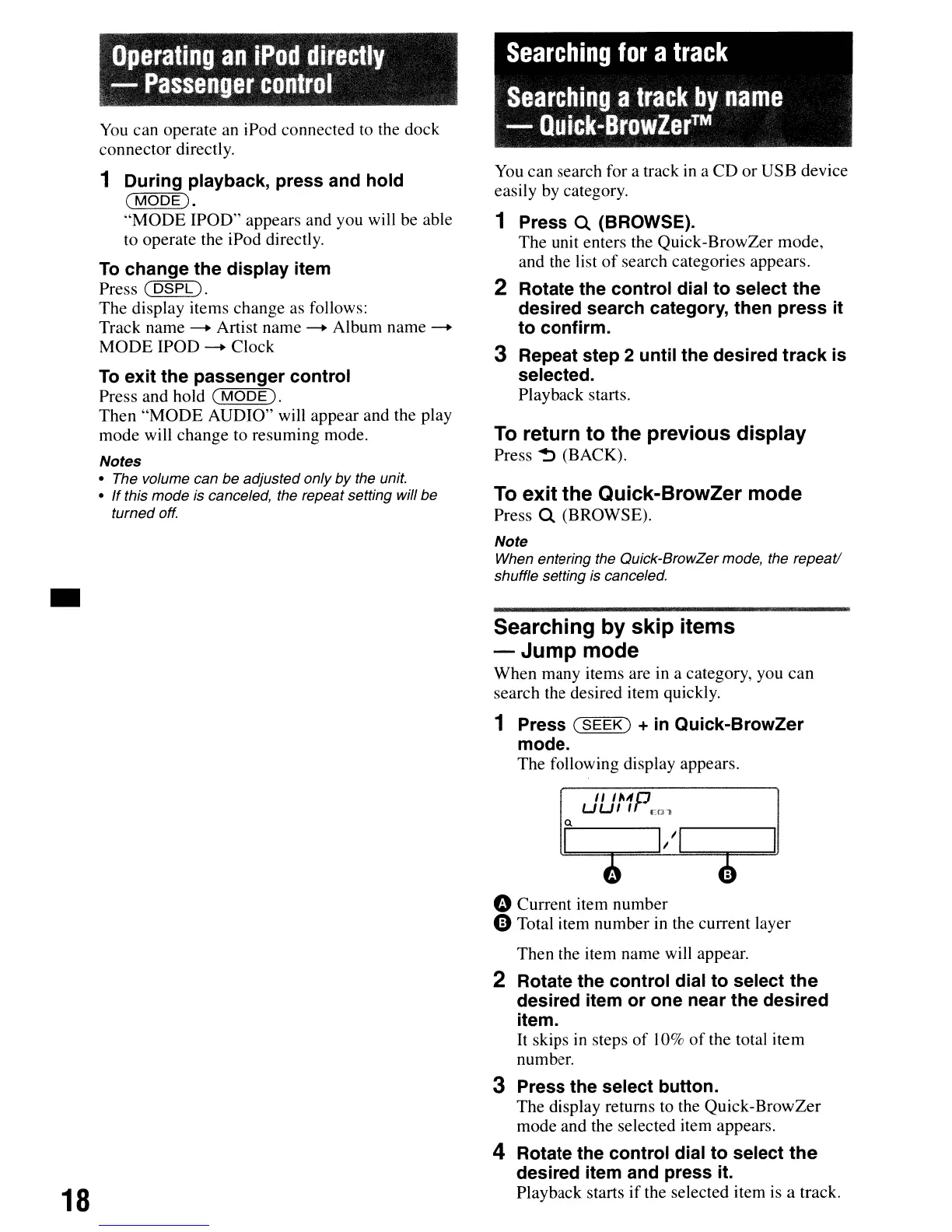
The following display appears.
II
IMp
UUII
Ern
Q
18
oCurrent item number
e Total item number in the current layer
Then the item name will appear.
2 Rotate the control dial to select the
desired item or one near the desired
item.
It
skips in steps
of
10%
of
the total item
number.
3 Press the select button.
The display returns to the Quick-BrowZer
mode and the selected item appears.
4 Rotate the control dial to select
the
desired item and press it.
Playback starts
if
the selected item is a track.



 To Next Page