•
6
Getting
Started
Playable
discs
on
this
unit
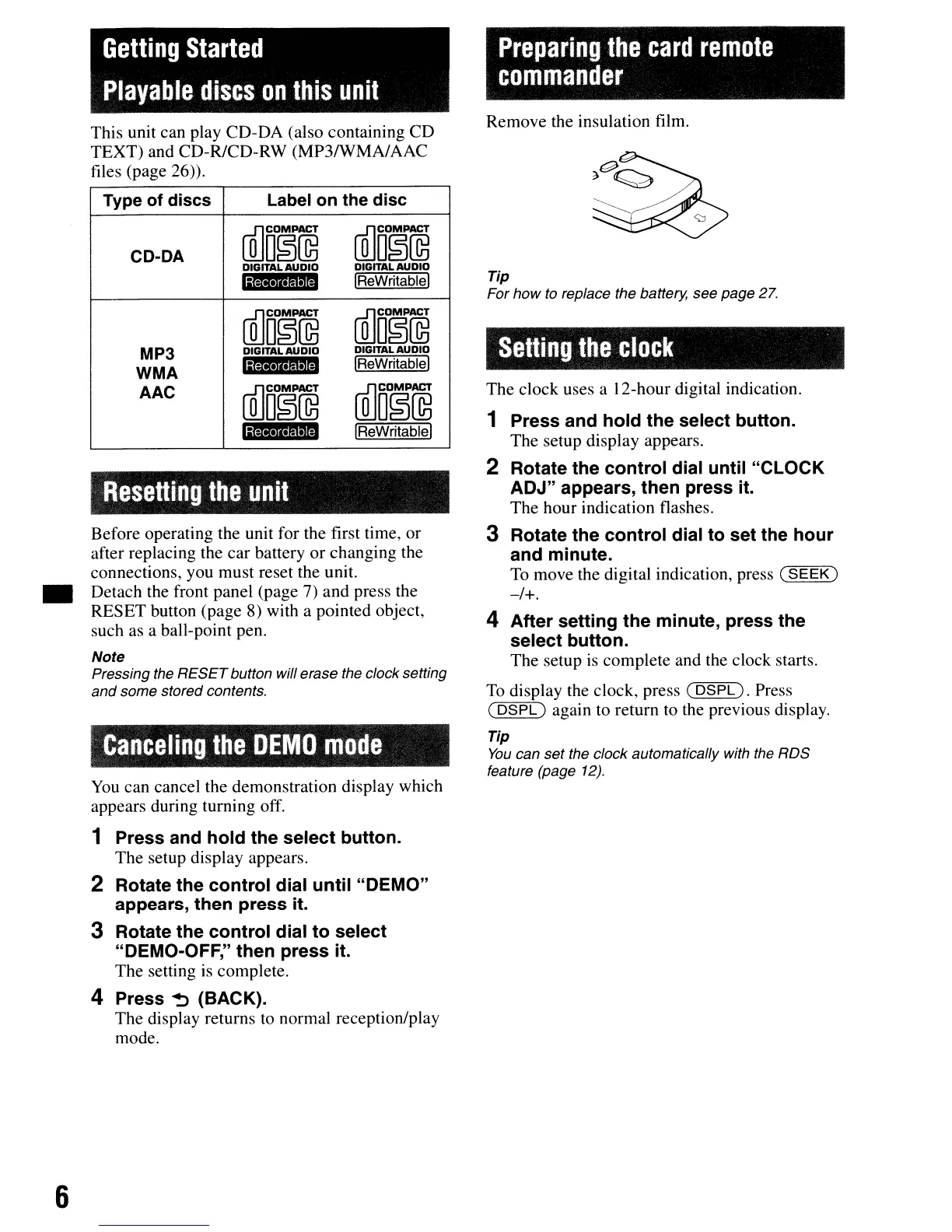
This unit can play CD-DA (also containing CD
TEXT) and CD-RlCD-RW (MP3/WMA/AAC
files (page
26».
Type of discs
Label
on
the disc
CD-DA
illJo~@
ffiJo~@
DIGITAL
AUDIO
DIGITAL
AUDIO
GtH·ftID
IReWritablel
illJo~@
ffiJo§@
MP3
DIGITAL
AUDIO
DIGITAL
AUDIO
,
••
1
••
IReWritablel
WMA
AAC
illJo~@
[Q]O~~
lijQ
••
Il.thM'
IReWritablel
Resetting
the
unit
Before operating the unit for the first time, or
after replacing the
car
battery
or
changing the
connections, you must reset the unit.
Detach the front panel (page 7) and press the
RESET button (page 8) with a pointed object,
such as a ball-point pen.
Note
Pressing the
RESET
button will erase the clock setting
and
some stored contents.
Canceling
the
DEMO
mode
You
can cancel the demonstration display which
appears during turning off.
1 Press and hold the select button.
The setup display appears.
2 Rotate the control dial until "DEMO"
appears, then press it.
3 Rotate the control dial to select
"DEMO-OFF," then press it.
The setting is complete.
4 Press ~ (BACK).
The display returns to normal reception/play
mode.
Preparing
the
card
remote
commander
Remove the insulation film.
Tip
For
how
to
replace the battery. see page 27.
Setting
the
clock
The clock uses a 12-hour digital indication.
1 Press and hold the select button.
The setup display appears.
2 Rotate the control dial until "CLOCK
ADJ" appears, then press it.
The hour indication flashes.
3 Rotate the control dial to set the hour
and minute.
To
move the digital indication, press
(SEEK)
-/+.
4 After setting the minute, press the
select button.
The setup is complete and the clock starts.
To
display the clock, press
(DSPL).
Press
(
DSPL)
again to return to the previous display.
Tip
You
can set the clock automatically with the RDS
feature (page
12).



 To Next Page