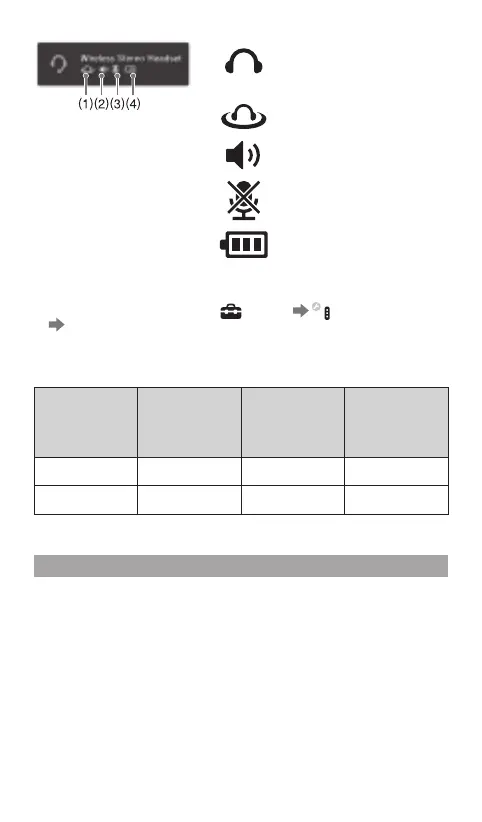
(1)
Displayed when [Stereo
Headset Audio Extension] is
set to [On] *
1
or
Displayed when Virtual
Surround is enabled *
1
*
2
(2)
Displays volume level
(3)
Displayed when the
microphone is turned off
(4)
Displays battery charge level
*
1
To change the audio output, and enable/disable the VIRTUAL SURROUND ON/
OFF button and Mixer slider, select
(Settings) (Accessory Settings)
[Stereo Headset Audio Extension].
*
2
Some content and applications may not support Virtual Surround. For details visit
eu.playstation.com/support
Stereo Headset
Audio
Extension
Audio Output
of Wireless
stereo headset
VIRTUAL
SURROUND
ON/OFF
button
Mixer slider
On All audio Enabled Enabled
Off Chat audio only Disabled Disabled
Charging the Headset
Charge the battery by connecting the headset to a supported USB device
such as a PC. While the battery is charging, the status indicator lights up
in red. The status indicator turns off when the battery is fully charged.
Checking the remaining battery charge
To check the remaining battery charge, press the POWER/MIC MUTING
button quickly two times while the headset power is on. The status
indicator will start to flash red. The number of times the indicator flashes
indicates the remaining battery charge.



 To Next Page