EasyManua.ls Logo

Sony CFD-21 - VCO Adjustment; Notes on Adjustment; Before Adjustment

Sony CFD-21
30 pages
Print Icon
To Next Page IconTo Next Page
To Previous Page IconTo Previous Page
Loading...
5-3.
CD
SECTION
Notes
on
Adjustment
1.
Perform
adjustment
in
test
mode.
After
adjustment,
be
sure
to
release
test_mode.
2.
Perform
adjustments
in
the
order
given.
3.
Use
the
disc
(YEDS-18,
Part
No.
3-702-101-01)
only
when
so
indicated.
Before
Adjustment
Put
the
set
into
test
mode
and
perform
the
following
checks.
Repair
if
there
are
any
problems.
e@
Sled
Motor
Check
1.
Press
}
Key,
then
press
I
key.
2.
Press
PPI,
Kd
keys
and
comfirm
that
the
FOP
moves
smoothly
from
the
innermost
to
outermost
circumference
and
back
smoothly
and
with
no
catching
or
abnormal
noises.
(Cancellation
of
BTL
mute.)
>|:
FOP
moves
to
the
outer
circumference
kK:
FOP
moves
to
the
inner
ciecumference
e@
Focus
Search
Check
1.
Press
>
key.
(Focus
search
operation
is
performed
continuously.)
2.
Look
at
the
FOP
objective
lens
and
confirm
that
it
moves
up
and
down
smoothly,
with
no
catching
or
abnormal
noises.
3.
Press
Ml
key.
Confirm
that
focus
search
operation
stops.
If
it
does
not,
press
ill
key
again
longer.
Note
:
When
the
malfunction
is
occured
by
mis-passing
other
keys,
turn
off
the
power
and
check
again
from
making
the
test
mode.
How
to
Put
the
Set
into
Test
Mode
1.
Short-circuit
follwing
portion(TP706)on
the
CD
MAIN
board.
2.
Turn
the
POWER
on.
3.
Release
the
short.
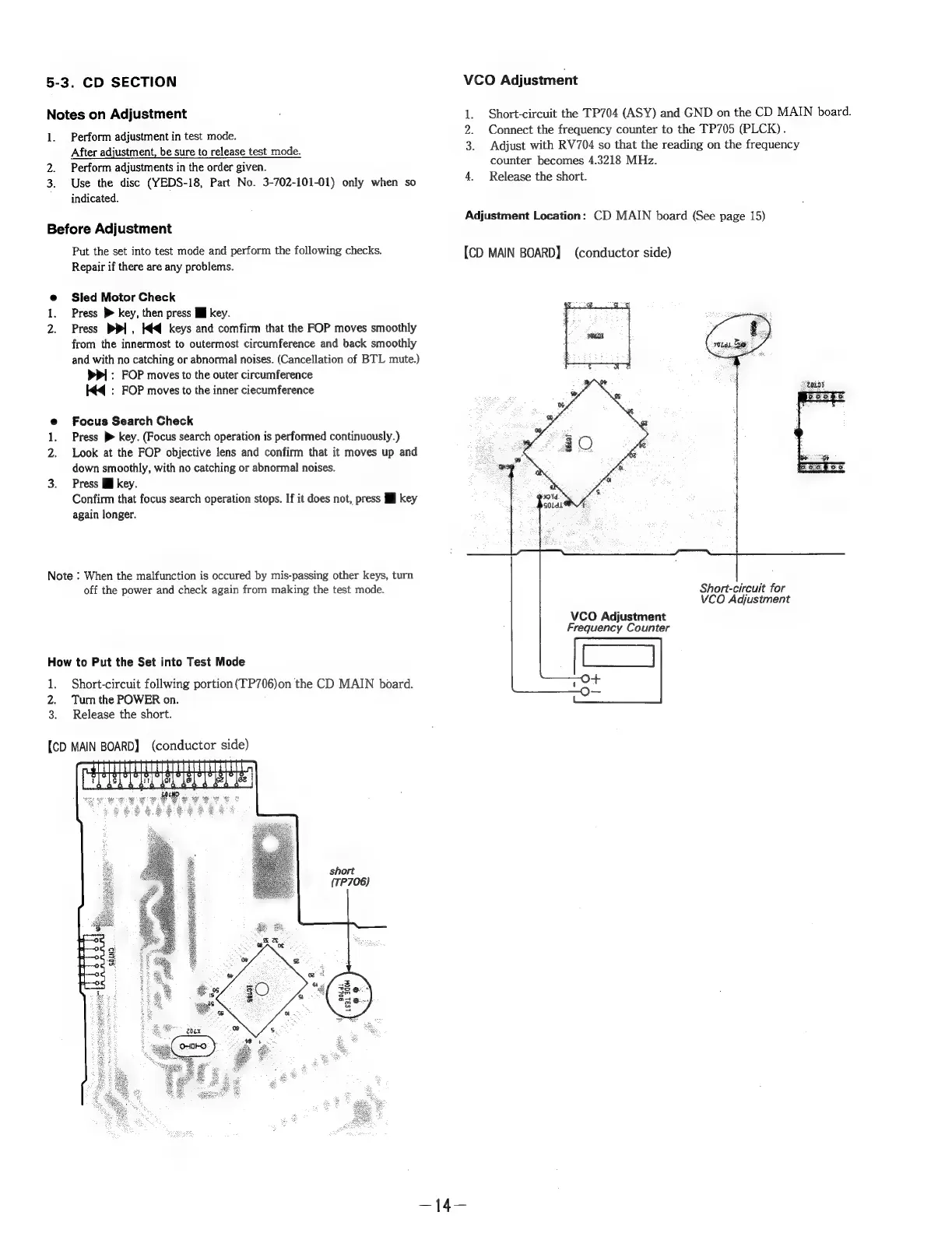
[CD
MAIN
BOARD]
(conductor
side)
short
(TP706)
VCO
Adjustment
1.
Short-circuit
the
TP704
(ASY)
and
GND
on
the
CD
MAIN
board.
2.
Connect
the
frequency
counter
to
the
TP705
(PLCK).
3.
Adjust
with
RV704
so
that
the
reading
on
the
frequency
counter
becomes
4.3218
MHz.
4.
Release
the
short.
Adjustment
Location:
CD
MAIN
board
(See
page
15)
[CD
MAIN
BOARD]
(conductor
side)
Short-circuit
for
VCO
Adjustment
VCO
Adjustment
Frequency
Counter

Related product manuals