EasyManua.ls Logo

Sony CFD-21 - Focus Bias Adjustment

Sony CFD-21
30 pages
Print Icon
To Next Page IconTo Next Page
To Previous Page IconTo Previous Page
Loading...
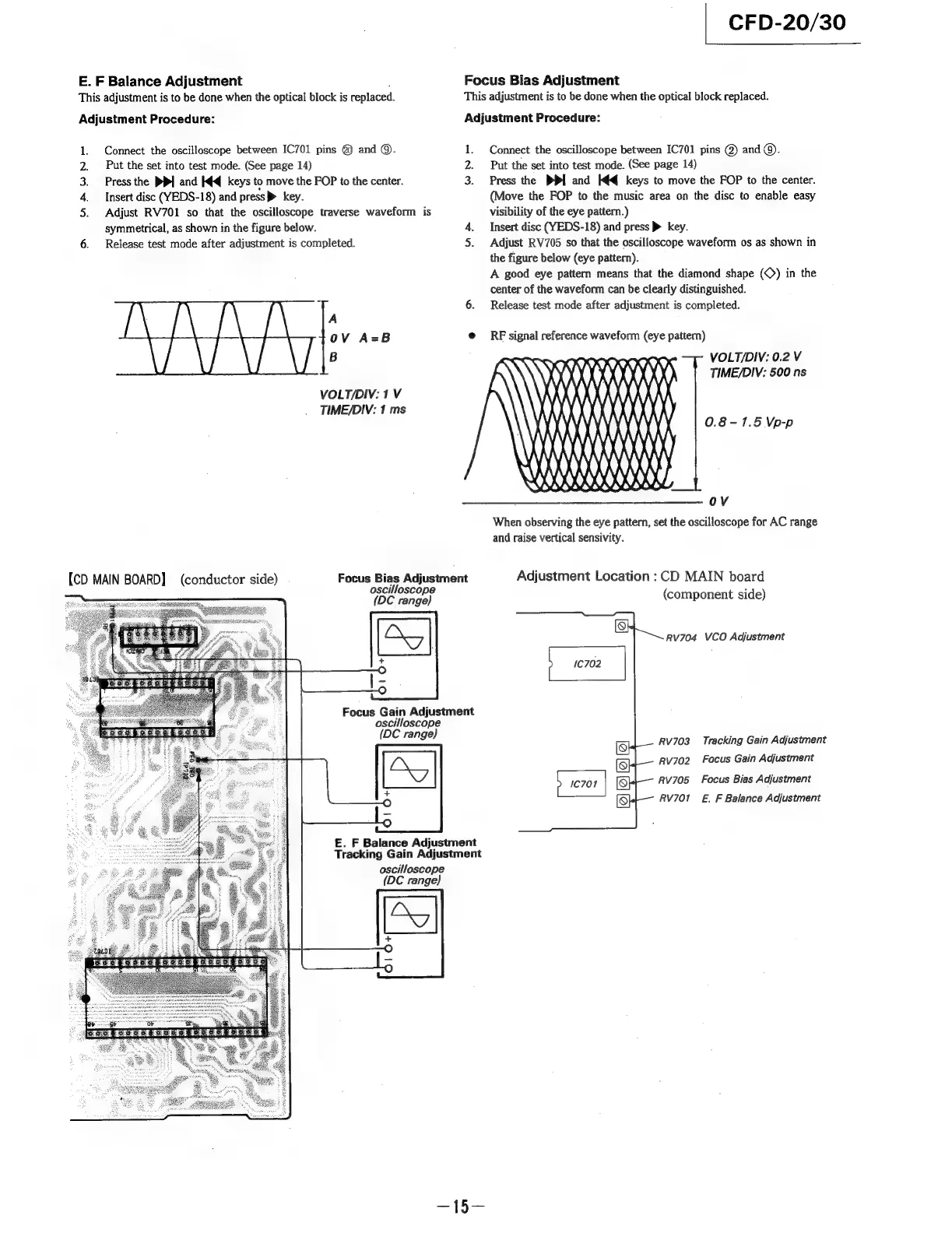
E.
F
Balance
Adjustment
This
adjustment
is to
be
done
when
the
optical
block
is
replaced.
Adjustment
Procedure:
Connect
the
oscilloscope
between
IC701
pins
@
and
©.
Put
the
set
into
test
mode.
(See
page
14)
Press
the
PP
and
I¢q
keys
to
move
the
FOP
to
the
center.
Insert
disc
(YEDS-18)
and
press
>
key.
Adjust
RV701
so
that
the
oscilloscope
traverse
waveform
is
symmetrical,
as
shown
in
the
figure
below.
6.
Release
test
mode
after
adjustment
is
completed.
ARWN
Ee
A
OV
A=B
B
VOLT/DIV:
1
V
TIME/DIV:
1
ms
{CD
MAIN
BOARD]
(conductor
side)
oscilloscope
(DC
range)
oscilloscope
(DC
range)
Focus
Bias
Adjustment
oscilloscope
(DC
range)
Focus
Gain
Adjustment
CFD-20/30
Focus
Bias
Adjustment
This
adjustment
is
to
be
done
when
the
optical
block
replaced.
Adjustment
Procedure:
1.
Connect
the
oscilloscope
between
IC701
pins
@)
and
@).
2.
Put
the
set
into
test
mode.
(See
page
14)
3.
Press
the
PPI
and
Iq
keys
to
move
the
FOP
to
the
center.
(Move
the
FOP
to
the
music
area
on
the
disc
to
enable
easy
visibility
of
the
eye
pattern.)
4.
Insert
disc
(YEDS-18)
and
press
®
key.
5.
Adjust
RV705
so
that
the
oscilloscope
waveform
os
as
shown
in
the
figure
below
(eye
pattern).
A
good
eye
pattern
means
that
the
diamond
shape
(©)
in
the
center
of
the
waveform
can
be
clearly
distinguished.
6.
Release
test
mode
after
adjustment
is
completed.
e@
RF
signal
reference
waveform
(eye
pattern)
DQ
KY)
Nit
VOLT/DIV:
0.2
V
TIME/DIV:
500
ns
S2
0.8-1.5
Vp-p
V4
)
AA
URI
NYY
When
observing
the
eye
pattern,
set
the
oscilloscope
for
AC
range
and
raise
vertical
sensivity.
Adjustment
Location
:
CD
MAIN
board
(component
side)
Rv704
VCO
Adjustment
RvV703_
Tracking
Gain
Adjustment
Rv702
Focus
Gain
Adjustment
RV705
RV701
Focus
Bias
Adjustment
E.
F
Balance
Adjustment
£.
F
Balance
Adjustment
Tracking
Gain
Adjustment

Related product manuals